
1.此刻打盹,你将做梦;而此刻学习,你将圆梦。
2.我荒废的今日,正是昨日殒身之人祈求的明日。
3.觉得为时已晚的时候,恰恰是最早的时候。
4.勿将今日之事拖到明日。
5.学习时的苦痛是暂时的,未学到的痛苦是终生的。
6.学习这件事,不是缺乏时间,而是缺乏努力。
7.幸福或许不排名次,但成功必排名次。
8.学习并不是人生的全部。但既然连人生的一部分―――学习也无法征服,还能做什么呢?
9.请享受无法回避的痛苦。
10.只有比别人更早、更勤奋地努力,才能尝到成功的滋味。
11.谁也不能随随便便成功,它来自彻底的自我管理和毅力。
12.时间在流逝。
13.现在流的口水,将成为明天的眼泪。
14.狗一样地学,绅士一样地玩。
15.今天不走,明天要跑。
16.投资未来的人,是忠于现实的人。
17.受教育程度代表收入。
18.一天过完,不会再来。
19.即使现在,对手也不停地翻动书页。
20.没有艰辛,便无所获。
Author Archives: 惜分飞
oracle之datafile,tablespace
1、创建一般tablespace
create tablespace xifenfei datafile ‘C:\ORACLE\PRODUCT\10.2.0\ORADATA\ORCL\
xifenfei.DBF’ size 10m reuse autoextend on next 10m maxsize UNLIMITED ;
2、创建temp tablespace
create temporary tablespace xff_temp tempfile
‘C:\ORACLE\PRODUCT\10.2.0\ORADATA\ORCL\xff_temp.dbf’ size 10m;
3、创建undo tablespace
create undo tablespace xff_undo datafile
‘C:\ORACLE\PRODUCT\10.2.0\ORADATA\ORCL\xff_undo.dbf’ size 10m;
4、更改数据库的默认临时表空间
alter database default temporary tablespace xff_temp;
5、查询表空间类型
select tablespace_name,contents from dba_tablespaces;
6、查询默认临时表空间
select * from database_properties where property_name like ‘%TEMP_TABLE%’;
7、表空间变为只读状态
alter tablespace xifenfei read only;
note:该表空间中的objects可以被drop,因为表的记录是放在数据字典(system)中
8、表空间变为读写状态
alter tablespace xifenfei read write;
9、表空间offline
alter tablespace xifenfei offline;
note:如果有数据没有commit,会自动被commit掉
10、表空间online
alter tablespace xifenfei online;
11、查看表空间剩余大小
select f.tablespace_name,a.total,u.used,f.free,round((u.used/a.total)*100) "% used", round((f.free/a.total)*100) "% Free"
 from
 (select tablespace_name, sum(bytes/(1024*1024)) total
 from dba_data_files group by tablespace_name) a,
 (select tablespace_name, round(sum(bytes/(1024*1024))) used
 from dba_extents group by tablespace_name) u,
 (select tablespace_name, round(sum(bytes/(1024*1024))) free
 from dba_free_space group by tablespace_name) f
 WHERE a.tablespace_name = f.tablespace_name and a.tablespace_name = u.tablespace_name order by "% Free";
12、表空间自增长
alter database datafile ‘C:\ORACLE\PRODUCT\10.2.0\ORADATA\ORCL\XIFENFEI.DBF
‘ autoextend on next 2m maxsize 100m;
13、表空间中添加数据文件
alter tablespace xifenfei add datafile ‘C:\ORACLE\PRODUCT\10.2.0\ORADATA\OR
CL\XIFENFEI1.DBF’ size 20m;
14、查看表空间是否是自增长
select file_name,autoextensible from dba_data_files;
15、修改表空间大小
alter database datafile ‘C:\ORACLE\PRODUCT\10.2.0\ORADATA\ORCL\
XIFENFEI1.DBF’ resize 15m;
16、查询临时表空间
select tablespace_name,file_name from dba_temp_files;
17、datafile rename
1)alter tablespace xifenfei rename datafile
‘C:\ORACLE\PRODUCT\10.2.0\ORADATA\ORCL\ XIFENFEI1.DBF’ to
‘C:\ORACLE\PRODUCT\10.2.0\ORADATA\abc\ XIFENFEI1.DBF’
note:target文件必须存在,表空间必须离线
2) alter database rename file ‘C:\ORACLE\PRODUCT\10.2.0\ORADATA\XIFENFEI1.DBF’
to ‘C:\ORACLE\PRODUCT\10.2.0\ORADATA\orcl\XIFENFEI1.DBF’
note:target文件必须存在,数据库必须mount状态
18、删除表空间中的某个datafile
alter tablespace xifenfei drop datafile
‘C:\ORACLE\PRODUCT\10.2.0\ORADATA\ORCL\XIFENFEI1.DBF’;
19、删除表空间
drop tablespace xifenfei including contents and datafiles;
jquery插件弹出div
一直在为弹出遮挡层的div烦恼着,今天网上找了下,发现jmpopups很不错,稍微修改下,基本上可以实现需要功能
总体HTML代码:
<!DOCTYPE HTML PUBLIC "-//W3C//DTD HTML 4.0 Transitional//EN">
<html>
<head>
 <title>Untitled</title>
 <meta http-equiv="Content-Type" content="text/html; charset=utf-8" />
 <script type="text/javascript" src="jquery-1.3.2.min.js"></script>
 <script type="text/javascript" src="jquery.jmpopups-0.5.1.js"></script>
 <script type="text/javascript">
 //<![CDATA[
 $.setupJMPopups({
 screenLockerBackground: "#003366",
 screenLockerOpacity: "0.7"
 });

 function openStaticPopup() {
 $.openPopupLayer({
 name: "myStaticPopup",
 width: 400,
 target: "myHiddenDiv"
 });
 }
 //]]>
 </script>
 <style type="text/css" media="screen">
 #myHiddenDiv {display:none;}
 .popup {background:#FFF; border:1px solid #333; padding:1px;}
 .popup-header {height:24px; padding:7px; background:url("bgr_popup_header.jpg") repeat-x;}
 .popup-header h2 {margin:0; padding:0; font-size:18px; float:left;}
 .popup-header .close-link {float:right; font-size:11px;}
 .popup-body {padding:10px;}
 </style>
</head>
<body>
<a href="javascript:void();" onclick="openStaticPopup();" title="Static example">添加Flash信息</a>
 <div id="myHiddenDiv">
 <div>
 <div>
 <h2>添加Flash信息</h2>
 <a href="javascript:void();" onclick="$.closePopupLayer('myStaticPopup');" title="Close">Close</a>
 <br clear="all" />
 </div>
 <div>
 <table>
 <tr><td>选择图片</td><td>13123124124312413413</td></tr>
 <tr><td>选择图片</td><td>13123124124312413413</td></tr>
 <tr><td>选择图片</td><td>13123124124312413413</td></tr>
 <tr><td></td><td>提交</td></tr>
 </table>
 </div>
 </div>
 </div>
</body>
</html>
jmpopups代码:
(function($) {
var openedPopups = [];
var popupLayerScreenLocker = false;
var focusableElement = [];
var setupJqueryMPopups = {
screenLockerBackground: "#000",
screenLockerOpacity: "0.5"
};
$.setupJMPopups = function(settings) {
setupJqueryMPopups = jQuery.extend(setupJqueryMPopups, settings);
return this;
}
$.openPopupLayer = function(settings) {
if (typeof(settings.name) != "undefined" && !checkIfItExists(settings.name)) {
settings = jQuery.extend({
width: "auto",
height: "auto",
parameters: {},
target: "",
success: function() {},
error: function() {},
beforeClose: function() {},
afterClose: function() {},
reloadSuccess: null,
cache: false
}, settings);
loadPopupLayerContent(settings, true);
return this;
}
}
$.closePopupLayer = function(name) {
if (name) {
for (var i = 0; i < openedPopups.length; i++) {
if (openedPopups[i].name == name) {
var thisPopup = openedPopups[i];
openedPopups.splice(i,1)
thisPopup.beforeClose();
$("#popupLayer_" + name).fadeOut(function(){
$("#popupLayer_" + name).remove();
focusableElement.pop();
if (focusableElement.length > 0) {
$(focusableElement[focusableElement.length-1]).focus();
}
thisPopup.afterClose();
hideScreenLocker(name);
});
break;
}
}
} else {
if (openedPopups.length > 0) {
$.closePopupLayer(openedPopups[openedPopups.length-1].name);
}
}
return this;
}
$.reloadPopupLayer = function(name, callback) {
if (name) {
for (var i = 0; i < openedPopups.length; i++) {
if (openedPopups[i].name == name) {
if (callback) {
openedPopups[i].reloadSuccess = callback;
}
loadPopupLayerContent(openedPopups[i], false);
break;
}
}
} else {
if (openedPopups.length > 0) {
$.reloadPopupLayer(openedPopups[openedPopups.length-1].name);
}
}
return this;
}
function setScreenLockerSize() {
if (popupLayerScreenLocker) {
$('#popupLayerScreenLocker').height($(document).height() + "px");
$('#popupLayerScreenLocker').width($(document.body).outerWidth(true) + "px");
}
}
function checkIfItExists(name) {
if (name) {
for (var i = 0; i < openedPopups.length; i++) {
if (openedPopups[i].name == name) {
return true;
}
}
}
return false;
}
function showScreenLocker() {
if ($("#popupLayerScreenLocker").length) {
if (openedPopups.length == 1) {
popupLayerScreenLocker = true;
setScreenLockerSize();
$('#popupLayerScreenLocker').fadeIn();
}
if ($.browser.msie && $.browser.version < 7) {
$("select:not(.hidden-by-jmp)").addClass("hidden-by-jmp hidden-by-" + openedPopups[openedPopups.length-1].name).css("visibility","hidden");
}
$('#popupLayerScreenLocker').css("z-index",parseInt(openedPopups.length == 1 ? 999 : $("#popupLayer_" + openedPopups[openedPopups.length - 2].name).css("z-index")) + 1);
} else {
$("body").append("<div id='popupLayerScreenLocker'><!-- --></div>");
$("#popupLayerScreenLocker").css({
position: "absolute",
background: setupJqueryMPopups.screenLockerBackground,
left: "0",
top: "0",
opacity: setupJqueryMPopups.screenLockerOpacity,
display: "none"
});
showScreenLocker();
$("#popupLayerScreenLocker").click(function() {
$.closePopupLayer();
});
}
}
function hideScreenLocker(popupName) {
if (openedPopups.length == 0) {
screenlocker = false;
$('#popupLayerScreenLocker').fadeOut();
} else {
$('#popupLayerScreenLocker').css("z-index",parseInt($("#popupLayer_" + openedPopups[openedPopups.length - 1].name).css("z-index")) - 1);
}
if ($.browser.msie && $.browser.version < 7) {
$("select.hidden-by-" + popupName).removeClass("hidden-by-jmp hidden-by-" + popupName).css("visibility","visible");
}
}
function setPopupLayersPosition(popupElement, animate) {
if (popupElement) {
if (popupElement.width() < $(window).width()) {
var leftPosition = (document.documentElement.offsetWidth - popupElement.width()) / 2;
} else {
var leftPosition = document.documentElement.scrollLeft + 5;
}
if (popupElement.height() < $(window).height()) {
var topPosition = document.documentElement.scrollTop + ($(window).height() - popupElement.height()) / 2;
} else {
var topPosition = document.documentElement.scrollTop + 5;
}
var positions = {
left: leftPosition + "px",
top: topPosition + "px"
};
if (!animate) {
popupElement.css(positions);
} else {
popupElement.animate(positions, "slow");
}
setScreenLockerSize();
} else {
for (var i = 0; i < openedPopups.length; i++) {
setPopupLayersPosition($("#popupLayer_" + openedPopups[i].name), true);
}
}
}
function showPopupLayerContent(popupObject, newElement, data) {
var idElement = "popupLayer_" + popupObject.name;
if (newElement) {
showScreenLocker();
$("body").append("<div id='" + idElement + "'><!-- --></div>");
var zIndex = parseInt(openedPopups.length == 1 ? 1000 : $("#popupLayer_" + openedPopups[openedPopups.length - 2].name).css("z-index")) + 2;
} else {
var zIndex = $("#" + idElement).css("z-index");
}
var popupElement = $("#" + idElement);
popupElement.css({
visibility: "hidden",
width: popupObject.width == "auto" ? "" : popupObject.width + "px",
height: popupObject.height == "auto" ? "" : popupObject.height + "px",
position: "absolute",
"z-index": zIndex
});
var linkAtTop = "<a href='#' class='jmp-link-at-top' style='position:absolute; left:-9999px; top:-1px;'> </a><input class='jmp-link-at-top' style='position:absolute; left:-9999px; top:-1px;' />";
var linkAtBottom = "<a href='#' class='jmp-link-at-bottom' style='position:absolute; left:-9999px; bottom:-1px;'> </a><input class='jmp-link-at-bottom' style='position:absolute; left:-9999px; top:-1px;' />";
popupElement.html(linkAtTop + data + linkAtBottom);
setPopupLayersPosition(popupElement);
popupElement.css("display","none");
popupElement.css("visibility","visible");
if (newElement) {
popupElement.fadeIn();
} else {
popupElement.show();
}
$("#" + idElement + " .jmp-link-at-top, " +
"#" + idElement + " .jmp-link-at-bottom").focus(function(){
$(focusableElement[focusableElement.length-1]).focus();
});
var jFocusableElements = $("#" + idElement + " a:visible:not(.jmp-link-at-top, .jmp-link-at-bottom), " +
"#" + idElement + " *:input:visible:not(.jmp-link-at-top, .jmp-link-at-bottom)");
if (jFocusableElements.length == 0) {
var linkInsidePopup = "<a href='#' class='jmp-link-inside-popup' style='position:absolute; left:-9999px;'> </a>";
popupElement.find(".jmp-link-at-top").after(linkInsidePopup);
focusableElement.push($(popupElement).find(".jmp-link-inside-popup")[0]);
} else {
jFocusableElements.each(function(){
if (!$(this).hasClass("jmp-link-at-top") && !$(this).hasClass("jmp-link-at-bottom")) {
focusableElement.push(this);
return false;
}
});
}
$(focusableElement[focusableElement.length-1]).focus();
popupObject.success();
if (popupObject.reloadSuccess) {
popupObject.reloadSuccess();
popupObject.reloadSuccess = null;
}
}
function loadPopupLayerContent(popupObject, newElement) {
if (newElement) {
openedPopups.push(popupObject);
}
if (popupObject.target != "") {
showPopupLayerContent(popupObject, newElement, $("#" + popupObject.target).html());
} else {
$.ajax({
url: popupObject.url,
data: popupObject.parameters,
cache: popupObject.cache,
dataType: "html",
method: "GET",
success: function(data) {
showPopupLayerContent(popupObject, newElement, data);
},
error: popupObject.error
});
}
}
$(window).resize(function(){
setScreenLockerSize();
setPopupLayersPosition();
});
$(document).keydown(function(e){
if (e.keyCode == 27) {
$.closePopupLayer();
}
});
})(jQuery);
使用说明:
myHiddenDiv表示要弹出来的整体div
popup-body中的内容替换为你需要的内容
openStaticPopup();表示弹出div,锁定界面
$.closePopupLayer(‘myStaticPopup’);表示关闭div,解锁界面
<h2></h2>弹出div的标题
openStaticPopup中的width表示弹出div的宽度
其实就是细节上的调整
效果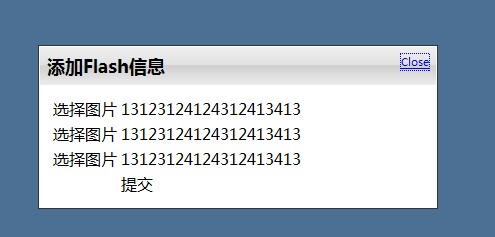
oracle之redo file
1、切换日志文件
alter system switch logfile;
2、增加联机日志组
alter database add logfile group 4 (‘C:\ORACLE\PRODUCT\10.2.0\ORADATA\ORCL\
REDO04_1.LOG’,’C:\ORACLE\PRODUCT\10.2.0\ORADATA\ORCL\REDO04_2.LOG’) size 10m;
3、添加联机日志文件
alter database add logfile member ‘C:\ORACLE\PRODUCT\10.2.0\ORADATA\ORCL\RE
DO04_3.LOG’ to group 4;
4、删除联机日志组
alter database drop logfile group 1;
note:不会删除对应文件(见13、14)
5、删除联机日志文件
ALTER DATABASE DROP LOGFILE MEMBER ‘c:/LOCATION_DUST/REDO0N_N.LOG’;
note:不会删除对应文件(见13、14)
6、归档当前联机日志文件
alter system archive log current
7、dos删除文件
del filename
8、dos强制删除文件夹(无提示)
rd C:\oracle\product\10.2.0\oradata\orcl\A /s/q
note:/s删除一个非空文件夹 /q无提示
9、联机重做日志文件重命名或者移动
1)shutdown 数据库
2)拷贝redo文件到需要的位置(或者并重命名)
3)startup mount数据库
4) alter database rename file ‘C:\oracle\product\10.2.0\oradata\orcl\REDO01.LOG’
to ‘C:\oracle\product\10.2.0\oradata\orcl\REDO01.rdo’;
5)open 数据库
10、清空redo log file
1)不归档情况下
alter database clear logfile group 1;
2)归档情况下
alter database clear unarchived logfile group 1;
flash幻灯片
以前一直想写这个这个类此的东西,都苦于没有项目驱动,这次因项目需要,真的搞了一个出来
js代码(导入js文件未给出)
AC_FL_RunContent('type', 'application/x-shockwave-flash', 'data', 'img/advertising.swf?xml=ahsx/flash.ashx', 'width', '300', 'height','200', 'id', 'xifenfei_flash', 'movie', 'img/advertising?xml=ashx/flash.ashx');
c#生成类xml代码
System.Text.StringBuilder str = new System.Text.StringBuilder();
 str.Append("<data>  <channel>");
 str.Append("   <item><link>http://www.baidu.com</link>").Append("   <image>1.jpg</image>").Append("   <title>111111</title></item>");
 str.Append("  <item> <link>http://http://www.baidu.com</link>").Append("   <image>2.jpg</image>").Append("   <title>222222</title></item>");
 str.Append(" <item>   <link>http://www.baidu.com</link>").Append("   <image>3.jpg</image>").Append("   <title>333333</title></item>");
 str.Append("   <item> <link>http://www.baidu.com</link>").Append("   <image>1.jpg</image>").Append("   <title>444444</title></item>");
 str.Append("   <item> <link>http://www.baidu.com</link>").Append("   <image>2.jpg</image>").Append("   <title>555555</title></item>");
 str.Append("   <item> <link>http://www.baidu.com</link>").Append("   <image>3.jpg</image>").Append("   <title>666666</title></item>");
 str.Append(" </channel>");
 str.Append("</data>");
 context.Response.Write(str.ToString());
note:仅供测试,没有和数据库关联起来
