sys用户密码含$ sqlplus登录数据库诡异事件分析

[oracle@ECP-UC-DB1 ~]$ sqlplus / as sysdba

SQL*Plus: Release 10.2.0.4.0 - Production on Mon Oct 17 23:37:51 2011

Copyright (c) 1982, 2007, Oracle.  All Rights Reserved.


Connected to:
Oracle Database 10g Enterprise Edition Release 10.2.0.4.0 - 64bit Production
With the Partitioning, OLAP, Data Mining and Real Application Testing options

SQL> alter user sys identified by "ab$";
User altered.

SQL> exit
Disconnected from Oracle Database 10g Enterprise Edition Release 10.2.0.4.0 - 64bit Production
With the Partitioning, OLAP, Data Mining and Real Application Testing options
[oracle@ECP-UC-DB1 ~]$ sqlplus sys/ab$ as sysdba

SQL*Plus: Release 10.2.0.4.0 - Production on Mon Oct 17 23:38:53 2011

Copyright (c) 1982, 2007, Oracle.  All Rights Reserved.


Connected to:
Oracle Database 10g Enterprise Edition Release 10.2.0.4.0 - 64bit Production
With the Partitioning, OLAP, Data Mining and Real Application Testing options

SQL> show parameter name;
NAME                                 TYPE        VALUE
------------------------------------ ----------- ------------------------------
db_file_name_convert                 string
db_name                              string      test
db_unique_name                       string      test
global_names                         boolean     FALSE
instance_name                        string      test
lock_name_space                      string
log_file_name_convert                string
service_names                        string      test

SQL> exit
Disconnected from Oracle Database 10g Enterprise Edition Release 10.2.0.4.0 - 64bit Production
With the Partitioning, OLAP, Data Mining and Real Application Testing options
[oracle@ECP-UC-DB1 ~]$ sqlplus sys/ab$abc as sysdba

SQL*Plus: Release 10.2.0.4.0 - Production on Mon Oct 17 23:39:05 2011

Copyright (c) 1982, 2007, Oracle.  All Rights Reserved.


Connected to:
Oracle Database 10g Enterprise Edition Release 10.2.0.4.0 - 64bit Production
With the Partitioning, OLAP, Data Mining and Real Application Testing options

SQL> exit
Disconnected from Oracle Database 10g Enterprise Edition Release 10.2.0.4.0 - 64bit Production
With the Partitioning, OLAP, Data Mining and Real Application Testing options
[oracle@ECP-UC-DB1 ~]$ sqlplus sys/ab$@abc as sysdba

SQL*Plus: Release 10.2.0.4.0 - Production on Mon Oct 17 23:40:06 2011

Copyright (c) 1982, 2007, Oracle.  All Rights Reserved.


Connected to:
Oracle Database 10g Enterprise Edition Release 10.2.0.4.0 - 64bit Production
With the Partitioning, OLAP, Data Mining and Real Application Testing options

SQL> show parameter name;

NAME                                 TYPE        VALUE
------------------------------------ ----------- ------------------------------
db_file_name_convert                 string
db_name                              string      test
db_unique_name                       string      test
global_names                         boolean     FALSE
instance_name                        string      test
lock_name_space                      string
log_file_name_convert                string
service_names                        string      test
SQL> exit
Disconnected from Oracle Database 10g Enterprise Edition Release 10.2.0.4.0 - 64bit Production
With the Partitioning, OLAP, Data Mining and Real Application Testing options
[oracle@ECP-UC-DB1 ~]$ sqlplus sys/ab$@abc11 as sysdba

SQL*Plus: Release 10.2.0.4.0 - Production on Mon Oct 17 23:44:11 2011

Copyright (c) 1982, 2007, Oracle.  All Rights Reserved.


Connected to:
Oracle Database 10g Enterprise Edition Release 10.2.0.4.0 - 64bit Production
With the Partitioning, OLAP, Data Mining and Real Application Testing options

SQL> show parameter name;

NAME                                 TYPE        VALUE
------------------------------------ ----------- ------------------------------
db_file_name_convert                 string
db_name                              string      test
db_unique_name                       string      test
global_names                         boolean     FALSE
instance_name                        string      test
lock_name_space                      string
log_file_name_convert                string
service_names                        string      test
SQL>  

通过以上sql发现,把sys的密码改为ab$后,无论是什么tns都可以登录数据库,而且都是本地数据库,是不是感觉很诡异,其实你仔细观察发现,密码中有了$,使得$@的操作都变成了无效的,其实就是sqlplus sys/123(随意) as sysdba方式登录本地数据库

[oracle@ECP-UC-DB1 ~]$ sqlplus sys/123 as sysdba

SQL*Plus: Release 10.2.0.4.0 - Production on Mon Oct 17 23:48:23 2011

Copyright (c) 1982, 2007, Oracle.  All Rights Reserved.


Connected to:
Oracle Database 10g Enterprise Edition Release 10.2.0.4.0 - 64bit Production
With the Partitioning, OLAP, Data Mining and Real Application Testing options

SQL> 

Oracle 小升级 opatch apply使用

这里记录的是Oracle 升级到10.2.0.4后,出现EM不能正常启动情况下,Oracle提示需要打上Patch 8350262,下面是记录打补丁过程

[oracle@ocp ~]$ unzip ~/p8350262_10204_Generic.zip 
Archive:  /home/oracle/p8350262_10204_Generic.zip
   creating: 8350262/
  inflating: 8350262/killDBConsole   
   creating: 8350262/files/
   creating: 8350262/files/sysman/
   creating: 8350262/files/sysman/jlib/
   creating: 8350262/files/sysman/jlib/emCORE.jar/
   creating: 8350262/files/sysman/jlib/emCORE.jar/oracle/
   creating: 8350262/files/sysman/jlib/emCORE.jar/oracle/sysman/
   creating: 8350262/files/sysman/jlib/emCORE.jar/oracle/sysman/eml/
   creating: 8350262/files/sysman/jlib/emCORE.jar/oracle/sysman/eml/sec/
   creating: 8350262/files/sysman/jlib/emCORE.jar/oracle/sysman/eml/sec/fsc/
  inflating: 8350262/files/sysman/jlib/emCORE.jar/oracle/sysman/eml/sec/fsc/FSWalletUtil.class  
   creating: 8350262/files/sysman/jlib/emCORE.jar/oracle/sysman/eml/sec/util/
  inflating: 8350262/files/sysman/jlib/emCORE.jar/oracle/sysman/eml/sec/util/RootCert.class  
  inflating: 8350262/files/sysman/jlib/emCORE.jar/oracle/sysman/eml/sec/util/SecConstants.class  
   creating: 8350262/files/sysman/jlib/emCORE.jar/oracle/sysman/eml/sec/rep/
  inflating: 8350262/files/sysman/jlib/emCORE.jar/oracle/sysman/eml/sec/rep/RepWalletUtil.class  
   creating: 8350262/files/sysman/jlib/emd_java.jar/
   creating: 8350262/files/sysman/jlib/emd_java.jar/oracle/
   creating: 8350262/files/sysman/jlib/emd_java.jar/oracle/sysman/
   creating: 8350262/files/sysman/jlib/emd_java.jar/oracle/sysman/eml/
   creating: 8350262/files/sysman/jlib/emd_java.jar/oracle/sysman/eml/sec/
   creating: 8350262/files/sysman/jlib/emd_java.jar/oracle/sysman/eml/sec/fsc/
  inflating: 8350262/files/sysman/jlib/emd_java.jar/oracle/sysman/eml/sec/fsc/FSWalletUtil.class  
   creating: 8350262/files/sysman/jlib/emd_java.jar/oracle/sysman/eml/sec/util/
  inflating: 8350262/files/sysman/jlib/emd_java.jar/oracle/sysman/eml/sec/util/RootCert.class  
  inflating: 8350262/files/sysman/jlib/emd_java.jar/oracle/sysman/eml/sec/util/SecConstants.class  
   creating: 8350262/files/sysman/jlib/emd_java.jar/oracle/sysman/eml/sec/rep/
  inflating: 8350262/files/sysman/jlib/emd_java.jar/oracle/sysman/eml/sec/rep/RepWalletUtil.class  
  inflating: 8350262/killDBConsole.pl  
  inflating: 8350262/README.txt      
   creating: 8350262/etc/
   creating: 8350262/etc/xml/
  inflating: 8350262/etc/xml/ShiphomeDirectoryStructure.xml  
  inflating: 8350262/etc/xml/GenericActions.xml  
   creating: 8350262/etc/config/
  inflating: 8350262/etc/config/inventory  
  inflating: 8350262/etc/config/actions  

[oracle@ocp ~]cd 8350262
[oracle@ocp 8350262]$ $ORACLE_HOME/OPatch/opatch apply     --Note:$ORACLE_HOME/OPatch/opatch路径
Invoking OPatch 10.2.0.4.2

Oracle Interim Patch Installer version 10.2.0.4.2
Copyright (c) 2007, Oracle Corporation.  All rights reserved.


Oracle Home       : /opt/oracle/app/10.2.0/db_1
Central Inventory : /opt/oracle/oraInventory
   from           : /etc/oraInst.loc
OPatch version    : 10.2.0.4.2
OUI version       : 10.2.0.4.0
OUI location      : /opt/oracle/app/10.2.0/db_1/oui
Log file location : /opt/oracle/app/10.2.0/db_1/cfgtoollogs/opatch/opatch2011-10-17_18-11-40PM.log

ApplySession applying interim patch '8350262' to OH '/opt/oracle/app/10.2.0/db_1'

Running prerequisite checks...

OPatch detected non-cluster Oracle Home from the inventory and will patch the local system only.

Backing up files and inventory (not for auto-rollback) for the Oracle Home
Backing up files affected by the patch '8350262' for restore. This might take a while...
Backing up files affected by the patch '8350262' for rollback. This might take a while...

Patching component oracle.sysman.agent.core, 10.2.0.4.0a...
Updating jar file "/opt/oracle/app/10.2.0/db_1/sysman/jlib/emCORE.jar" with "/sysman/jlib/emCORE.jar/oracle/sysman/eml/sec/fsc/FSWalletUtil.class"
Updating jar file "/opt/oracle/app/10.2.0/db_1/sysman/jlib/emCORE.jar" with "/sysman/jlib/emCORE.jar/oracle/sysman/eml/sec/rep/RepWalletUtil.class"
Updating jar file "/opt/oracle/app/10.2.0/db_1/sysman/jlib/emCORE.jar" with "/sysman/jlib/emCORE.jar/oracle/sysman/eml/sec/util/RootCert.class"
Updating jar file "/opt/oracle/app/10.2.0/db_1/sysman/jlib/emCORE.jar" with "/sysman/jlib/emCORE.jar/oracle/sysman/eml/sec/util/SecConstants.class"
Updating jar file "/opt/oracle/app/10.2.0/db_1/sysman/jlib/emd_java.jar" with "/sysman/jlib/emd_java.jar/oracle/sysman/eml/sec/fsc/FSWalletUtil.class"
Updating jar file "/opt/oracle/app/10.2.0/db_1/sysman/jlib/emd_java.jar" with "/sysman/jlib/emd_java.jar/oracle/sysman/eml/sec/rep/RepWalletUtil.class"
Updating jar file "/opt/oracle/app/10.2.0/db_1/sysman/jlib/emd_java.jar" with "/sysman/jlib/emd_java.jar/oracle/sysman/eml/sec/util/RootCert.class"
Updating jar file "/opt/oracle/app/10.2.0/db_1/sysman/jlib/emd_java.jar" with "/sysman/jlib/emd_java.jar/oracle/sysman/eml/sec/util/SecConstants.class"
ApplySession adding interim patch '8350262' to inventory

Verifying the update...
Inventory check OK: Patch ID 8350262 is registered in Oracle Home inventory with proper meta-data.
Files check OK: Files from Patch ID 8350262 are present in Oracle Home.

OPatch succeeded.

[oracle@ocp 8350262]$ ../opatch lsinventory  --Note检测是否安装成功
Invoking OPatch 10.2.0.4.2

Oracle Interim Patch Installer version 10.2.0.4.2
Copyright (c) 2007, Oracle Corporation.  All rights reserved.


Oracle Home       : /opt/oracle/app/10.2.0/db_1
Central Inventory : /opt/oracle/oraInventory
   from           : /etc/oraInst.loc
OPatch version    : 10.2.0.4.2
OUI version       : 10.2.0.4.0
OUI location      : /opt/oracle/app/10.2.0/db_1/oui
Log file location : /opt/oracle/app/10.2.0/db_1/cfgtoollogs/opatch/opatch2011-10-17_18-18-34PM.log

Lsinventory Output file location : /opt/oracle/app/10.2.0/db_1/cfgtoollogs/opatch/lsinv/lsinventory2011-10-17_18-18-34PM.txt

--------------------------------------------------------------------------------
Installed Top-level Products (2): 

Oracle Database 10g                                                  10.2.0.1.0
Oracle Database 10g Release 2 Patch Set 3                            10.2.0.4.0
There are 2 products installed in this Oracle Home.


Interim patches (1) :

Patch  8350262      : applied on Mon Oct 17 18:17:28 CST 2011
   Created on 14 Sep 2010, 04:59:44 hrs PST8PDT
   Bugs fixed:
     8350262


--------------------------------------------------------------------------------

OPatch succeeded.

p8350262_10204_Generic
p8350262_10205_Generic

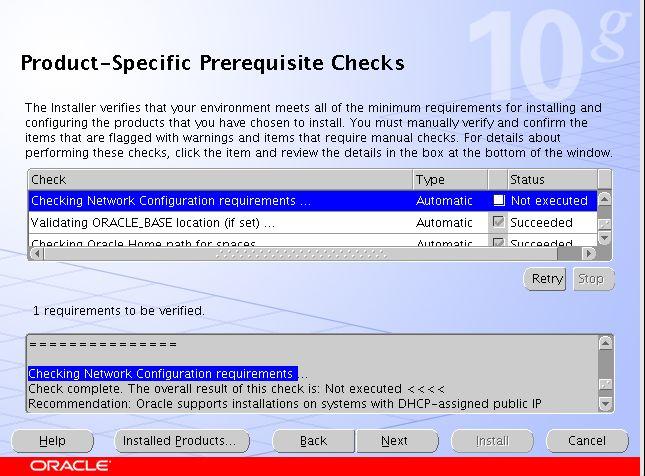
checking network configuration requirements

最近准备考ocp,所以决定按照教程,从头到尾系统的学习一次oracle,也算是为了对得起考证的几千大洋。
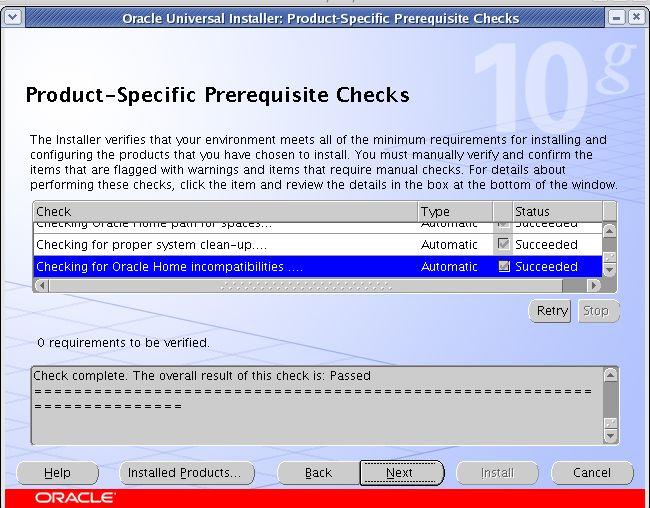
在安装oracle 10g的过程中,遇到了checking network configuration requirements is: Not executed的错误提示。

没有执行网络检测,google下,发现是/etc/hosts中没有指定静态ip地址导致,检测/etc/hosts发现果真如此(好久没有装oracle 了,竟然忘记这个基础的东西)修改如下配置
127.0.0.1 ocp localhost.localdomain localhost
192.168.1.55 ocp.xifenfei.com
重新检测,显示正常

rac中的spfile探讨

今天朋友的的rac,因为被同事做数据库升级,分别在两个节点的本地创建了spfile,然后使用这个spfile启动了数据库,因为他不是非常懂oracle,所以向我求救,我改他的建议是:
1、利用备份的原来的pfile文件创建在asm中的spfile,规则是:+ASM/SID/spfileSID
2、dbs目录下创建一个本地的initsid.ora,然后在里面加一个spfile=’+ASM pfile path’(两个节点同样操作,注意sid不同)
3、分别重启数据库
出现该问题的原因分析:
做数据库升级的朋友的同事也不懂rac的spfile的相关规则,应该是在重启数据库的时候,提示spfile不存在,然后自己手工创建利用pfile创建的spfile到dbs下面,然后朋友十一后检测数据库,发现spfile都放置在本地了。

1、通常读取参数文件顺序
我们知道,如果不指定参数文件,oracle是按照这个顺序查找文件来启动数据库的:
spfileSID.ora
spfile.ora
initSID.ora
init.ora
如果这些文件都没有找到,启动会失败。

2、RAC中关于spfile的启动探讨

[rac@cent1 dbs]$ echo $ORACLE_SID
RACDB1
[rac@cent1 dbs]$ touch spfileRACDB1.ora  <==手工创建一个空白的spfile
[rac@cent1 dbs]$ sqlplus / as sysdba

SQL*Plus: Release 10.2.0.4.0 - Production on Thu Apr 29 13:45:50 2010

Copyright (c) 1982, 2007, Oracle.  All Rights Reserved.

Connected to:
Oracle Database 10g Enterprise Edition Release 10.2.0.4.0 - Production
With the Partitioning, Real Application Clusters, OLAP, Data Mining
and Real Application Testing options

SQL> shutdown immediate
Database closed.
Database dismounted.
ORACLE instance shut down.
SQL> startup
ORA-27091: unable to queue I/O  <== 用sqlplus启动数据库时会报错
ORA-27069: attempt to do I/O beyond the range of the file
Additional information: 1
SQL>
SQL> exit
Disconnected from Oracle Database 10g Enterprise Edition Release 10.2.0.4.0 - Production
With the Partitioning, Real Application Clusters, OLAP, Data Mining
and Real Application Testing options
[rac@cent1 dbs]$ crs_stat -t
Name           Type           Target    State     Host
------------------------------------------------------------
ora....B1.inst application    OFFLINE   OFFLINE
ora....B2.inst application    ONLINE    ONLINE    cent2
ora.RACDB.db   application    ONLINE    ONLINE    cent1
ora....SM1.asm application    ONLINE    ONLINE    cent1
ora....T1.lsnr application    ONLINE    ONLINE    cent1
ora.cent1.gsd  application    ONLINE    ONLINE    cent1
ora.cent1.ons  application    ONLINE    ONLINE    cent1
ora.cent1.vip  application    ONLINE    ONLINE    cent1
ora....SM2.asm application    ONLINE    ONLINE    cent2
ora....T2.lsnr application    ONLINE    ONLINE    cent2
ora.cent2.gsd  application    ONLINE    ONLINE    cent2
ora.cent2.ons  application    ONLINE    ONLINE    cent2
ora.cent2.vip  application    ONLINE    ONLINE    cent2
[rac@cent1 dbs]$ srvctl start instance -i racdb1 -d racdb  <== 用srvctl启动成功
[rac@cent1 dbs]$ sqlplus / as sysdba

SQL*Plus: Release 10.2.0.4.0 - Production on Thu Apr 29 13:47:25 2010

Copyright (c) 1982, 2007, Oracle.  All Rights Reserved.

Connected to:
Oracle Database 10g Enterprise Edition Release 10.2.0.4.0 - Production
With the Partitioning, Real Application Clusters, OLAP, Data Mining
and Real Application Testing options

SQL> select instance_name, status from v$instance;

INSTANCE_NAME    STATUS
---------------- ------------
RACDB1           OPEN
--说明srvctl不是用那个顺序去查找参数文件

3、查看srvctl读取spfile位置

[rac@cent1 dbs]$ srvctl config database -d racdb -a
cent1 RACDB1 /rac/product/10.2.0/db
cent2 RACDB2 /rac/product/10.2.0/db
DB_NAME: RACDB
ORACLE_HOME: /rac/product/10.2.0/db
SPFILE: +DATA/RACDB/spfileRACDB.ora
DOMAIN: WORLD
DB_ROLE: null
START_OPTIONS: null
POLICY:  AUTOMATIC
ENABLE FLAG: DB ENABLED

4、修改CRS中关于spfile位置

[rac@cent1 dbs]$ srvctl modify database -d racdb -p ' +DATA/RACDB/spfileRACDB1.ora'