StatSpack报告中redo size为负数

在一份statspack报告中发现redo size 为负数

DB Name         DB Id    Instance     Inst Num Release     Cluster Host
------------ ----------- ------------ -------- ----------- ------- ------------
CRM           3413823439 crm2                2 9.2.0.8.0   YES     zwq_crm2

              Snap Id     Snap Time      Sessions Curs/Sess Comment
            --------- ------------------ -------- --------- -------------------
Begin Snap:     47654 05-Feb-12 11:00:04    2,301      20.0
  End Snap:     47655 05-Feb-12 12:00:02    2,298      20.3
   Elapsed:               59.97 (mins)

Cache Sizes (end)
~~~~~~~~~~~~~~~~~
               Buffer Cache:    36,448M      Std Block Size:          8K
           Shared Pool Size:    10,240M          Log Buffer:     20,480K

Load Profile
~~~~~~~~~~~~                            Per Second       Per Transaction
                                   ---------------       ---------------
  负数=====>      Redo size:           -359,121.01             -7,828.69
              Logical reads:            349,787.58              7,625.22
              Block changes:              5,656.13                123.30
             Physical reads:             12,521.51                272.96
            Physical writes:                427.44                  9.32
                 User calls:             22,223.63                484.47
                     Parses:              4,673.27                101.88
                Hard parses:                 46.78                  1.02
                      Sorts:              4,027.70                 87.80
                     Logons:                 10.57                  0.23
                   Executes:             10,480.35                228.47
               Transactions:                 45.87

一时之间感觉很奇怪,在运行的数据库redo size不可能为负数(只要数据库在运行redo size都应该大于0).查询MOS[ID 308414.1]发现原来是一个bug引起(Bug:1713403 NEGATIVE VALUE IN V$SESSTAT FOR STATISTIC REDO SIZE),sp中的redo size其本质还是来源于V$SESSTAT.

Applies to:
Oracle Server - Enterprise Edition - Version: 8.1.7.4 to 9.2.0.8
This problem can occur on any platform.

Symptoms
Redo Size is displayed as a Negative number in a Statspack report.

For example:

Load Profile
~~~~~~~~~~~~ Per Second Per Transaction
             --------------- ---------------
Redo size:        -17,931.33      -55,277.73
Logical reads:     31,095.80       95,860.43
...


Cause
Bug:1713403 NEGATIVE VALUE IN V$SESSTAT FOR STATISTIC REDO SIZE
Overflow of 'redo size' statistic. This is fixed in Oracle10g and above.
Patches do not exist for earlier releases.

Solution
Use 'redo blocks written' instead to measure the amount of redo. 
Ignore negative 'redo size'.
Timesten安装与试用

1.安装timesten

[oracle@bas linux8664]$ ./setup.sh 

NOTE: Each TimesTen installation is identified by a unique instance name.
      The instance name must be a non-null alphanumeric string, not longer
      than 255 characters.

Please choose an instance name for this installation? [ tt1122 ] xifenfei
Instance name will be 'xifenfei'.
Is this correct? [ yes ] yes

Of the three components:

  [1] Client/Server and Data Manager
  [2] Data Manager Only
  [3] Client Only

Which would you like to install? [ 1 ] 1

Of the following options :

  [1] /home/oracle
  [2] /home/oracle/timesten
  [3] Specify a location
  [q] Quit the installation

Where would you like to install the xifenfei instance of TimesTen? [ 1 ] 2
Where would you like to create the daemon home directory? [ /home/oracle/timesten/TimesTen/xifenfei/info ] 

The daemon logs will be located in /home/oracle/timesten/TimesTen/xifenfei/info
Would you like to specify a different location for the daemon logs? [ no ] 
Installing into /home/oracle/timesten/TimesTen/xifenfei ...
Uncompressing ...

NOTE: If you are configuring TimesTen for use with Oracle Clusterware, the
      daemon port number must be the same across all TimesTen installations
      managed within the same Oracle Clusterware cluster.

NOTE: All installations that replicate to each other must use the same daemon
      port number that is set at installation time. The daemon port number can
      be verified by running 'ttVersion'.

The default port number is 53396.

Do you want to use the default port number for the TimesTen daemon? [ yes ] 
The daemon will run on the default port number (53396).

NOTE: For security, we recommend that you restrict access to the
      TimesTen installation to members of a single OS group. Only members of
      that OS group will be allowed to perform direct mode connections to
      TimesTen, and only members of that OS group will be allowed to perform
      operations that access TimesTen data stores, TimesTen files and shared
      memory. The OS group defaults to the primary group of the instance
      administrator. You can default to this group, choose another OS group
      or you can make this instance world-accessible. If you choose to make
      this instance world-accessible, all database files and shared memory
      are readable and writable by all users.

Restrict access to the the TimesTen installation to the group 'oinstall'? [ yes ] yes

NOTE: Enabling PL/SQL will increase the size of some TimesTen libraries.

Would you like to enable PL/SQL for this instance? [ yes ] yes
      TNS_ADMIN was not set in your environment but there is a tnsnames.ora
      file in /opt/app/oracle/product/10.2.0/db_1/network/admin.
Would you like to use this TNS_ADMIN setting for the In-Memory Database Cache? [ yes ] yes

TNS_ADMIN will be set to /opt/app/oracle/product/10.2.0/db_1/network/admin
You can change TNS_ADMIN later by running <install_dir>/bin/ttmodinstall.


NOTE: It appears that you are running version 3.4 or higher of the g++
      compiler. TimesTen ships with multiple sets of client libraries and server
      binaries : one built for compatibility with g++ 3.4.6 and one with
      g++ 4.1.0. The installer has created links to the 3.4.6 library in the
      <install_dir>/lib directory and to the 3.4.6 server binary in the
      <install_dir>/bin directory. If you want to use a different compiler,
      please modify the links to point to the desired library and server binary.

Installing server components ...
What is the TCP/IP port number that you want the TimesTen Server to listen on? [ 53397 ] 
Do you want to install QuickStart and the TimesTen Documentation? [ no ] no
Would you like to install the documentation (without QuickStart)? [ yes ] 
Where would you like to create the doc directory (s=skip)? [ /home/oracle/timesten/TimesTen/xifenfei/doc ] s
Installing client components ...

Would you like to use TimesTen Replication with Oracle Clusterware? [ no ] no

NOTE: The TimesTen daemon startup/shutdown scripts have not been installed.

Run the 'setuproot' script :
        cd /home/oracle/timesten/TimesTen/xifenfei/bin
        ./setuproot -install
This will move the TimesTen startup script into its appropriate location.

The startup script is currently located here :
  '/home/oracle/timesten/TimesTen/xifenfei/startup/tt_xifenfei'.

The documentation was not installed.
To manually install the documentation, run the command 'setup.sh -installDoc'

The 11.2.2.2 Release Notes are located here :
  '/home/oracle/timesten/TimesTen/xifenfei/README.html'

Starting the daemon ...
TimesTen Daemon startup OK.
End of TimesTen installation.

--设置开机启动
[root@bas linux8664]# cd /home/oracle/timesten/TimesTen/xifenfei/bin/
[root@bas bin]# ./setuproot -install
Would you like to install the TimesTen daemon startup scripts into /etc/init.d? [ yes ] yes
Copying /home/oracle/timesten/TimesTen/xifenfei/startup/tt_xifenfei to /etc/init.d

Successfully installed the following scripts :
/etc/init.d/tt_xifenfei
/etc/rc.d/rc0.d/K45tt_xifenfei
/etc/rc.d/rc1.d/K45tt_xifenfei
/etc/rc.d/rc2.d/S90tt_xifenfei
/etc/rc.d/rc3.d/S90tt_xifenfei
/etc/rc.d/rc5.d/S90tt_xifenfei
/etc/rc.d/rc6.d/K45tt_xifenfei

2.配置DSN

[root@bas info]# pwd
/home/oracle/timesten/TimesTen/xifenfei/info
[root@bas info]# more sys.odbc.ini
[ODBC Data Sources]
TT_1122=TimesTen 11.2.2 Driver

[TT_1122]
Driver=/home/oracle/timesten/TimesTen/xifenfei/lib/libtten.so
DataStore=/home/oracle/timesten/TimesTen/xifenfei/info/TT_1122
DatabaseCharacterSet=ZHS16GBK
PermSize=300
TempSize=64
OracleNetServiceName=orcl_tt

Driver = the TimesTen Direct Linked ODBC Driver
DataStore = the location and the name of the database files
LogDir = the directory for the transaction logs
PermSize = the size of the permanent region of the database. In the above example, this is configured for 40MB
TempSize = the size of the temporary region of the database. In the above example, this is configured for 32MB
DatabaseCharacterSet = the character set used by the database
OracleNetServiceName = the TNS service name to the Oracle database. This attribute is required for In-Memory Database Cache only.

3.查看相关文件和进程

[root@bas info]# ps -ef|grep timesten|grep -v grep
oracle   30391     1  0 00:01 ?        00:00:00 /home/oracle/timesten/TimesTen/xifenfei/bin/timestend -initfd 13
oracle   30395 30391  0 00:01 ?        00:00:00 /home/oracle/timesten/TimesTen/xifenfei/bin/timestensubd -verbose -userlog tterrors.log -supportlog ttmesg.log -id 1000000 -facility user
oracle   30396 30391  0 00:01 ?        00:00:00 /home/oracle/timesten/TimesTen/xifenfei/bin/timestensubd -verbose -userlog tterrors.log -supportlog ttmesg.log -id 1000001 -facility user
oracle   30397 30391  0 00:01 ?        00:00:00 /home/oracle/timesten/TimesTen/xifenfei/bin/timestensubd -verbose -userlog tterrors.log -supportlog ttmesg.log -id 1000002 -facility user
oracle   30398 30391  0 00:01 ?        00:00:00 /home/oracle/timesten/TimesTen/xifenfei/bin/timestensubd -verbose -userlog tterrors.log -supportlog ttmesg.log -id 1000003 -facility user
oracle   30400 30391  0 00:01 ?        00:00:00 /home/oracle/timesten/TimesTen/xifenfei/bin/ttcserver -verbose -userlog tterrors.log -supportlog ttmesg.log -id 1000004 -p 53397 -facility user -group oinstall
[root@bas TimesTen]# pwd
/home/oracle/timesten/TimesTen
[root@bas TimesTen]# ls -l
total 4
drwxr-x---  17 oracle oinstall 4096 Feb 12 00:01 xifenfei
[root@bas TimesTen]# cd xifenfei
[root@bas xifenfei]# ls -l
total 140
drwxr-x---  4 oracle oinstall  4096 Feb 12 00:01 3rdparty
drwxr-x---  2 oracle oinstall  4096 Feb 12 00:43 bin
drwxr-x---  3 oracle oinstall  4096 Dec 24 00:23 include
drwxr-x---  2 oracle oinstall  4096 Feb 12 00:18 info
drwxr-x---  2 oracle oinstall  4096 Feb 12 00:00 lib
drwxr-x---  2 oracle oinstall  4096 Dec 24 00:23 mibs
drwxr-x---  3 oracle oinstall  4096 Dec 24 00:23 network
drwxr-x---  3 oracle oinstall  4096 Dec 24 00:23 nls
drwxr-x---  2 oracle oinstall  4096 Dec 24 00:23 oraclescripts
drwxr-x---  4 oracle oinstall  4096 Feb 11 23:59 PERL
drwxr-x---  8 oracle oinstall  4096 Dec 24 00:23 plsql
-r--r-----  1 oracle oinstall 74764 Feb 12 00:00 README.html
drwxr-x---  2 oracle oinstall  4096 Feb 11 23:59 startup
drwxr-x---  2 oracle oinstall  4096 Dec 24 00:23 support
drwxrw----  5 oracle oinstall  4096 Feb 12 00:00 ttclasses
drwxr-x---  3 oracle oinstall  4096 Feb 11 23:59 ttoracle_home

4.试用Timesten

[oracle@bas bin]$ ttisql -version
TimesTen Release 11.2.2.2.0
[oracle@bas info]$ ttisql TT_1122

Copyright (c) 1996-2011, Oracle.  All rights reserved.
Type ? or "help" for help, type "exit" to quit ttIsql.


connect "DSN=TT_1122";

Warning 01S00: Undefined connection attribute "ConnectionCharacte" on line 144 of file /home/oracle/timesten/TimesTen/xifenfei/info/sys.odbc.ini

Connection successful: DSN=TT_1122;UID=oracle;DataStore=/home/oracle/timesten/TimesTen/xifenfei/info/TT_1122;DatabaseCharacterSet=ZHS16GBK;ConnectionCharacterSet=US7ASCII;DRIVER=/home/oracle/timesten/TimesTen/xifenfei/lib/libtten.so;PermSize=300;TempSize=64;TypeMode=0;OracleNetServiceName=orcl_tt;
(Default setting AutoCommit=1)

Command> tables;
0 tables found.
Command> create table t_xff(id number,name varchar2(100));
Command> tables;
  ORACLE.T_XFF
1 table found.
Command> desc t_xff;

Table ORACLE.T_XFF:
  Columns:
    ID                              NUMBER
    NAME                            VARCHAR2 (100) INLINE

1 table found.
Command> insert into t_xff values(1,'xifenfei');
1 row inserted.
Command> insert into t_xff values(2,'www.orasos.com');
1 row inserted.
Command> commit;
Command> select * from t_xff;
< 1, xifenfei >
< 2, www.orasos.com >
2 rows found.
Command> update t_xff set name='xff' where id=1;
1 row updated.
Command> select * from t_xff;
< 1, xff >
< 2, www.orasos.com >
2 rows found.
Command> delete from t_xff where id=1;
1 row deleted.
Command> commit;
Command> select * from t_xff;
< 2, www.orasos.com >
1 row found.
Command> help
Use "help all" to get a description of all commands or use "help <cmd>" to
limit it to that command.

?                         free                      sqlcolumns               
!                         functions                 sqlgetinfo               
@@                        globalprocessing          sqlquerytimeout          
accept                    help                      sqlstatistics            
allfunctions              history                   sqltables                
allindexes                host                      statsclear               
allpackages               if                        statsestimate            
allprocedures             indexes                   statsupdate              
allsequences              isolation                 synonyms                 
allsynonyms               monitor                   tables                   
alltables                 tblsize                   timing                   
allviews                  multipleconnections       tryglobalprocessing      
autocommit                ncharencoding             tryhash                  
builtins                  optfirstrow               trymaterialize           
cachegroups               optprofile                trymergejoin             
cachesqlget               packages                  trynestedloopjoin        
clearhistory              passthrough               tryrowid                 
clienttimeout             prefetchcount             tryrowlocks              
close                     prepare                   tryserial                
closeall                  print                     trytbllocks              
cmdcache                  procedures                trytmphash               
columnlabels              quantify                  trytmptable              
commit                    prompt                    trytmprange              
commitdurable             remark                    tryrange                 
compact                   repschemes                undefine                 
compare                   retryconnect              unsetjoinorder           
connect                   rollback                  unsetuseindex            
define                    run                       use                      
describe                  savehistory               variable                 
disconnect                sequences                 verbosity                
dssize                    set                       version                  
e:                        setjoinorder              vertical                 
exec                      setuseindex               views                    
execandfetch              setvariable               waitfor                  
exit                      show                      whenever                 
explain                   showjoinorder             xlabookmarkdelete        
fetchall                  showplan                  <sql_statement>          
fetchone                  sleep                                              

Command> exit
Disconnecting...
Done.

Easy Connect Naming Method与EZCONNECT关系

Easy Connect Naming Method这个东西是Oracle 10g推出的东东,我想不用我解释它的好,dba和开发人员都喜欢它,以前一直都用它,从没有关注到它和sqlnet.ora中的NAMES.DIRECTORY_PATH的关系,昨天一朋友和我说到了EZCONNECT,今天查询了一些资料和做了一些实验,使得自己对NAMES.DIRECTORY_PATH和EZCONNECT有了新的认识,也怪自己一致忽略了这个知识点。

1.NAMES.DIRECTORY_PATH= (TNSNAMES)

[oracle@node1 samples]$ more $ORACLE_HOME/network/admin/sqlnet.ora
#NAMES.DIRECTORY_PATH= (EZCONNECT)
NAMES.DIRECTORY_PATH= (TNSNAMES)


[oracle@node1 samples]$ sqlplus hr/xifenfei@127.0.0.1/ecp

SQL*Plus: Release 10.2.0.5.0 - Production on Wed Feb 8 23:12:12 2012

Copyright (c) 1982, 2010, Oracle.  All Rights Reserved.

ERROR:
ORA-12154: TNS:could not resolve the connect identifier specified


Enter user-name: 
ERROR:
ORA-01017: invalid username/password; logon denied


Enter user-name: 
ERROR:
ORA-01017: invalid username/password; logon denied


SP2-0157: unable to CONNECT to ORACLE after 3 attempts, exiting SQL*Plus

证明sqlnet.ora中的NAMES.DIRECTORY_PATH设置为TNSNAMES时,Easy Connect Naming Method不能工作。

2.NAMES.DIRECTORY_PATH= (EZCONNECT)

[oracle@node1 samples]$ more $ORACLE_HOME/network/admin/sqlnet.ora
NAMES.DIRECTORY_PATH= (EZCONNECT)
#NAMES.DIRECTORY_PATH= (TNSNAMES)


[oracle@node1 samples]$ sqlplus hr/xifenfei@127.0.0.1/ecp

SQL*Plus: Release 10.2.0.5.0 - Production on Wed Feb 8 23:13:21 2012

Copyright (c) 1982, 2010, Oracle.  All Rights Reserved.


Connected to:
Oracle Database 10g Enterprise Edition Release 10.2.0.5.0 - 64bit Production
With the Partitioning, OLAP, Data Mining and Real Application Testing options

SQL> 

登录成功,其实这里生效是因为设置了NAMES.DIRECTORY_PATH为EZCONNECT的功效,从EZCONNECT的上面也可以看出是

3.NAMES.DIRECTORY_PATH为默认值

[oracle@node1 samples]$ more $ORACLE_HOME/network/admin/sqlnet.ora
#NAMES.DIRECTORY_PATH= (EZCONNECT)
#NAMES.DIRECTORY_PATH= (TNSNAMES)
[oracle@node1 samples]$ sqlplus hr/xifenfei@127.0.0.1/ecp

SQL*Plus: Release 10.2.0.5.0 - Production on Wed Feb 8 23:13:49 2012

Copyright (c) 1982, 2010, Oracle.  All Rights Reserved.


Connected to:
Oracle Database 10g Enterprise Edition Release 10.2.0.5.0 - 64bit Production
With the Partitioning, OLAP, Data Mining and Real Application Testing options

SQL> 

当NAMES.DIRECTORY_PATH为默认值时,使用Easy Connect Naming Method也可以登录成功(正是因为这个原因,导致我忽略了EZCONNECT的存在).

4.sqlnet.ora中关于NAMES.DIRECTORY_PATH说明

#names.directory_path
#
#Syntax:  <adapter-name>
#Default: TNSNAMES,ONAMES,HOSTNAME
#
# Sets the (ordered) list of naming adaptors to use in resolving a name.
# The default is as shown for 3.0.2 of sqlnet onwards. The default was
# (TNSNAMES, ONAMES) before that. The value can be presented without
# parentheses if only a single entry is being specified. The parameter is
# recognized from version 2.3.2 of sqlnet onward. Acceptable values include:
#  TNSNAMES -- tnsnames.ora lookup
#  ONAMES   -- Oracle Names
#  HOSTNAME -- use the hostname (or an alias of the hostname)
#  NIS      -- NIS (also known as "yp")
#  CDS      -- OSF DCE's Cell Directory Service
#  NDS      -- Novell's Netware Directory Service

5.关于NAMES.DIRECTORY_PATH参数的补充说明

tnsnames:local naming naming method
Set to resolve a net service name through the tnsnames.ora file on the client.

hostname:host naming method
Set to resolve a host name alias through an existing names resolution service or a centrally-maintained set of /etc/hosts files.

onames:Oracle Names method
Set to resolve database objects through a Oracle Names server.

ldap:directory naming naming method
Set to resolve a database service name, net service name, or net service alias through a directory server.

cds:Cell Directory Services (CDS) external naming method
Set to resolve an Oracle database name in a Distributed Computing Environment (DCE) environment.

nis:Network Information Service (NIS) external naming method
Set to resolve service information through an existing NIS.

Ezconnect:The easy connect naming method eliminates the need for service name lookup in the tnsnames.ora files for TCP/IP environments; in fact, no naming or directory system is required if you use this method.

ORA-00600[4454]

数据库版本信息

SQL> select * from gv$version;

   INST_ID BANNER
---------- ----------------------------------------------------------------
         1 Oracle9i Enterprise Edition Release 9.2.0.8.0 - 64bit Production
         1 PL/SQL Release 9.2.0.8.0 - Production
         1 CORE 9.2.0.8.0       Production
         1 TNS for IBM/AIX RISC System/6000: Version 9.2.0.8.0 - Production
         1 NLSRTL Version 9.2.0.8.0 - Production
         2 Oracle9i Enterprise Edition Release 9.2.0.8.0 - 64bit Production
         2 PL/SQL Release 9.2.0.8.0 - Production
         2 CORE 9.2.0.8.0       Production
         2 TNS for IBM/AIX RISC System/6000: Version 9.2.0.8.0 - Production
         2 NLSRTL Version 9.2.0.8.0 - Production

10 rows selected.

早上检查某运营商的结算数据库时发现

Mon Feb  6 16:03:23 2012
Errors in file /oracle9/app/admin/settl/udump/settl1_ora_1355948.trc:
ORA-00600: internal error code, arguments: [4454], [], [], [], [], [], [], []
Mon Feb  6 16:03:23 2012
Errors in file /oracle9/app/admin/settl/udump/settl1_ora_1355948.trc:
ORA-00600: internal error code, arguments: [4454], [], [], [], [], [], [], []

trace文件信息

*** SESSION ID:(100.35758) 2012-02-06 16:03:23.223
*** 2012-02-06 16:03:23.223
ksedmp: internal or fatal error
ORA-00600: internal error code, arguments: [4454], [], [], [], [], [], [], []
Current SQL statement for this session:
select trim(operator_id) into :b1  from b_sys_proc where program_name=:b2
----- Call Stack Trace -----
calling              call     entry                argument values in hex      
location             type     point                (? means dubious value)     
-------------------- -------- -------------------- ----------------------------
ksedmp+0148          bl       ksedst               1029746CC ?
ksfdmp+0018          bl       01FD4010             
kgeriv+0118          bl       _ptrgl               
kgeasi+00cc          bl       kgeriv               1101FAF48 ? 110248038 ?
                                                   00000000C ? 110235978 ?
                                                   000000040 ?
ktcsptg+00c4         bl       kgeasi               1100062D8 ? 110389E88 ?
                                                   116600001166 ? 200000002 ?
                                                   000000000 ? 70000010738F0E8 ?
                                                   0FFFFFFFF ? 0FFFFFFFF ?
opiexe+0524          bl       ktcsptg              000000000 ? 000000000 ?
opiefn0+01c0         bl       opiexe               49FFFFA640 ? 4900000001 ?
                                                   FFFFFFFFFFFA5C8 ?
opiefn+0100          bl       opiefn0              01000CF60 ? 1029C61B0 ?
                                                   000000002 ? FFFFFFFFFFFC1BC ?
                                                   000000001 ? 00000000C ?
                                                   00000000B ? 110061F50 ?
opiodr+08cc          bl       _ptrgl               
ttcpip+0cc4          bl       _ptrgl               
opitsk+0d60          bl       ttcpip               11000CF60 ? 000000000 ?
                                                   000000000 ? 000000000 ?
                                                   000000000 ? 000000000 ?
                                                   000000000 ? 000000000 ?
opiino+0758          bl       opitsk               000000000 ? 000000000 ?
opiodr+08cc          bl       _ptrgl               
opidrv+032c          bl       opiodr               3C00000018 ? 4101FAF48 ?
                                                   FFFFFFFFFFFF790 ? 0A000EEA8 ?
sou2o+0028           bl       opidrv               3C0C000000 ? 4A0147B50 ?
                                                   FFFFFFFFFFFF790 ?
main+0138            bl       01FD3A28             
__start+0098         bl       main                 000000000 ? 000000000 ?
………………
SO: 70000010738f0e8, type: 4, owner: 7000001043acd90, flag: INIT/-/-/0x00
    (session) trans: 70000010dde1dd8, creator: 7000001043acd90, flag: (100041) USR/- BSY/-/-/-/-/-
              DID: 0001-0064-7625733A, short-term DID: 0000-0000-00000000
              txn branch: 7000001147dbed8
              oct: 0, prv: 0, sql: 700000117b7f778, psql: 0, user: 24/SETTLE
    O/S info: user: settle, term: , ospid: 1400836, machine: zwq_jies2
              program: /settlement/pkg01/bin/long/long_app@zwq_jies2 (T
    application name: /settlement/pkg01/bin/long/long_app@zwq_jies2 (T, hash value=0
    last wait for 'SQL*Net message from client' blocking sess=0x0 seq=483 wait_time=240
                driver id=54435000, #bytes=1, =0

查询MOS,发现是Bug# 1402161(虽然在mos中声明该bug是在9.2.0.1中已经被修复,但是这里的trace文件中的Call Stack Trace和mos中记录一致,而且网络上也存在很多9.2.0.8中关于该bug的情况),trace文件最后一段可以看出是在节点2上(zwq_jies2)运行/settlement/pkg01/bin/long/long_app程序导致出现该错误
产生该错误原因:

This exception is signalled because the savepoint number is not what was
  expected.
The current transaction savepoint is less than the beginning savepoint of 
  the transaction.

解决方法:
把/settlement/pkg01/bin/long/long_app中的需要运行的程序分割成几个小程序运行。

Break the job into smaller chunks and reconnect for each part of the job 
  to reset the savepoint number.

PL/SQL Developer编译过程引起ora-600[15419]

数据库版本

SQL> select * from v$version;

BANNER
----------------------------------------------------------------
Oracle9i Enterprise Edition Release 9.2.0.8.0 - 64bit Production
PL/SQL Release 9.2.0.8.0 - Production
CORE    9.2.0.8.0       Production
TNS for IBM/AIX RISC System/6000: Version 9.2.0.8.0 - Production
NLSRTL Version 9.2.0.8.0 - Production

alert中发现错误

Sun Feb  5 16:32:33 2012
Errors in file /oracle9/app/admin/crm/udump/crm2_ora_2434040.trc:
ORA-00600: internal error code, arguments: [15419], [severe error during PL/SQL execution], [], [], [], [], [], []
ORA-06544: PL/SQL: internal error, arguments: [2603], [], [], [], [], [], [], []
ORA-06553: PLS-707: unsupported construct or internal error [2603]
Sun Feb  5 16:32:33 2012
Trace dumping is performing id=[cdmp_20120205163233]
Sun Feb  5 16:32:45 2012
Errors in file /oracle9/app/admin/crm/udump/crm2_ora_2732864.trc:
ORA-00600: internal error code, arguments: [15419], [severe error during PL/SQL execution], [], [], [], [], [], []
ORA-06544: PL/SQL: internal error, arguments: [2603], [], [], [], [], [], [], []
ORA-06553: PLS-707: unsupported construct or internal error [2603]

trace文件内容

----- Call Stack Trace -----
calling              call     entry                argument values in hex      
location             type     point                (? means dubious value)     
-------------------- -------- -------------------- ----------------------------
ksedmp+0148          bl       ksedst               1029746FC ?
ksfdmp+0018          bl       01FD4014             
kgeriv+0118          bl       _ptrgl               
kgesiv+0080          bl       kgeriv               FFFFFFFFFFF3AF0 ?
                                                   700000D072A1238 ?
                                                   FFFFFFFFFFF3A80 ?
                                                   3592393502A3F478 ?
                                                   100112038 ?
ksesic1+005c         bl       kgesiv               000000000 ? 700000000003BC8 ?
                                                   2FFFFFEFFFF40C8 ?
                                                   7000002E147A6E0 ? 110002A20 ?
kkxexe+0308          bl       ksesic1              3C3B00003C3B ? 000000001 ?
                                                   000000024 ? 102A1143C ?
                                                   000000009 ? 110362830 ?
                                                   000000002 ? 000007FFF ?
opiexe+274c          bl       kkxexe               1103B5B50 ?
opiodr+08cc          bl       _ptrgl               
rpidrus+008c         bl       opiodr               4103A2A20 ? 300000000 ?
                                                   FFFFFFFFFFF6A70 ? 50000F618 ?
skgmstack+00d0       bl       _ptrgl               
rpidru+0090          bl       skgmstack            0FFFF5F30 ? 1101FAF78 ?
                                                   110006448 ? FFFFFFFFFFF6AD8 ?
                                                   700000C7CF68900 ?
rpiswu2+0358         bl       _ptrgl               
rpidrv+07fc          bl       rpiswu2              700000C386E8718 ? 500000000 ?
                                                   1103B7908 ? FFFFFFFFFFF6E40 ?
                                                   000000000 ? 2E00000000 ?
                                                   1101E9CA8 ? 000000000 ?
rpiexe+0034          bl       rpidrv               5FFFF6A68 ? 400000A20 ?
                                                   FFFFFFFFFFF6A70 ? 00000002E ?
psdevnCallback+00d4  bl       rpiexe               FFFFFFFFFFF71D0 ?
rpiswu2+0358         bl       _ptrgl               
psdevn+0068          bl       rpiswu2              700000C386E8718 ?
                                                   10803D00008 ? 000000000 ?
                                                   102A1BA98 ? 1103B7210 ?
                                                   2E00000008 ? 108000003D0 ?
                                                   000000000 ?
pbedeevn+0350        bl       _ptrgl               
pbeevnd+0198         bcl      pevm_CHSNULL+01c0    FFFFFFFFFFF7370 ? 000000000 ?
                                                   100AE4A10 ? 000000000 ?
                                                   11035F738 ? 11035FB76 ?
pfrrun+0ce4          bl       pbeevnd              1103B7210 ? 1103B7278 ?
                                                   700000CE62919A6 ?
peicnt+01b8          bl       pfrrun               1103B7210 ?
kkxexe+01f8          bl       peicnt               FFFFFFFFFFF8F80 ? 1103B7210 ?
opiexe+274c          bl       kkxexe               1103B7908 ?
opiall0+102c         bl       opiexe               4FFFFFFB0 ? FFFFFFFFFFFBBB0 ?
                                                   FFFFFFFFFFFA0A0 ?
kpoal8+0a78          bl       opiall0              5EFFFFBED4 ? 22FFFFBC18 ?
                                                   FFFFFFFFFFFA5B8 ? 000000000 ?
                                                   FFFFFFFFFFFA508 ? 1102A6498 ?
                                                   5B00000070 ? 24000000007FFF ?
opiodr+08cc          bl       _ptrgl               
ttcpip+0cc4          bl       _ptrgl               
opitsk+0d60          bl       ttcpip               11000CF90 ? 000000000 ?
                                                   000000000 ? 000000000 ?
                                                   000000000 ? 000000000 ?
                                                   000000000 ? 000000000 ?
opiino+0758          bl       opitsk               000000000 ? 000000000 ?
opiodr+08cc          bl       _ptrgl               
opidrv+032c          bl       opiodr               3C00000018 ? 4101FAF78 ?
                                                   FFFFFFFFFFFF7B0 ? 0A000F350 ?
sou2o+0028           bl       opidrv               3C0C000000 ? 4A00E8B50 ?
                                                   FFFFFFFFFFFF7B0 ?
main+0138            bl       01FD3A28             
__start+0098         bl       main                 000000000 ? 000000000 ?
 
--------------------- Binary Stack Dump ---------------------

………………

SO: 700000c386e8718, type: 4, owner: 700000c3c7779a0, flag: INIT/-/-/0x00
    (session) trans: 0, creator: 700000c3c7779a0, flag: (41) USR/- BSY/-/-/-/-/-
              DID: 0002-02FA-00A04E87, short-term DID: 0000-0000-00000000
              txn branch: 0
              oct: 47, prv: 0, sql: 700000d85e7a0d8, psql: 7000002615ef140, user: 46/DBMARK
    O/S info: user: yuyangah, term: LENOVO-C18854BA, ospid: 5624:5632, machine: WORKGROUP\LENOVO-C18854BA
              program: plsqldev.exe
    application name: PL/SQL Developer, hash value=1190136663
    action name: 测试窗口 - procedure PRC_MARK_UP, hash value=3097949562
    last wait for 'pipe get' blocking sess=0x0 seq=42 wait_time=122
                handle address=700000cd07bddb8, buffer length=1000, timeout=e10
temporary object counter: 0

通过这里可以看出,WORKGROUP\LENOVO-C18854BA机上的yuyangah用户在使用PL/SQL Developer操作PRC_MARK_UP过程的时候,产生了该错误。查询mos[ID 436359.1]发现有相关记录
解决方法:
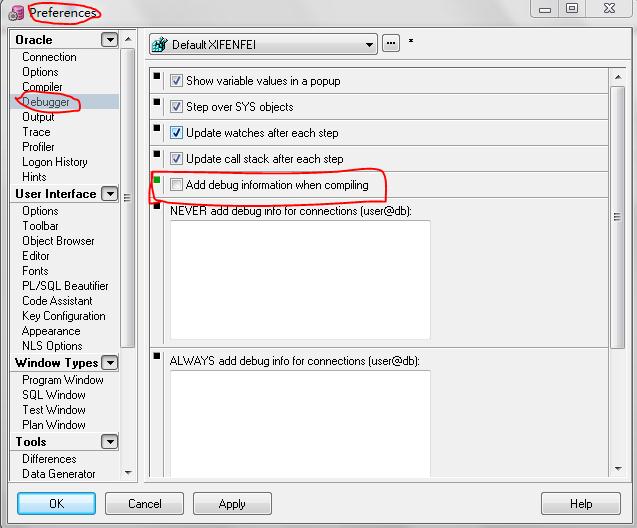
1.在编译包/过程/函数时,不要选中在pl/sql dev中的Tools > Preferences > Debugger >Add debug information when compiling

2.检查的版本pl/sql dev是否和数据库兼容,建议使用新版本