重建控制文件引发ORA-00218故障

遇到一个案例在数据库启动的时候报ORA-00218错误,而这个故障的引起原因是因为重建控制文件的时候,有一个控制文件无法创建,而导致了原有的控制文件被破坏,提醒:创建控制文件之前,最好对原有控制文件进行备份
数据库启动报ORA-00218错误

SQL> startup
ORACLE instance started.

Total System Global Area  285212672 bytes
Fixed Size                  2020224 bytes
Variable Size              92277888 bytes
Database Buffers          188743680 bytes
Redo Buffers                2170880 bytes
ORA-00218: block size 0 of control file
'/u01/app/oracle/oradata/zxy/control01.ctl' does not match DB_BLOCK_SIZE (0)

分析ORA-00218错误

Oracle10g Release 1 Message
~~~~~~~~~~~~~~~~~~~~~~~~~~~
Error:	  ORA-00218  (ORA-218)
Text:	  block size %s of controlfile '%s' does not match DB_BLOCK_SIZE 
	  (%s) 
---------------------------------------------------------------------------
Cause:	The block size as stored in the controlfile header is different 
	from the value of the initialization parameter DB_BLOCK_SIZE. This 
	might be due to an incorrect setting of DB_BLOCK_SIZE, or else 
	might indicate that the controlfile has either been corrupted or 
	belongs to a different database. 
Action:	Restore a good copy of the controlfile. If the controlfile is 
	known to be clean set the DB_BLOCK_SIZE to match controlfile 
	headers block size value. 


Oracle 9.2 or Earlier Error Message 
~~~~~~~~~~~~~~~~~~~~~~~~~~~~~~~~~~~~~~~~~~~~
Error:  ORA 218  
Text:   control file <name> was created with block size <num> now is <num>
-------------------------------------------------------------------------------
Cause:  The physical block size, stored in the control file header, was  
        different in physical block size returned by the O/S.
        This usually indicates that the control file was corrupted.
Action: Restore a good copy of the control file.
        For more information about control files and recovery, see the index 
        entries on "control files," "control files, backing up," "control 
        files, recovery and" in <Oracle7 Server Concepts>.

通过这里可以知道,很可能是控制文件header的db_block_size和参数文件中的db_block_size的大小不一致,从而导致了该问题,而从启动数据库的错误提示上看,是控制文件的block size 为0.

分析控制文件

--dbv检查控制文件
[oracle@zxy bdump]$ dbv file='/u01/app/oracle/oradata/zxy/control01.ctl' blocksize=16384

DBVERIFY: Release 10.2.0.1.0 - Production on Sun Jan 6 23:39:32 2013

Copyright (c) 1982, 2005, Oracle.  All rights reserved.

DBVERIFY - Verification starting : FILE = /u01/app/oracle/oradata/zxy/control01.ctl


DBVERIFY - Verification complete

Total Pages Examined         : 450
Total Pages Processed (Data) : 0
Total Pages Failing   (Data) : 0
Total Pages Processed (Index): 0
Total Pages Failing   (Index): 0
Total Pages Processed (Other): 0
Total Pages Processed (Seg)  : 0
Total Pages Failing   (Seg)  : 0
Total Pages Empty            : 450
Total Pages Marked Corrupt   : 0
Total Pages Influx           : 0
Highest block SCN            : 0 (0.0)

--strings读控制文件
[oracle@zxy bdump]$ strings /u01/app/oracle/oradata/zxy/control01.ctl
}|{z

--正常库dbv检查控制文件
E:\oracle\oradata\xifenfei>dbv file=CONTROL01.CTL blocksize=16384

DBVERIFY: Release 11.2.0.3.0 - Production on 星期一 1月 7 10:26:46 2013

Copyright (c) 1982, 2011, Oracle and/or its affiliates.  All rights reserved.

DBVERIFY - 开始验证: FILE = E:\ORACLE\ORADATA\XIFENFEI\CONTROL01.CTL


DBVERIFY - 验证完成

检查的页总数: 600
处理的页总数 (数据): 0
失败的页总数 (数据): 0
处理的页总数 (索引): 0
失败的页总数 (索引): 0
处理的页总数 (其他): 65
处理的总页数 (段)  : 0
失败的总页数 (段)  : 0
空的页总数: 535
标记为损坏的总页数: 0
流入的页总数: 0
加密的总页数        : 0
最高块 SCN            : 39198 (65535.39198)

检查参数文件db_block_size

SQL> show parameter db_block_size

TYPE        VALUE
------------------------------------ ----------- ------------------------------
db_block_size                        integer     8192

通过分析我们知道spfile中的db_block_size是正确的,而控制文件通过dbv和strings检测均为空值,证明是控制文件异常导致该问题,对于该问题可以通过重建控制文件或者还原备份控制文件来解决问题.

分析问题原因

--参数文件配置
control_files            = /u01/app/oracle/oradata/zxy/control01.ctl, /tmp/oradata/control04.ctl

--alert日志
Sun Jan  6 21:42:50 2013
CREATE CONTROLFILE REUSE DATABASE "ZXY" RESETLOGS  NOARCHIVELOG
 …………
CHARACTER SET AL32UTF8
Sun Jan  6 21:42:50 2013
WARNING: Default Temporary Tablespace not specified in CREATE DATABASE command
Default Temporary Tablespace will be necessary for a locally managed database in future release
Sun Jan  6 21:42:53 2013
Errors in file /u01/app/oracle/admin/zxy/udump/zxy_ora_3898.trc:
ORA-00200: control file could not be created
ORA-00202: control file: '/tmp/oradata/control04.ctl'
ORA-27040: file create error, unable to create file
Linux-x86_64 Error: 2: No such file or directory

--再次启动
control_files            = /u01/app/oracle/oradata/zxy/control01.ctl

--日志
ALTER DATABASE   MOUNT
Sun Jan  6 21:56:31 2013
ORA-00218: block size 0 of control file 
'/u01/app/oracle/oradata/zxy/control01.ctl' does not match DB_BLOCK_SIZE (0)
Sun Jan  6 21:56:31 2013
ORA-218 signalled during: ALTER DATABASE   MOUNT...

创建控制文件,因为/tmp/oradata/目录不存在或者没有权限导致创建控制文件失败,而导致原来有的控制文件也失败

故障重现

--正常启动
control_files='/u01/oracle/oradata/XFF/control01.ctl'

SQL> startup pfile=/tmp/pfile
ORACLE instance started.

Total System Global Area  306184192 bytes
Fixed Size                  1267164 bytes
Variable Size             109054500 bytes
Database Buffers          188743680 bytes
Redo Buffers                7118848 bytes
Database mounted.
Database opened.

SQL> alter database backup controlfile to trace as '/tmp/ctl';

Database altered.

--尝试重建控制文件
control_files='/u01/oracle/oradata/XFF/control01.ctl','/tmp/xifenfei/con.ctl'

SQL> CREATE CONTROLFILE REUSE DATABASE "XFF" NORESETLOGS  ARCHIVELOG
  2      MAXLOGFILES 16
  3      MAXLOGMEMBERS 3
  4      MAXDATAFILES 100
  5      MAXINSTANCES 8
  6      MAXLOGHISTORY 292
  7  LOGFILE
  8    GROUP 1 '/u01/oracle/oradata/XFF/redo01.log'  SIZE 50M,
  9    GROUP 2 '/u01/oracle/oradata/XFF/redo02.log'  SIZE 50M,
 10    GROUP 3 '/u01/oracle/oradata/XFF/redo03.log'  SIZE 50M
 11  DATAFILE
 12    '/u01/oracle/oradata/XFF/system01.dbf',
 13    '/u01/oracle/oradata/XFF/undotbs01.dbf',
 14    '/u01/oracle/oradata/XFF/sysaux01.dbf',
 15    '/u01/oracle/oradata/XFF/users01.dbf',
 16    '/u01/oracle/oradata/XFF/xifenfei01.dbf',
 17    '/u01/oracle/oradata/XFF/users03.dbf'
 18  CHARACTER SET ZHS16GBK
 19  ;

CREATE CONTROLFILE REUSE DATABASE "XFF" NORESETLOGS  ARCHIVELOG
*
ERROR at line 1:
ORA-01503: CREATE CONTROLFILE failed
ORA-00200: control file could not be created
ORA-00202: control file: '/tmp/xifenfei/con.ctl'
ORA-27040: file create error, unable to create file
Linux Error: 2: No such file or directory

--使用原控制文件启动库
control_files='/u01/oracle/oradata/XFF/control01.ctl'

SQL> shutdown abort
ORACLE instance shut down.
SQL> startup pfile='/tmp/pfile'
ORACLE instance started.

Total System Global Area  306184192 bytes
Fixed Size                  1267164 bytes
Variable Size             109054500 bytes
Database Buffers          188743680 bytes
Redo Buffers                7118848 bytes
ORA-00218: block size 0 of control file '/u01/oracle/oradata/XFF/control01.ctl'
does not match DB_BLOCK_SIZE (0)

补充参数文件中DB_BLOCK_SIZE不正确导致后果

DB_BLOCK_SIZE从8192修改为16384

SQL> startup pfile='/tmp/pfile'
ORACLE instance started.

Total System Global Area  306184192 bytes
Fixed Size                  1267164 bytes
Variable Size             109054500 bytes
Database Buffers          188743680 bytes
Redo Buffers                7118848 bytes
ORA-00058: DB_BLOCK_SIZE must be 8192 to mount this database (not 16384)
ORACLE 12C varchar2支持32k长度字符串

在Oracle的以前版本中如果要存储超过4000byte的字符串需要使用clob字段,而lob本身操作就麻烦,而且效率不高。从12C开始Oracle提供了 VARCHAR2, NVARCHAR2, and RAW支持32k长度在字符串,大大提高了Oracle程序在处理4000到32k的字符串的处理效率.
数据库版本

SQL> select * from v$version;

BANNER                                                                               CON_ID
-------------------------------------------------------------------------------- ----------
Oracle Database 12c Enterprise Edition Release 12.1.0.0.2 - 64bit                         0
PL/SQL Release 12.1.0.0.2                                                                 0
CORE    12.1.0.0.2                                                                        0
TNS for Linux: Version 12.1.0.0.2                                                         0
NLSRTL Version 12.1.0.0.2                                                                 0

max_sql_string_size参数

SQL> show parameter max_sql_string_size;

NAME                                 TYPE        VALUE
------------------------------------ ----------- ------------------------------
max_sql_string_size                  string      LEGACY

max_sql_string_size:controls maximum size of VARCHAR2, NVARCHAR2, and RAW types in SQL
max_sql_string_size, must be from among EXTENDED, LEGACY

创建测试表

SQL> create table t_xifenfei(id number,name varchar2(4001));
create table t_xifenfei(id number,name varchar2(4001))
                                                *
ERROR at line 1:
ORA-00910: specified length too long for its datatype


SQL> create table t_xifenfei(id number,name varchar2(4000));

Table created.

SQL> insert into t_xifenfei values(1,rpad('www.orasos.com',4000,0));

1 row created.

SQL> insert into t_xifenfei values(2,lpad('www.orasos.com',4009,0));

1 row created.

SQL> commit;

Commit complete.

SQL> select id,length(name) from t_xifenfei;

        ID LENGTH(NAME)
---------- ------------
         1         4000
         2         4000

SQL> select id,substr(name,-10,10) from t_xifenfei;

        ID SUBSTR(NAME,-10,10)
---------- ----------------------------------------
         1 0000000000
         2 fenfei.com

SQL>  select id,substr(name,3990) from t_xifenfei;

        ID SUBSTR(NAME,3990)
---------- --------------------------------------------
         1 00000000000
         2 ifenfei.com

测试说明几点:
1.默认情况下varchar2长度不能超过4000
2.插入varchar2超过4000的字段(列长度为4000),自动被截断

修改max_sql_string_size参数

SQL> alter system set max_sql_string_size='EXTENDED';
alter system set max_sql_string_size='EXTENDED'
*
ERROR at line 1:
ORA-02097: parameter cannot be modified because specified value is invalid
ORA-02096: specified initialization parameter is not modifiable with this option


SQL> alter system set max_sql_string_size='EXTENDED' scope=spfile;

System altered.

执行utl32k.sql脚本

SQL> shutdown immediate;
Database closed.
Database dismounted.
ORACLE instance shut down.
SQL> startup upgrade;
ORACLE instance started.

Total System Global Area  313159680 bytes
Fixed Size                  2259912 bytes
Variable Size             243270712 bytes
Database Buffers           62914560 bytes
Redo Buffers                4714496 bytes
Database mounted.
Database opened.
SQL> @?/rdbms/admin/utl32k.sql
--包含编译无效对象

QL> shutdown immediate
Database closed.
Database dismounted.
ORACLE instance shut down.
SQL> startup
ORACLE instance started.

Total System Global Area  313159680 bytes
Fixed Size                  2259912 bytes
Variable Size             251659320 bytes
Database Buffers           54525952 bytes
Redo Buffers                4714496 bytes
Database mounted.
Database opened.

SQL> show parameter max_sql_string_size;

NAME                                 TYPE        VALUE
------------------------------------ ----------- ----------------
max_sql_string_size                  string      EXTENDED

测试varchar2(32767)

SQL> conn xff/xifenfei
Connected.
SQL> create table t_xifenfei_1(id number,name varchar2(32768));
create table t_xifenfei_1(id number,name varchar2(32768))
                                                  *
ERROR at line 1:
ORA-00910: specified length too long for its datatype

SQL> create table t_xifenfei_extend(id number,name varchar2(32767));

Table created.

SQL> insert into t_xifenfei_extend values(3,lpad('www.orasos.com',32767,0));

1 row created.

SQL> commit;

Commit complete.

SQL> select id,substr(name,-10,10) from t_xifenfei_extend;

        ID SUBSTR(NAME,-10,10)
---------- ----------------------------------------
         3 fenfei.com

SQL> select id,substr(name,32760) from t_xifenfei_extend;

        ID SUBSTR(NAME,32760)
---------- --------------------------------
         3 nfei.com

SQL> select id,length(name) from t_xifenfei_extend;

        ID LENGTH(NAME)
---------- ------------
         3        32767

Oracle 12C支持字符串32K处理过程
1.修改max_sql_string_size=’EXTENDED’
2.重启数据库至upgrade状态
3.执行@?/rdbms/admin/utl32k.sql
4.重启数据库至正常open状态

dcli完成多节点对等ssh配置

dcli是Python脚本,可以实现在多节点中的之间非交换命令的执行,因为dcli执行需要通过ssh来实现,所以dcli也提供了ssh配置功能.本文通过dcli来完成多节点间的对等ssh配置
dcli整体描述

The dcli utility runs commands on multiple cells in parallel threads. 
However, it does not support an interactive session with a remote application on a cell.

To use the dcli utility, copy the utility from the bin directory on a cell to 
a host computer from which central management can be performed.
You can issue a command to be run on multiple cells, or use files that can be copied to cells and then run. 
The cells are referenced by their domain name or IP address.

The dcli utility requires Python version 2.3 or later. 
You can determine the version of Python by running the python -V command. 
In addition, use of this tool assumes prior setup of SSH user-equivalence to a cell. 
You can use the dcli utility initially with the -k option to set up SSH user-equivalence to a cell. 

dcli使用说明

[xifenfei@db1 ~]$ dcli
Error: No command specified.
usage: dcli [options] [command]

options:
  --version           show program's version number and exit
  -c CELLS            comma-separated list of cells
  -d DESTFILE         destination directory or file
  -f FILE             file to be copied
  -g GROUPFILE        file containing list of cells
  -h, --help          show help message and exit
  -k                  push ssh key to cell's authorized_keys file
  -l USERID           user to login as on remote cells (default: celladmin)
  -n                  abbreviate non-error output
  -r REGEXP           abbreviate output lines matching a regular expression
  -s SSHOPTIONS       string of options passed through to ssh
  --scp=SCPOPTIONS    string of options passed through to scp if different
                      from sshoptions
  -t                  list target cells
  -v                  print extra messages to stdout
  --vmstat=VMSTATOPS  vmstat command options
  -x EXECFILE         file to be copied and executed

服务器相关ip配置

[xifenfei@db1 ~]$ more xifenfei.txt 
192.168.30.10
192.168.30.20
192.168.30.30
[xifenfei@db1 ~]$ more /etc/hosts
127.0.0.1 localhost.localdomain localhost
192.168.30.30   db1 
192.168.30.10   cell1
192.168.30.20   cell2

操作系统用户
说明:dcli配置对等ssh不需要uid完全一样,不需要用户密码完全一样,因为是双向对等,需要用户名一致

[root@cell2 ~]# id xifenfei
uid=8001(xifenfei) gid=8001(xifenfei) groups=8001(xifenfei)
[root@cell1 ~]# id xifenfei
uid=8001(xifenfei) gid=8001(xifenfei) groups=8001(xifenfei)
[root@db1 ~]# id xifenfei
uid=8001(xifenfei) gid=8001(xifenfei) groups=8001(xifenfei)

db1节点配置ssh

[xifenfei@db1 ~]$ ssh-keygen -t dsa
Generating public/private dsa key pair.
Enter file in which to save the key (/home/xifenfei/.ssh/id_dsa): 
Created directory '/home/xifenfei/.ssh'.
Enter passphrase (empty for no passphrase): 
Enter same passphrase again: 
Your identification has been saved in /home/xifenfei/.ssh/id_dsa.
Your public key has been saved in /home/xifenfei/.ssh/id_dsa.pub.
The key fingerprint is:
63:95:13:ba:4a:4c:13:93:67:7f:4f:e8:18:13:3c:4f xifenfei@db1

[xifenfei@db1 ~]$ dcli -k -g xifenfei.txt -l xifenfei
The authenticity of host '192.168.30.10 (192.168.30.10)' can't be established.
RSA key fingerprint is 1b:b6:91:11:58:89:b1:6a:c6:eb:72:df:68:d4:dd:5b.
Are you sure you want to continue connecting (yes/no)? yes
xifenfei@192.168.30.10's password: 
The authenticity of host '192.168.30.20 (192.168.30.20)' can't be established.
RSA key fingerprint is 1b:b6:91:11:58:89:b1:6a:c6:eb:72:df:68:d4:dd:5b.
Are you sure you want to continue connecting (yes/no)? yes
xifenfei@192.168.30.20's password: 
The authenticity of host '192.168.30.30 (192.168.30.30)' can't be established.
RSA key fingerprint is 54:ea:84:ae:38:24:07:31:9f:dd:8a:8b:4b:c2:a8:fe.
Are you sure you want to continue connecting (yes/no)? yes
xifenfei@192.168.30.30's password: 
192.168.30.10: Warning: Permanently added '192.168.30.10' (RSA) to the list of known hosts.
192.168.30.10: ssh key added
192.168.30.20: Warning: Permanently added '192.168.30.20' (RSA) to the list of known hosts.
192.168.30.20: ssh key added
192.168.30.30: Warning: Permanently added '192.168.30.30' (RSA) to the list of known hosts.
192.168.30.30: ssh key added

[xifenfei@db1 ~]$ for host in `cat xifenfei.txt`
> do
> scp /home/xifenfei/.ssh/id_dsa.pub ${host}:/home/xifenfei/.ssh/authorized_keys
> done
id_dsa.pub                                                                      100%  602     0.6KB/s   00:00

[xifenfei@db1 ~]$ dcli -g xifenfei.txt -l xifenfei "chmod -R 700 /home/xifenfei/.ssh"

[xifenfei@db1 ~]$ dcli -g xifenfei.txt -l xifenfei "chown -R xifenfei /home/xifenfei/.ssh"
[xifenfei@db1 ~]$ ssh 192.168.30.30
Last login: Tue Dec 25 07:45:17 2012 from 192.168.30.30
[xifenfei@db1 ~]$ ssh 192.168.30.20
Last login: Tue Dec 25 19:17:30 2012 from 192.168.30.10
[xifenfei@db1 ~]$ ssh 192.168.30.10
Last login: Tue Dec 25 20:17:20 2012 from 192.168.30.20

--ssh为单向,正向可以ssh成功,逆向需要输入密码
[xifenfei@db1 ~]$ ssh 192.168.30.10
xifenfei@192.168.30.10's password: 

拷贝ip文件到其他节点

[xifenfei@db1 ~]$ for host in `cat xifenfei.txt`
> do
> scp /home/xifenfei/xifenfei.txt ${host}:/home/xifenfei/xifenfei.txt
> done
xifenfei.txt                                                                    100%   42     0.0KB/s   00:00
scp: /home/xifenfei/xifenfei.txt: Permission denied   --自身节点不能拷贝

cell1节点配置

[xifenfei@cell1 ~]$ ssh-keygen -t dsa
Generating public/private dsa key pair.
Enter file in which to save the key (/home/xifenfei/.ssh/id_dsa): 
Enter passphrase (empty for no passphrase): 
Enter same passphrase again: 
Your identification has been saved in /home/xifenfei/.ssh/id_dsa.
Your public key has been saved in /home/xifenfei/.ssh/id_dsa.pub.
The key fingerprint is:
f2:b6:88:5c:c6:97:5e:38:c2:df:f1:58:49:8a:8d:90 xifenfei@cell1
[xifenfei@cell1 ~]$  dcli -k -g xifenfei.txt -l xifenfei
The authenticity of host '192.168.30.10 (192.168.30.10)' can't be established.
RSA key fingerprint is 1b:b6:91:11:58:89:b1:6a:c6:eb:72:df:68:d4:dd:5b.
Are you sure you want to continue connecting (yes/no)? yes
xifenfei@192.168.30.10's password: 
xifenfei@192.168.30.20's password: 
xifenfei@192.168.30.30's password: 
192.168.30.10: Warning: Permanently added '192.168.30.10' (RSA) to the list of known hosts.
192.168.30.10: ssh key added
192.168.30.20: ssh key added
192.168.30.30: ssh key added
[xifenfei@cell1 ~]$ ssh 192.168.30.30
Last login: Tue Dec 25 07:48:24 2012 from 192.168.30.30

--cell1 to cell2 正向成功,逆向失败
[xifenfei@cell1 ~]$ ssh 192.168.30.20
Last login: Tue Dec 25 19:23:42 2012 from 192.168.30.30
[xifenfei@cell2 ~]$ ssh 192.168.30.10
xifenfei@192.168.30.10's password: 

--cell1和db1正逆向均可以ssh
[xifenfei@cell1 ~]$ ssh 192.168.30.30
Last login: Tue Dec 25 20:24:15 2012 from 192.168.30.30
[xifenfei@db1 ~]$ ssh 192.168.30.10
Last login: Tue Dec 25 20:27:27 2012 from 192.168.30.10

cell2节点配置

[xifenfei@cell2 ~]$ ssh-keygen -t dsa
Generating public/private dsa key pair.
Enter file in which to save the key (/home/xifenfei/.ssh/id_dsa): 
Enter passphrase (empty for no passphrase): 
Enter same passphrase again: 
Your identification has been saved in /home/xifenfei/.ssh/id_dsa.
Your public key has been saved in /home/xifenfei/.ssh/id_dsa.pub.
The key fingerprint is:
87:80:02:e1:27:b8:d0:af:c0:5f:e0:f3:5e:95:29:cb xifenfei@cell2
[xifenfei@cell2 ~]$ dcli -k -g xifenfei.txt -l xifenfei
The authenticity of host '192.168.30.10 (192.168.30.10)' can't be established.
RSA key fingerprint is 1b:b6:91:11:58:89:b1:6a:c6:eb:72:df:68:d4:dd:5b.
Are you sure you want to continue connecting (yes/no)? yes
xifenfei@192.168.30.10's password: 
The authenticity of host '192.168.30.20 (192.168.30.20)' can't be established.
RSA key fingerprint is 1b:b6:91:11:58:89:b1:6a:c6:eb:72:df:68:d4:dd:5b.
Are you sure you want to continue connecting (yes/no)? yes
xifenfei@192.168.30.20's password: 
The authenticity of host '192.168.30.30 (192.168.30.30)' can't be established.
RSA key fingerprint is 54:ea:84:ae:38:24:07:31:9f:dd:8a:8b:4b:c2:a8:fe.
Are you sure you want to continue connecting (yes/no)? yes
xifenfei@192.168.30.30's password: 
192.168.30.10: Warning: Permanently added '192.168.30.10' (RSA) to the list of known hosts.
192.168.30.10: ssh key added
192.168.30.20: Warning: Permanently added '192.168.30.20' (RSA) to the list of known hosts.
192.168.30.20: ssh key added
192.168.30.30: Warning: Permanently added '192.168.30.30' (RSA) to the list of known hosts.
192.168.30.30: ssh key added

--ssh测试
[xifenfei@cell2 ~]$ ssh 192.168.30.10
Last login: Tue Dec 25 20:11:02 2012 from 192.168.30.30
[xifenfei@cell2 ~]$ ssh 192.168.30.30
Last login: Tue Dec 25 07:53:27 2012 from cell1
[xifenfei@cell2 ~]$ ssh 192.168.30.20
Last login: Tue Dec 25 19:30:16 2012 from 192.168.30.10

ssh等效性测试汇总

--db1节点
[xifenfei@db1 ~]$ ssh 192.168.30.10
Last login: Tue Dec 25 20:30:24 2012 from 192.168.30.20
[xifenfei@db1 ~]$ ssh 192.168.30.20
Last login: Tue Dec 25 19:33:07 2012 from 192.168.30.20
[xifenfei@db1 ~]$ ssh 192.168.30.30
Last login: Tue Dec 25 07:57:56 2012 from cell2

--cell1节点
[xifenfei@cell1 ~]$ ssh 192.168.30.20
Last login: Tue Dec 25 19:34:05 2012 from 192.168.30.30
[xifenfei@cell1 ~]$ ssh 192.168.30.30
Last login: Tue Dec 25 07:59:29 2012 from 192.168.30.30
[xifenfei@cell1 ~]$ ssh 192.168.30.10
Last login: Tue Dec 25 20:33:59 2012 from 192.168.30.30

--cell2节点
[xifenfei@cell2 ~]$ ssh 192.168.30.10
Last login: Tue Dec 25 20:35:42 2012 from 192.168.30.10
[xifenfei@cell2 ~]$ ssh 192.168.30.30
Last login: Tue Dec 25 08:00:56 2012 from cell1
[xifenfei@cell2 ~]$ ssh 192.168.30.20
Last login: Tue Dec 25 19:35:31 2012 from 192.168.30.10

到此证明三个节点之间的xifenfei用户的ssh等效配置完成,实现使用dcli完成多节点ssh等效配置

整体处理思路总结

1.确定需要配置ssh用户
--第一节点
2.编辑需要配置ssh等效连接ip列表
3.ssh-keygen -t dsa
4.dcli -k -g xifenfei.txt -l xifenfei
5.
for host in `cat xifenfei.txt`
do
scp /home/xifenfei/.ssh/id_dsa.pub ${host}:/home/xifenfei/.ssh/authorized_keys
done
6.dcli -g xifenfei.txt -l xifenfei "chmod -R 700 /home/xifenfei/.ssh"
7.dcli -g xifenfei.txt -l xifenfei "chown -R xifenfei /home/xifenfei/.ssh"
8.
for host in `cat xifenfei.txt`
 do
 scp /home/xifenfei/xifenfei.txt ${host}:/home/xifenfei/xifenfei.txt
 done
--其他节点
9. ssh-keygen -t dsa
10. dcli -k -g xifenfei.txt -l xifenfei

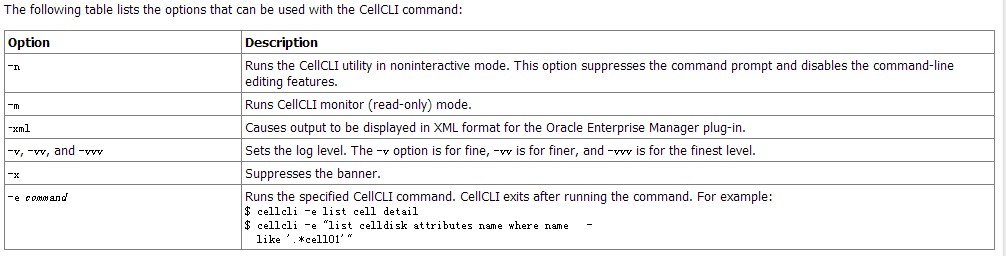
cellcli命令简介

cellcli用途描述

The CellCLI utility is the command-line administration tool for Exadata Cell. 
CellCLI runs on each cell to enable you to manage an individual cell. 
You use CellCLI to start and stop the cell, to manage cell configuration information, 
to enable or disable cells, and to manage objects in the cell environment. 
The command-line utility is already installed when Exadata Cell is shipped. 

cellcli语法

cellcli [port_number] [-n] [-m] [-xml] [-v | -vv | -vvv] [-x] [-e command]


cellcli登录

[root@cell2 ~]# cellcli 
CellCLI: Release 11.2.1.2.0 - Production on Tue Dec 25 16:07:01 PST 2012

Copyright (c) 2007, 2009, Oracle.  All rights reserved.
Cell Efficiency Ratio: 24M

CellCLI> 

cellcli help

CellCLI> help

 HELP [topic]
   Available Topics:
        ALTER
        ALTER ALERTHISTORY
        ALTER CELL
        ALTER CELLDISK
        ALTER GRIDDISK
        ALTER IORMPLAN
        ALTER LUN
        ALTER THRESHOLD
        ASSIGN KEY
        CALIBRATE
        CREATE
        CREATE CELL
        CREATE CELLDISK
        CREATE FLASHCACHE
        CREATE GRIDDISK
        CREATE KEY
        CREATE THRESHOLD
        DESCRIBE
        DROP
        DROP ALERTHISTORY
        DROP CELL
        DROP CELLDISK
        DROP FLASHCACHE
        DROP GRIDDISK
        DROP THRESHOLD
        EXPORT CELLDISK
        IMPORT CELLDISK
        LIST
        LIST ACTIVEREQUEST
        LIST ALERTDEFINITION
        LIST ALERTHISTORY
        LIST CELL
        LIST CELLDISK
        LIST FLASHCACHE
        LIST FLASHCACHECONTENT
        LIST GRIDDISK
        LIST IORMPLAN
        LIST KEY
        LIST LUN
        LIST METRICCURRENT
        LIST METRICDEFINITION
        LIST METRICHISTORY
        LIST PHYSICALDISK
        LIST THRESHOLD
        SET
        SPOOL
        START

CellCLI> help list

  Enter HELP LIST <object_type> for specific help syntax.
    <object_type>:  {ACTIVEREQUEST | ALERTHISTORY | ALERTDEFINITION | CELL 
                     | CELLDISK | FASHCACHE | FLASHCACHECONTENT | GRIDDISK
                     | IORMPLAN | KEY | LUN 
                     | METRICCURRENT | METRICDEFINITION | METRICHISTORY 
                     | PHYSICALDISK | THRESHOLD }

CellCLI> help list PHYSICALDISK

  Usage: LIST PHYSICALDISK [<name> | <filters>] [<attribute_list>] [DETAIL] 

  Purpose: Displays specified attributes for physical disks.

  Arguments:
    <name>:  The name of the physical disk to be displayed.
    <filters>:  an expression which determines which physical disks should
                be displayed.
    <attribute_list>: The attributes that are to be displayed.
                      ATTRIBUTES {ALL | attr1 [, attr2]... }

  Options:
    [DETAIL]: Formats the display as an attribute on each line, with
    an attribute descriptor preceding each value.

  Examples:
    LIST PHYSICALDISK DETAIL

cellcli describe

CellCLI> DESCRIBE PHYSICALDISK
        name
        ctrlFirmware
        ctrlHwVersion
        deviceId
        diskType
        enclosureDeviceId
        errCmdTimeoutCount
        errHardReadCount
        errHardWriteCount
        errMediaCount
        errOtherCount
        errSeekCount
        errorCount
        foreignState
        hotPlugCount
        id
        lastFailureReason
        luns
        makeModel
        notPresentSince
        physicalFirmware
        physicalInsertTime
        physicalInterface
        physicalPort
        physicalRPM
        physicalSerial
        physicalSize
        physicalUseType
        sectorRemapCount
        slotNumber
        status

cellcli list

CellCLI> LIST PHYSICALDISK attributes name ,physicalSize
         /opt/oracle/cell11.2.1.2.0_LINUX_091102/disks/raw/FLASH01       450M
         /opt/oracle/cell11.2.1.2.0_LINUX_091102/disks/raw/FLASH02       450M
         /opt/oracle/cell11.2.1.2.0_LINUX_091102/disks/raw/FLASH03       450M
         /opt/oracle/cell11.2.1.2.0_LINUX_091102/disks/raw/FLASH04       450M
         /opt/oracle/cell11.2.1.2.0_LINUX_091102/disks/raw/disk01        450M
         /opt/oracle/cell11.2.1.2.0_LINUX_091102/disks/raw/disk02        450M
         /opt/oracle/cell11.2.1.2.0_LINUX_091102/disks/raw/disk03        450M
         /opt/oracle/cell11.2.1.2.0_LINUX_091102/disks/raw/disk04        450M
         /opt/oracle/cell11.2.1.2.0_LINUX_091102/disks/raw/disk05        450M
         /opt/oracle/cell11.2.1.2.0_LINUX_091102/disks/raw/disk06        450M
         /opt/oracle/cell11.2.1.2.0_LINUX_091102/disks/raw/disk07        450M
         /opt/oracle/cell11.2.1.2.0_LINUX_091102/disks/raw/disk08        450M
         /opt/oracle/cell11.2.1.2.0_LINUX_091102/disks/raw/disk09        450M
         /opt/oracle/cell11.2.1.2.0_LINUX_091102/disks/raw/disk10        450M
         /opt/oracle/cell11.2.1.2.0_LINUX_091102/disks/raw/disk11        450M
         /opt/oracle/cell11.2.1.2.0_LINUX_091102/disks/raw/disk12        450M

CellCLI> LIST PHYSICALDISK attributes name ,physicalSize where name like '.*FLASH.*'
         /opt/oracle/cell11.2.1.2.0_LINUX_091102/disks/raw/FLASH01       450M
         /opt/oracle/cell11.2.1.2.0_LINUX_091102/disks/raw/FLASH02       450M
         /opt/oracle/cell11.2.1.2.0_LINUX_091102/disks/raw/FLASH03       450M
         /opt/oracle/cell11.2.1.2.0_LINUX_091102/disks/raw/FLASH04       450M

attributes后面可以加上对应的属性,”.*”表示通配符
这里通过help和describe来实现cellcli的基本操作,这里只是提供了一种处理问题的思路,通过help操作来完成cellcli的基本操作.

How to Get the Contents of an Spfile on ASM when ASM/GRID is down

在11g中asm的spfile文件是存放在asm中的,如果asm不能正常启动是否可以获得其spfile信息.这里通过gpnptool来获得spfile文件信息,给大家提供了在11gr2的rac是怎么利用asm 中的spfile启动asm的思路
asm spfile信息

[grid@rac1 ~]$ sqlplus / as sysdba

SQL*Plus: Release 11.2.0.3.0 Production on Fri Dec 21 01:41:31 2012

Copyright (c) 1982, 2011, Oracle.  All rights reserved.


Connected to:
Oracle Database 11g Enterprise Edition Release 11.2.0.3.0 - Production
With the Real Application Clusters and Automatic Storage Management options

SQL> create pfile='/tmp/pfile' from spfile;

File created.

SQL> !more /tmp/pfile 
+ASM1.__oracle_base='/u01/app/gridbase'#ORACLE_BASE set from in memory value
+ASM2.asm_diskgroups='XIFENFEI'#Manual Mount
+ASM1.asm_diskgroups='XIFENFEI'#Manual Mount
*.asm_diskstring='/dev/oracleasm/disks/*'
*.asm_power_limit=1
*.diagnostic_dest='/u01/app/gridbase'
*.instance_type='asm'
*.large_pool_size=12M
*.remote_login_passwordfile='EXCLUSIVE'

关闭集群(asm已关闭)

[root@rac1 ~]# crsctl stop crs 
[root@rac1 ~]# ps -ef|grep pmon
root      8768  6372  0 02:53 pts/1    00:00:00 grep pmon
[root@rac1 ~]# crsctl stat res
CRS-4535: Cannot communicate with Cluster Ready Services
CRS-4000: Command Status failed, or completed with errors.

gpnptool命令获取asm disk信息

[root@rac1 ~]# gpnptool get -o-
<?xml version="1.0" encoding="UTF-8"?>
<gpnp:GPnP-Profile Version="1.0" xmlns="http://www.grid-pnp.org/2005/11/gpnp-profile" 
xmlns:gpnp="http://www.grid-pnp.org/2005/11/gpnp-profile" 
xmlns:orcl="http://www.oracle.com/gpnp/2005/11/gpnp-profile" xmlns:xsi="http://www.w3.org/2001/XMLSchema-instance" 
xsi:schemaLocation="http://www.grid-pnp.org/2005/11/gpnp-profile gpnp-profile.xsd" ProfileSequence="4" 
ClusterUId="885339054e904f1dbfa646b41d7a0edb" ClusterName="rac-cluster" PALocation="">
<gpnp:Network-Profile>
<gpnp:HostNetwork id="gen" HostName="*">
<gpnp:Network id="net1" IP="192.168.1.0" Adapter="eth0" Use="public"/>
<gpnp:Network id="net2" IP="10.10.1.0" Adapter="eth1" Use="cluster_interconnect"/>
</gpnp:HostNetwork>
</gpnp:Network-Profile>
<orcl:CSS-Profile id="css" DiscoveryString="+asm" LeaseDuration="400"/>
--重点关注信息(asm disk 信息)
<orcl:ASM-Profile id="asm" DiscoveryString="/dev/oracleasm/disks/*" 
SPFile="+DATA/rac-cluster/asmparameterfile/registry.253.776955291"/>
<ds:Signature xmlns:ds="http://www.w3.org/2000/09/xmldsig#">
<ds:SignedInfo>
<ds:CanonicalizationMethod Algorithm="http://www.w3.org/2001/10/xml-exc-c14n#"/>
<ds:SignatureMethod Algorithm="http://www.w3.org/2000/09/xmldsig#rsa-sha1"/>
<ds:Reference URI="">
<ds:Transforms><ds:Transform Algorithm="http://www.w3.org/2000/09/xmldsig#enveloped-signature"/>
<ds:Transform Algorithm="http://www.w3.org/2001/10/xml-exc-c14n#"> 
<InclusiveNamespaces xmlns="http://www.w3.org/2001/10/xml-exc-c14n#" PrefixList="gpnp orcl xsi"/>
</ds:Transform></ds:Transforms><ds:DigestMethod Algorithm="http://www.w3.org/2000/09/xmldsig#sha1"/>
<ds:DigestValue>T2Q3r+5sER2Rp0VfeqzYh461f2s=</ds:DigestValue>
</ds:Reference>
</ds:SignedInfo>
<ds:SignatureValue>
LwcQEtlsPGfywzdYJrOqiTp4cZNFGB/S9Ts8OCvYOGf/Z8HDT2yN5p2nCuxArUfW+KzaPzPHHihpRVaTcAY31nJ2Rcf2vMqYp4e++shliQXC8mg
1oGxQGifkjZwA4pTTEK5MBmr4FTZnR3VArZjjVfJdsmOMfyH4YeSMU5HPjdA=
</ds:SignatureValue>
</ds:Signature>
</gpnp:GPnP-Profile>
Success.

Error CLSGPNP_NO_DAEMON getting profile.

获得asm spfile信息
通过kfed找磁盘中的kfdhdb.sp|ausize来获得asm spfile相关信息

[root@rac1 ~]# ls /dev/oracleasm/disks/
VOL1  VOL2  VOL3  VOL4
[root@rac1 ~]# kfed dev=/dev/oracleasm/disks/VOL1 op=READ | egrep "kfdhdb.sp|ausize"
kfdhdb.ausize:                  1048576 ; 0x0bc: 0x00100000
kfdhdb.spfile:                       22 ; 0x0f4: 0x00000016
kfdhdb.spfflg:                        1 ; 0x0f8: 0x00000001
[root@rac1 ~]# kfed dev=/dev/oracleasm/disks/VOL2 op=READ | egrep "kfdhdb.sp|ausize"
kfdhdb.ausize:                  1048576 ; 0x0bc: 0x00100000
kfdhdb.spfile:                        0 ; 0x0f4: 0x00000000
kfdhdb.spfflg:                        0 ; 0x0f8: 0x00000000
[root@rac1 ~]# kfed dev=/dev/oracleasm/disks/VOL3 op=READ | egrep "kfdhdb.sp|ausize"
kfdhdb.ausize:                  1048576 ; 0x0bc: 0x00100000
kfdhdb.spfile:                        0 ; 0x0f4: 0x00000000
kfdhdb.spfflg:                        0 ; 0x0f8: 0x00000000
[root@rac1 ~]# kfed dev=/dev/oracleasm/disks/VOL4 op=READ | egrep "kfdhdb.sp|ausize"
kfdhdb.ausize:                  1048576 ; 0x0bc: 0x00100000
kfdhdb.spfile:                        0 ; 0x0f4: 0x00000000
kfdhdb.spfflg:                        0 ; 0x0f8: 0x00000000

这里可以看出来asm spfile信息在磁盘VOL1中,spfile从第22个au开始,1个au(1M).

获得asm spfile 内容

[root@rac1 ~]# dd if=/dev/oracleasm/disks/VOL1 bs=1M skip=22 count=1 > /tmp/spfile
1+0 records in
1+0 records out
1048576 bytes (1.0 MB) copied, 1.47474 seconds, 711 kB/s
[root@rac1 ~]# strings /tmp/spfile
+ASM1.__oracle_base='/u01/app/gridbase'#ORACLE_BASE set from in memory value
+ASM2.asm_diskgroups='XIFENFEI'#Manual Mount
+ASM1.asm_diskgroups='XIFENFEI'#Manual Mount
*.asm_diskstring='/dev/oracleasm/disks/*'
*.asm_power_limit=1
*.diagnostic_dest='/u01/app/gridbase'
*.instance_type='asm'
*.large_pool_size=12M
*.remote_login_passwordfile='EXCLUSIVE'

通过对比发现,在asm实例未正常启动的情况下,也可以通过其他方面来获得asm spfile文件.本实验只是对于spfile在asm中位置的定位(大家去猜测11gr2的rac是怎么利用asm 中的spfile启动asm的思路),实际生产环境中请勿模仿,gpnptool命令有较大风险