使用dbms_pumpdata执行expdp操作

使用dbms_pumpdata执行expdp操作

set serverout on 
declare 
  h1 number; -- Datapump handle 
  dir_name varchar2(30); -- Directory Name 
  job_status VARCHAR2(30); 
begin 
  dir_name := 'DATA_PUMP_DIR'; 
  h1 := dbms_datapump.open(
  operation =>'EXPORT', --是export还是impport
--导出表配置
  job_mode =>'TABLE',  --job_mode可以为SCHEMA/TABLE等
--导出用户配置
  job_mode =>'SCHEMA',
  remote_link => NULL, --是否使用dblink导出(就是NETWORK_LINK)
  job_name =>'TABLE_XFF' --job_name expdpjob的名称
  ); 

  dbms_datapump.add_file(handle =>h1, 
                         filename => 'XIFENFEI.DMP', 
                         directory => dir_name, 
                         filetype => DBMS_DATAPUMP.KU$_FILE_TYPE_DUMP_FILE, 
                         reusefile => 1); -- value of 1 instructs to overwrite existing file 

  dbms_datapump.add_file(handle =>h1, 
                         filename => 'XIFENFEI.LOG', 
                         directory => dir_name, 
                         filetype => DBMS_DATAPUMP.KU$_FILE_TYPE_LOG_FILE, 
                         reusefile => 1); 

--导出表配置
  dbms_datapump.metadata_filter(handle =>h1, 
                         name => 'TABLE_FILTER', 
                         value => 'CHF.T_XIFENFEI'); 

--导出用户配置
  dbms_datapump.metadata_filter (handle => dp_handle, 
                                 name => 'SCHEMA_EXPR', 
                                 value => 'IN (''CHF'')'); 
-- Start the job. 
  dbms_datapump.start_job(h1); 
  dbms_datapump.wait_for_job (handle => dp_handle, 
                              job_state => job_status); 
  dbms_output.put_line ('DataPump Export - '||to_char(sysdate,'DD/MM/YYYY HH24:MI:SS')||' Status '||job_status); 
  begin 
     dbms_datapump.detach(handle => h1); 
   end; 
end; 
/

bbed打开丢失部分system数据文件库

在某种情况下,数据库system表空间可能有多个数据文件,而意外的丢失了其中某个(不能为第一个),然后通过bbed来模拟一个数据文件来open库
system增加数据文件

SQL> alter tablespace system add datafile '/u01/oracle/oradata/ora11g/system02.dbf' size 10m;

Tablespace altered.

--创建表,为了使得数据库发生类此生产环境的部分操作,使得system表空间可能发生改变
SQL> create table t_xifenfei tablespace system 
  2  as 
  3  select * from dba_tables;

Table created.

删除system中某个文件(system02.dbf)

[oracle@xifenfei ora11g]$ mv system02.dbf system02.dbf_bak

尝试启动数据库

SQL> shutdown abort  
ORACLE instance shut down.
SQL> startup 
ORACLE instance started.

Total System Global Area  313860096 bytes
Fixed Size                  1344652 bytes
Variable Size             251661172 bytes
Database Buffers           54525952 bytes
Redo Buffers                6328320 bytes
Database mounted.
ORA-01157: cannot identify/lock data file 8 - see DBWR trace file
ORA-01110: data file 8: '/u01/oracle/oradata/ora11g/system02.dbf'

错误思路offline system数据文件

SQL> alter database datafile 8 offline;

Database altered.

SQL> alter database open;
alter database open
*
ERROR at line 1:
ORA-01147: SYSTEM tablespace file 8 is offline
ORA-01110: data file 8: '/u01/oracle/oradata/ora11g/system02.dbf'

SQL> alter database datafile 8 online;
alter database datafile 8 online
*
ERROR at line 1:
ORA-01157: cannot identify/lock data file 8 - see DBWR trace file
ORA-01110: data file 8: '/u01/oracle/oradata/ora11g/system02.dbf'

使用system表空间其他数据文件来模拟丢失数据文件

[oracle@xifenfei ora11g]$ cp system01.dbf system02.dbf

通过dul获取file$相关信息

FILE#
RELFILE#
CRSCNWRP
CRSCNBAS

bbed修改下面参数值

--rdba
 ub4 rdba_kcbh                         @4        0x02000001
--绝对文件号
 ub2 kccfhfno                          @52       0x0008
--scn
 ub4 kscnbas                           @100      0xc01a3581
 ub2 kscnwrp                           @104      0x0b2c
--相对文件号
 ub4 kcvfhrfn                             @368      0x00000008
--文件大小(不修改,为了重建欺骗数据库重建控制文件)
kccfhfsz
--文件创建时间(重建控制文件来实现控制文件和数据文件头一致)
kcvfhcrt

重建控制文件
1.因为复制来自同一个表空间下面的数据文件,数据文件大小和原数据文件一样, 所以不要修改kccfhfsz大小,不然会出现

CREATE CONTROLFILE REUSE DATABASE "ORA11G" NORESETLOGS       ARCHIVELOG
*
ERROR at line 1:
ORA-01503: CREATE CONTROLFILE failed
ORA-01200: actual file size of 90880 is smaller than correct size of 10485760 blocks
ORA-01110: data file 8: '/u01/oracle/oradata/ora11g/system02.dbf'

2. 数据文件创建时间是通过kcvfhcrt参数值来控制的,而这个值是通过1988年01月01日00时00分00秒开始计时,按照每月31天计算的累计值,按照这个规则可以推断出来kcvfhcrt.因为数据库在启动的时候会验证控制文件中这个值和数据文件头的该值是否一致,所以如果你不修改kcvfhcrt,可以选择重建控制文件来完成.

再次open数据库

SQL> alter database open;
alter database open
*
ERROR at line 1:
ORA-01113: file 1 needs media recovery
ORA-01110: data file 1: '/u01/oracle/oradata/ora11g/system01.dbf'


SQL> recover database;
Media recovery complete.
SQL> alter database open;

Database altered.

操作到这里,库已经可以正常的被open,如果通过这种方面屏蔽掉的异常的system数据文件中数据字典的部分表信息时,可能数据库依然不能被正常逻辑导出(例如dba_segments,dba_extents的基表等),所以遇到这样的情况,在不确定异常的system中包含的内容之时,还是建议直接使用dul或者第三方工具来抽取数据.

recover遇到坏块处理本质探讨

如果在还原出来的数据文件中有坏块,而归档日志和联机日志是正常的,那么在应用日志恢复过程中,会出现什么情况,这里通过一个简单的测试给予其中一种情况的说明
创建测试表

SQL> select * from v$version;

BANNER
----------------------------------------------------------------
Oracle Database 10g Enterprise Edition Release 10.2.0.4.0 - Prod
PL/SQL Release 10.2.0.4.0 - Production
CORE    10.2.0.4.0      Production
TNS for Linux: Version 10.2.0.4.0 - Production
NLSRTL Version 10.2.0.4.0 - Production

SQL> create table t_xifenfei(object_id,object_name) tablespace xifenfei
  2  as
  3  select object_id,object_name from dba_objects      
  4  where rownum<11;

Table created.

SQL> col object_name for a30
SQL> select   object_id,object_name,
  2   dbms_rowid.rowid_relative_fno(rowid)rel_fno,
  3  dbms_rowid.rowid_block_number(rowid)blockno
  4   from chf.t_xifenfei;

 OBJECT_ID OBJECT_NAME                       REL_FNO    BLOCKNO
---------- ------------------------------ ---------- ----------
        20 ICOL$                                   5         12
        44 I_USER1                                 5         12
        28 CON$                                    5         12
        15 UNDO$                                   5         12
        29 C_COBJ#                                 5         12
         3 I_OBJ#                                  5         12
        25 PROXY_ROLE_DATA$                        5         12
        39 I_IND1                                  5         12
        51 I_CDEF2                                 5         12
        26 I_PROXY_ROLE_DATA$_1                    5         12

10 rows selected.

SQL> select name from v$datafile where file#=5;

NAME
--------------------------------------------------------------
/u01/oracle/oradata/XFF/xifenfei01.dbf

SQL> update t_xifenfei set object_name='WWW.XIFENFEI.COM';

10 rows updated.

SQL> commit;

Commit complete.

SQL> create table t_xifenfei_new(object_id,object_name) tablespace xifenfei
  2  as
  3  select object_id,object_name from dba_objects      
  4  where rownum<11;

Table created.

SQL> conn / as sysdba
Connected.
SQL> shutdown immediate
Database closed.
Database dismounted.
ORACLE instance shut down.

备份数据文件

[oracle@xifenfei XFF]$ cp xifenfei01.dbf  ../tmp/
[oracle@xifenfei XFF]$ ll ../tmp/xifenfei01.dbf 
-rw-r----- 1 oracle oinstall 10493952 Sep 28 19:05 ../tmp/xifenfei01.dbf
[oracle@xifenfei XFF]$ date
Fri Sep 28 19:05:42 CST 2012

bbed破坏备份文件

[oracle@xifenfei XFF]$ bbed password=blockedit

BBED: Release 2.0.0.0.0 - Limited Production on Fri Sep 28 19:05:59 2012

Copyright (c) 1982, 2007, Oracle.  All rights reserved.

************* !!! For Oracle Internal Use only !!! ***************

BBED> set filename '/u01/oracle/oradata/tmp/xifenfei01.dbf'
        FILENAME        /u01/oracle/oradata/tmp/xifenfei01.dbf

BBED> set block 12
        BLOCK#          12

BBED> set mode edit
        MODE            Edit

BBED> map
 File: /u01/oracle/oradata/tmp/xifenfei01.dbf (0)
 Block: 12                                    Dba:0x00000000
------------------------------------------------------------
 KTB Data Block (Table/Cluster)

 struct kcbh, 20 bytes                      @0       

 struct ktbbh, 96 bytes                     @20      

 struct kdbh, 14 bytes                      @124     

 struct kdbt[1], 4 bytes                    @138     

 sb2 kdbr[10]                               @142     

 ub1 freespace[7666]                        @162     

 ub1 rowdata[360]                           @7828    

 ub4 tailchk                                @8188    


BBED> p kcbh
struct kcbh, 20 bytes                       @0       
   ub1 type_kcbh                            @0        0x06
   ub1 frmt_kcbh                            @1        0xa2
   ub1 spare1_kcbh                          @2        0x00
   ub1 spare2_kcbh                          @3        0x00
   ub4 rdba_kcbh                            @4        0x0140000c
   ub4 bas_kcbh                             @8        0x0004d7b0
   ub2 wrp_kcbh                             @12       0x000a
   ub1 seq_kcbh                             @14       0x01
   ub1 flg_kcbh                             @15       0x06 (KCBHFDLC, KCBHFCKV)
   ub2 chkval_kcbh                          @16       0xe573
   ub2 spare3_kcbh                          @18       0x0000

BBED> d offset 8188
 File: /u01/oracle/oradata/tmp/xifenfei01.dbf (0)
 Block: 12               Offsets: 8188 to 8191           Dba:0x00000000
------------------------------------------------------------------------
 0106b0d7 

 <32 bytes per line>

BBED> m /x 11
Warning: contents of previous BIFILE will be lost. Proceed? (Y/N) y
 File: /u01/oracle/oradata/tmp/xifenfei01.dbf (0)
 Block: 12               Offsets: 8188 to 8191           Dba:0x00000000
------------------------------------------------------------------------
 1106b0d7 

 <32 bytes per line>

BBED> sum apply
Check value for File 0, Block 12:
current = 0xe563, required = 0xe563

BBED> verify
DBVERIFY - Verification starting
FILE = /u01/oracle/oradata/tmp/xifenfei01.dbf
BLOCK = 12

Block 12 is corrupt
Corrupt block relative dba: 0x0140000c (file 0, block 12)
Fractured block found during verification
Data in bad block:
 type: 6 format: 2 rdba: 0x0140000c
 last change scn: 0x000a.0004d7b0 seq: 0x1 flg: 0x06
 spare1: 0x0 spare2: 0x0 spare3: 0x0
 consistency value in tail: 0xd7b00611
 check value in block header: 0xe563
 computed block checksum: 0x0


DBVERIFY - Verification complete

Total Blocks Examined         : 1
Total Blocks Processed (Data) : 0
Total Blocks Failing   (Data) : 0
Total Blocks Processed (Index): 0
Total Blocks Failing   (Index): 0
Total Blocks Empty            : 0
Total Blocks Marked Corrupt   : 1
Total Blocks Influx           : 2

修改数据库记录

SQL> startup
ORACLE instance started.

Total System Global Area  318767104 bytes
Fixed Size                  1267236 bytes
Variable Size             109054428 bytes
Database Buffers          201326592 bytes
Redo Buffers                7118848 bytes
Database mounted.
Database opened.
SQL> conn chf/xifenfei
Connected.
SQL> update t_xifenfei set object_name='惜分飞';

10 rows updated.

SQL> update t_xifenfei_new set object_name='惜分飞';

10 rows updated.

SQL> commit;

Commit complete.

SQL> alter system switch logfile;

System altered.

SQL> alter system switch logfile;

System altered.

SQL> alter system switch logfile;

System altered.

SQL> conn / as sysdba
Connected.
SQL> shutdown immediate
Database closed.
Database dismounted.
ORACLE instance shut down.

利用备份数据文件恢复数据库

[oracle@xifenfei XFF]$ cp xifenfei01.dbf xifenfei01.dbf_bak
[oracle@xifenfei XFF]$ cp ../tmp/xifenfei01.dbf  xifenfei01.dbf
[oracle@xifenfei XFF]$ sqlplus / as sysdba

SQL*Plus: Release 10.2.0.4.0 - Production on Fri Sep 28 19:13:59 2012

Copyright (c) 1982, 2007, Oracle.  All Rights Reserved.

Connected to an idle instance.

SQL> startup
ORACLE instance started.

Total System Global Area  318767104 bytes
Fixed Size                  1267236 bytes
Variable Size             109054428 bytes
Database Buffers          201326592 bytes
Redo Buffers                7118848 bytes
Database mounted.
ORA-01113: file 5 needs media recovery
ORA-01110: data file 5: '/u01/oracle/oradata/XFF/xifenfei01.dbf'
--提示数据需要恢复

SQL> recover datafile 5;
ORA-00279: change 42949990720 generated at 09/28/2012 19:04:10 needed for
thread 1
ORA-00289: suggestion : /u01/oracle/oradata/XFF/archivelog/1_24_792679299.dbf
ORA-00280: change 42949990720 for thread 1 is in sequence #24


Specify log: {<RET>=suggested | filename | AUTO | CANCEL}
auto
Log applied.
Media recovery complete.
SQL> alter database open;

Database altered.
--利用被破坏的数据文件+归档日志恢复数据库正常

SQL> col object_name for a30
SQL> select   object_id,object_name from t_xifenfei;
select   object_id,object_name from t_xifenfei
                                    *
ERROR at line 1:
ORA-01578: ORACLE data block corrupted (file # 5, block # 12)
ORA-01110: data file 5: '/u01/oracle/oradata/XFF/xifenfei01.dbf'
--提示被破坏的数据块,查询不能完成

--证明坏块之外的数据块还是被正常应用日志
SQL>  select   object_id,object_name from t_xifenfei_new;

 OBJECT_ID OBJECT_NAME
---------- ------------------------------
        20 惜分飞
        44 惜分飞
        28 惜分飞
        15 惜分飞
        29 惜分飞
         3 惜分飞
        25 惜分飞
        39 惜分飞
        51 惜分飞
        26 惜分飞

10 rows selected.

SQL> shutdown immediate
Database closed.
Database dismounted.
ORACLE instance shut down.

dbv检查坏块

[oracle@xifenfei XFF]$ dbv file=xifenfei01.dbf

DBVERIFY: Release 10.2.0.4.0 - Production on Fri Sep 28 19:14:52 2012

Copyright (c) 1982, 2007, Oracle.  All rights reserved.

DBVERIFY - Verification starting : FILE = xifenfei01.dbf

DBV-00200: Block, DBA 20971532, already marked corrupt
--这里可以看出来,该数据块已经被标志为坏块

DBVERIFY - Verification complete

Total Pages Examined         : 1280
Total Pages Processed (Data) : 2
Total Pages Failing   (Data) : 0
Total Pages Processed (Index): 0
Total Pages Failing   (Index): 0
Total Pages Processed (Other): 14
Total Pages Processed (Seg)  : 0
Total Pages Failing   (Seg)  : 0
Total Pages Empty            : 1264
Total Pages Marked Corrupt   : 1
Total Pages Influx           : 0
Highest block SCN            : 318700 (10.318700)

查看恢复过程alert日志

Fri Sep 28 19:14:06 2012
Database mounted in Exclusive Mode
Completed: ALTER DATABASE   MOUNT
Fri Sep 28 19:14:06 2012
ALTER DATABASE OPEN
ORA-1113 signalled during: ALTER DATABASE OPEN...
Fri Sep 28 19:14:11 2012
ALTER DATABASE RECOVER  datafile 5  
Media Recovery Start
 parallel recovery started with 2 processes
ORA-279 signalled during: ALTER DATABASE RECOVER  datafile 5  ...
Fri Sep 28 19:14:16 2012
ALTER DATABASE RECOVER    CONTINUE DEFAULT  
Fri Sep 28 19:14:16 2012

--恢复数据库的时候,发现坏块
Media Recovery Log /u01/oracle/oradata/XFF/archivelog/1_24_792679299.dbf
Fri Sep 28 19:14:16 2012
Hex dump of (file 5, block 12) in trace file /u01/oracle/admin/XFF/bdump/xff_p001_23011.trc
Corrupt block relative dba: 0x0140000c (file 5, block 12)
Fractured block found during media recovery
Data in bad block:
 type: 6 format: 2 rdba: 0x0140000c
 last change scn: 0x000a.0004d7b0 seq: 0x1 flg: 0x06
 spare1: 0x0 spare2: 0x0 spare3: 0x0
 consistency value in tail: 0xd7b00611
 check value in block header: 0xe563
 computed block checksum: 0x0
Reread of rdba: 0x0140000c (file 5, block 12) found same corrupted data

--继续恢复
Fri Sep 28 19:14:16 2012
Recovery of Online Redo Log: Thread 1 Group 1 Seq 25 Reading mem 0
  Mem# 0: /u01/oracle/oradata/XFF/redo01.log
Fri Sep 28 19:14:16 2012
Recovery of Online Redo Log: Thread 1 Group 2 Seq 26 Reading mem 0
  Mem# 0: /u01/oracle/oradata/XFF/redo02.log
Fri Sep 28 19:14:16 2012
Recovery of Online Redo Log: Thread 1 Group 3 Seq 27 Reading mem 0
  Mem# 0: /u01/oracle/oradata/XFF/redo03.log
Fri Sep 28 19:14:16 2012
Media Recovery Complete (XFF)
Completed: ALTER DATABASE RECOVER    CONTINUE DEFAULT  
Fri Sep 28 19:14:31 2012
alter database open

bbed查看修改相关信息

BBED> set filename '/u01/oracle/oradata/XFF/xifenfei01.dbf'
        FILENAME        /u01/oracle/oradata/XFF/xifenfei01.dbf

BBED> set block 12
        BLOCK#          12

BBED> map
 File: /u01/oracle/oradata/XFF/xifenfei01.dbf (0)
 Block: 12                                    Dba:0x00000000
------------------------------------------------------------
 KTB Data Block (Table/Cluster)

 struct kcbh, 20 bytes                      @0       

 struct ktbbh, 96 bytes                     @20      

 struct kdbh, 14 bytes                      @124     

 struct kdbt[1], 4 bytes                    @138     

 sb2 kdbr[10]                               @142     

 ub1 freespace[7666]                        @162     

 ub1 rowdata[360]                           @7828    

 ub4 tailchk                                @8188    


BBED> p kcbh
struct kcbh, 20 bytes                       @0       
   ub1 type_kcbh                            @0        0x06
   ub1 frmt_kcbh                            @1        0xa2
   ub1 spare1_kcbh                          @2        0x00
   ub1 spare2_kcbh                          @3        0x00
   ub4 rdba_kcbh                            @4        0x0140000c
   ub4 bas_kcbh                             @8        0x00000000
   ub2 wrp_kcbh                             @12       0x0000
   ub1 seq_kcbh                             @14       0xff   <--因为被标记为坏块,所以为ff
   ub1 flg_kcbh                             @15       0x04 (KCBHFCKV)
   ub2 chkval_kcbh                          @16       0xe77d
   ub2 spare3_kcbh                          @18       0x0000

--查看数据块中记录
BBED> p *kdbr[5]
rowdata[69]
-----------
ub1 rowdata[69]                             @7897     0x2c

BBED> x /rnc
rowdata[69]                                 @7897    
-----------
flag@7897: 0x2c (KDRHFL, KDRHFF, KDRHFH)
lock@7898: 0x02
cols@7899:    2

col    0[2] @7900: 3 
col   1[16] @7903: WWW.XIFENFEI.COM  <--确实没有被恢复,而是直接被跳过


BBED> set mode edit
        MODE            Edit

BBED> m /x 01 offset 14
Warning: contents of previous BIFILE will be lost. Proceed? (Y/N) y
 File: /u01/oracle/oradata/XFF/xifenfei01.dbf (0)
 Block: 12               Offsets:   14 to  525           Dba:0x00000000
------------------------------------------------------------------------
 01047de7 00000100 00000dcc 000098d7 ………… 

 <32 bytes per line>

BBED> d offset 8188
 File: /u01/oracle/oradata/XFF/xifenfei01.dbf (0)
 Block: 12               Offsets: 8188 to 8191           Dba:0x00000000
------------------------------------------------------------------------
 ff060000    <--这么说明:数据块被标志为坏块的时候,同时会修改tailchk值

 <32 bytes per line>

BBED> m /x 01 offset 8188
 File: /u01/oracle/oradata/XFF/xifenfei01.dbf (0)
 Block: 12               Offsets: 8188 to 8191           Dba:0x00000000
------------------------------------------------------------------------
 01060000 

 <32 bytes per line>

BBED> sum apply
Check value for File 0, Block 12:
current = 0xe77d, required = 0xe77d

--验证块已经标记为正常块
BBED> verify
DBVERIFY - Verification starting
FILE = /u01/oracle/oradata/XFF/xifenfei01.dbf
BLOCK = 12


DBVERIFY - Verification complete

Total Blocks Examined         : 1
Total Blocks Processed (Data) : 1
Total Blocks Failing   (Data) : 0
Total Blocks Processed (Index): 0
Total Blocks Failing   (Index): 0
Total Blocks Empty            : 0
Total Blocks Marked Corrupt   : 0
Total Blocks Influx           : 0

启动数据库测试

SQL> startup
ORACLE instance started.

Total System Global Area  318767104 bytes
Fixed Size                  1267236 bytes
Variable Size             109054428 bytes
Database Buffers          201326592 bytes
Redo Buffers                7118848 bytes
Database mounted.
Database opened.
SQL> conn chf/xifenfei
Connected.
SQL> col object_name for a30
SQL> select   object_id,object_name from t_xifenfei;

 OBJECT_ID OBJECT_NAME
---------- ------------------------------
        20 WWW.XIFENFEI.COM
        44 WWW.XIFENFEI.COM
        28 WWW.XIFENFEI.COM
        15 WWW.XIFENFEI.COM
        29 WWW.XIFENFEI.COM
         3 WWW.XIFENFEI.COM
        25 WWW.XIFENFEI.COM
        39 WWW.XIFENFEI.COM
        51 WWW.XIFENFEI.COM
        26 WWW.XIFENFEI.COM

10 rows selected.

--通过修改数据块的seq_kcbh和tailchk,让这个块恢复正常,但是记录依然丢失,
--因为应用日志恢复之时标记为坏块跳过该块的日志应用

通过实验证明:
1.如果只有数据块异常,应用日志恢复,不一定会出现ORA-600[3020],而是直接把该块标记为坏块,继续应用日志
2.标记坏块其实就是修改seq_kcbh为ff,同时也修改tailchk值
3.经验值:如果在数据库应用日志恢复的时候,如果出现ORA-600[3020]错误,可以使用allow 2 corruption来跳过坏块处理,其实也是修改seq_kcbh为ff,然后让数据库跳过该块的恢复.

使用plsql抢救数据

“在oracle出现ORA-8103/ORA-1578/ORA-376″等情况下抢救数据的争论没有停止过,很多人想到的是使用bbed,dul等工具来抢救,其实在很多时候我们使用pl/sql也可以完美的抢救数据.在这里我们通过模拟ORA-8103错误,然后使用plsql来找回数据.这中处理方法相对于bbed风险小,但是缺点是如果数据量大处理时间可能比较长,可能比dul有的一比,但是dul的工具不是任何人都有的.所以整体来说,在大部分情况下,这种方法处理某个数据块错误,抢救某个对象数据,还是很好的方法.
1.有非空列index情况

--创建测试表
SQL> create table xifenfei 
  2  as
  3  select * from dba_objects;

Table created.

--修改某个项为非空值
SQL> alter table xifenfei modify object_id not null;

Table altered.

--创建一个唯一index
SQL> create unique index ind_xifenfei  on xifenfei(object_id);

Index created.

--表总记录
SQL> select count(*) from xifenfei;

  COUNT(*)
----------
     50088

--extent的分布情况
SQL> set pages 100
SQL>  select file_id,block_id,block_id+blocks-1
  2    from dba_extents
  3   where segment_name ='XIFENFEI' AND owner='CHF';

   FILE_ID   BLOCK_ID BLOCK_ID+BLOCKS-1
---------- ---------- -----------------
         9       1545              1552
         9       1553              1560
         9       1561              1568
         9       1569              1576
         9       1577              1584
         9       1585              1592
         9       1593              1600
         9       1601              1608
         9       1609              1616
         9       1617              1624
         9       1625              1632
         9       1633              1640
         9       1641              1648
         9       1649              1656
         9       1657              1664
         9       1665              1672
         9       1673              1800
         9       1801              1928
         9       1929              2056
         9       2057              2184
         9       2185              2312

21 rows selected.

--2200数据块包含记录
SQL> select   count(*)
  2  from chf.xifenfei where dbms_rowid.rowid_block_number(rowid)=2200;

  COUNT(*)
----------
        69

--关闭数据库
SQL> shutdown immediate
Database closed.
Database dismounted.
ORACLE instance shut down.

--破坏数据块
[oracle@xifenfei ~]$ dd if=/dev/zero of=/u01/oracle/oradata/XFF/users03.dbf  bs=8192  count=1 seek=2200 conv=notrunc
1+0 records in
1+0 records out
8192 bytes (8.2 kB) copied, 0.000151554 seconds, 54.1 MB/s

--启动数据库
SQL> startup
ORACLE instance started.

Total System Global Area  318767104 bytes
Fixed Size                  1267236 bytes
Variable Size             104860124 bytes
Database Buffers          205520896 bytes
Redo Buffers                7118848 bytes
Database mounted.
Database opened.

--查询结果
SQL>  select /*+ full(xifenfei) */ count(*) from chf.xifenfei;
 select /*+ full(xifenfei) */ count(*) from chf.xifenfei
                                                *
ERROR at line 1:
ORA-08103: object no longer exists

SQL> create table chf.xifenfei_new
  2  as
  3  select * from chf.xifenfei;
select * from chf.xifenfei
                  *
ERROR at line 3:
ORA-08103: object no longer exists

--创建备份表

SQL> create table chf.xifenfei_new
  2  as
  3  select * from chf.xifenfei where 1=0;

Table created.

--创建坏块相关rowid记录表
SQL> create table chf.bad_rows (row_id rowid, oracle_error_code number);

Table created.

--执行plsql脚本
DECLARE
 TYPE RowIDTab IS TABLE OF ROWID INDEX BY BINARY_INTEGER;

 CURSOR c1 IS  select /*+ index(xifenfei ind_xifenfei) */ rowid
 from chf.xifenfei
 where object_id is NOT NULL;

 r RowIDTab;
 rows  NATURAL := 20000;
 bad_rows number := 0 ;
 errors number;
 error_code number;
 myrowid rowid;
BEGIN
 OPEN c1;
 LOOP
   FETCH  c1 BULK COLLECT INTO r LIMIT rows;
   EXIT WHEN r.count=0;
   BEGIN
    FORALL i IN r.FIRST..r.LAST SAVE EXCEPTIONS
     insert into chf.xifenfei_new      
     select /*+ ROWID(A) */ *
     from chf.xifenfei A where rowid = r(i);
   EXCEPTION
   when OTHERS then
    BEGIN
     errors := SQL%BULK_EXCEPTIONS.COUNT;
     FOR err1 IN 1..errors LOOP
       error_code := SQL%BULK_EXCEPTIONS(err1).ERROR_CODE;
       if error_code in (1410, 8103) then
         myrowid := r(SQL%BULK_EXCEPTIONS(err1).ERROR_INDEX);
         bad_rows := bad_rows + 1;
         insert into chf.bad_rows values(myrowid, error_code);
       else
         raise;
       end if;
     END LOOP;
     END;
   END;
  commit;
 END LOOP;
 commit;
 CLOSE c1;
 dbms_output.put_line('Total Bad Rows: '||bad_rows);
END;
/


--查询错误记录
SQL> select count(*) from chf.bad_rows ;                   

  COUNT(*)
----------
        69

SQL> select * from chf.bad_rows where rownum<10;

ROW_ID             ORACLE_ERROR_CODE
------------------ -----------------
AAAMugAAJAAAAiYAAA              8103
AAAMugAAJAAAAiYAAB              8103
AAAMugAAJAAAAiYAAC              8103
AAAMugAAJAAAAiYAAD              8103
AAAMugAAJAAAAiYAAE              8103
AAAMugAAJAAAAiYAAF              8103
AAAMugAAJAAAAiYAAG              8103
AAAMugAAJAAAAiYAAH              8103
AAAMugAAJAAAAiYAAI              8103

9 rows selected.

--查询备份表记录
SQL> select count(*) from chf.xifenfei_new;

  COUNT(*)
----------
     50019

50088-50019=69和被破坏块中记录一致,证明所有好块中记录全部被找回来

2.无非空列index情况

--创建表
SQL> CONN CHF/XIFENFEI
Connected.
SQL> create table t_xifenfei
  2  as
  3  select * from dba_objects;

Table created.

--表中记录总数
SQL> select count(*) from t_xifenfei;

  COUNT(*)
----------
     50086

--extent分布
SQL> SET PAGES 100
SQL>  select file_id,block_id,block_id+blocks-1
  2    from dba_extents
  3   where segment_name ='T_XIFENFEI' AND owner='CHF';

   FILE_ID   BLOCK_ID BLOCK_ID+BLOCKS-1
---------- ---------- -----------------
         9          9                16
         9         17                24
         9         25                32
         9         33                40
         9         41                48
         9         49                56
         9         57                64
         9         65                72
         9         73                80
         9         81                88
         9         89                96
         9         97               104
         9        105               112
         9        113               120
         9        121               128
         9        129               136
         9        137               264
         9        265               392
         9        393               520
         9        521               648
         9        649               776

21 rows selected.

--700数据块中记录数
SQL> select   count(*)
  2  from chf.t_xifenfei where dbms_rowid.rowid_block_number(rowid)=700;

  COUNT(*)
----------
        73

--关闭数据库
SQL> shutdown immediate
Database closed.
Database dismounted.
ORACLE instance shut down.

--破坏block 700的数据块
[oracle@xifenfei ~]$ dd if=/dev/zero of=/u01/oracle/oradata/XFF/users03.dbf  bs=8192  count=1 seek=700 conv=notrunc
1+0 records in
1+0 records out
8192 bytes (8.2 kB) copied, 0.000156576 seconds, 52.3 MB/s

--启动数据库
SQL> startup
ORACLE instance started.

Total System Global Area  318767104 bytes
Fixed Size                  1267236 bytes
Variable Size             104860124 bytes
Database Buffers          205520896 bytes
Redo Buffers                7118848 bytes
Database mounted.
Database opened.

--查询报错
SQL> select count(*) from chf.t_xifenfei;
select count(*) from chf.t_xifenfei
                         *
ERROR at line 1:
ORA-08103: object no longer exists

--创建备份表
SQL> CREATE TABLE T_XIFENFEI_NEW
  2  AS
  3  SELECT * FROM T_XIFENFEI WHERE 1=0;

--找回记录
set serveroutput on 
set concat off         
DECLARE  
 nrows number; 
 rid rowid; 
 dobj number; 
 ROWSPERBLOCK number; 
BEGIN 
 ROWSPERBLOCK:=1000;  --估算最大的一个块中记录条数
 nrows:=0; 

 select data_object_id  into dobj  
 from dba_objects  
 where owner = 'CHF'  
 and object_name = 'T_XIFENFEI' 
-- and subobject_name = '<table partition>'  Add this condition if table is partitioned  
 ;

 for i in (select relative_fno, block_id, block_id+blocks-1 totblocks            
           from dba_extents            
           where owner = 'CHF'              
             and segment_name = 'T_XIFENFEI'  
-- and partition_name = '<table partition>' Add this condition if table is partitioned 
-- and file_id != <OFFLINED DATAFILE> This condition is only used if a datafile needs to be skipped due to ORA-376 (A) 
          order by extent_id)  
 loop   
   for br in i.block_id..i.totblocks loop  
    for j in 1..ROWSPERBLOCK loop 
    begin 
      rid := dbms_rowid.ROWID_CREATE(1,dobj,i.relative_fno, br , j-1); 
      insert into CHF.T_XIFENFEI_NEW      
      select /*+ ROWID(A) */ *        
      from CHF.T_XIFENFEI A  
      where rowid = rid;          
      if sql%rowcount = 1 then nrows:=nrows+1; end if; 
      if (mod(nrows,10000)=0) then commit; end if; 
    exception when others then null; 
    end; 
    end loop; 
  end loop; 
 end loop; 
 COMMIT;
 dbms_output.put_line('Total rows: '||to_char(nrows)); 
END; 
/ 

--找回记录数
SQL> SELECT COUNT(*) FROM CHF.T_XIFENFEI_NEW;

  COUNT(*)
----------
     50013

50086-50013=73  证明非坏块中的数据都被完全寻找回来

参考:
ORA-8103 Troubleshooting, Diagnostic and Solution [ID 268302.1]
Extract rows from a CORRUPT table creating ROWID from DBA_EXTENTS [ID 422547.1]

在win中运行bbed程序

学习ORACLE三剑客:互联网,ORACLE资料,交流.今天在朋友的帮助下,了结了一个心结:在WIN平台中完美的使用bbed(8i/9i部分版本/10g 11g不支持),今天在朋友的帮助下解决了该问题
9i中bbed相关程序

Microsoft Windows [版本 6.1.7601]
版权所有 (c) 2009 Microsoft Corporation。保留所有权利。

C:\Users\XIFENFEI>cd E:\study\Oracle\数据库非常规恢复\bbed\win-bbed\bbed_win

C:\Users\XIFENFEI>e:
E:\study\Oracle\数据库非常规恢复\bbed\win-bbed\bbed_win>dir
 驱动器 E 中的卷没有标签。
 卷的序列号是 000C-3B41

 E:\study\Oracle\数据库非常规恢复\bbed\win-bbed\bbed_win 的目录

2012/09/24  19:45    <DIR>          .
2012/09/24  19:45    <DIR>          ..
2006/07/29  13:33           147,728 bbed.exe
2006/06/28  11:32            20,752 heteroxa9.dll
2004/10/26  16:35            49,152 kpp95rdr.dll
2004/10/26  16:35            45,056 kpp97rdr.dll
2012/09/24  19:49               250 log.bbd
2006/07/29  02:08           229,648 njssl9.dll
2006/06/28  11:33            61,712 ocijdbc9.dll
2002/04/26  16:22           733,184 oip9.dll
2006/07/29  14:02         1,589,520 oraclient9.dll
2006/07/29  15:25           602,384 oracommon9.dll
2006/06/28  09:54           651,536 ORACORE9.DLL
2006/06/27  08:44         1,736,976 oractxx9.dll
2006/07/29  14:02         2,691,344 orageneric9.dll
2006/07/29  13:56            24,576 oraimr9.dll
2006/07/29  15:19         3,014,656 orajox9.dll
2006/06/28  03:09           155,920 oraldapclnt9.dll
2006/06/28  03:09            24,848 oraldapjclnt9.dll
2006/07/29  02:18           741,648 oran9.dll
2006/07/29  02:10            41,232 oranad9.dll
2006/07/29  02:06            33,040 oranbeq9.dll
2006/07/29  02:08            24,848 ORANCDS9.DLL
2006/07/29  02:07            98,576 orancrypt9.dll
2006/07/29  02:07            33,040 ORANGSS9.DLL
2006/07/29  02:07            24,848 oranhost9.dll
2006/07/29  02:06            33,040 oranipc9.dll
2006/07/29  02:08           176,400 oranjni9.dll
2006/07/29  02:07           213,264 ORANK59.DLL
2006/07/29  02:06           180,496 oranl9.dll
2006/07/29  02:07            74,000 oranldap9.dll
2006/07/29  02:08            28,944 oranldapj9.dll
2006/06/28  06:32           499,984 ORANLS9.DLL
2006/07/29  02:06            33,040 orannmp9.dll
2006/07/29  02:07            53,520 orannts9.dll
2006/07/29  02:07            28,944 orannzentr9.dll
2006/07/29  02:08            28,944 ORANNZMCS9.DLL
2006/07/29  02:07           586,000 orannzsbb9.dll
2006/07/29  02:07            24,848 oranoname9.dll
2006/07/29  02:08            57,616 oranoncj9.dll
2006/07/29  02:07            45,328 ORANRAD9.DLL
2006/07/29  02:06           225,552 oranro9.dll
2006/07/29  02:08            41,232 oransgr9.dll
2006/07/29  02:06            49,424 orantcp9.dll
2006/07/29  02:07            53,520 ORANTCPS9.DLL
2006/07/29  02:07            28,944 orantns9.dll
2006/07/29  13:58            57,784 oraobjop9.dll
2006/07/29  14:58           311,568 oraocci9.dll
2006/07/29  14:02            24,848 oraodm9.dll
2006/06/26  19:19         2,314,240 oraolapapi9.dll
2006/07/29  13:58            57,784 oraolapop9.dll
2006/07/18  08:53           377,104 oraordim9.dll
2006/07/29  12:39            61,712 ORAPLC9.DLL
2006/07/29  12:40           909,584 ORAPLP9.DLL
2006/07/29  12:39         3,281,168 ORAPLS9.DLL
2006/07/29  13:58            57,784 ORAPRTOP9.DLL
2003/01/22  18:59            20,480 orarac9.dll
2002/04/26  17:18            28,944 ORASLAX9.DLL
2006/06/28  06:33            69,904 ORASNLS9.DLL
2006/06/28  16:04           483,600 ORASQL9.DLL
2002/04/29  14:04           246,032 oratrace9.dll
2002/04/29  14:04            86,288 oratracepls9.dll
2006/06/28  06:32            69,904 ORAUNLS9.DLL
2006/07/29  14:02            24,848 oravsn9.dll
2005/03/29  17:17            24,576 orawsec9.dll
2006/07/29  14:02            24,848 orawtc9.dll
2001/04/16  19:19           191,248 orawwg9.dll
2006/06/27  01:50           520,464 ORAXML9.DLL
2006/06/27  01:50            41,232 ORAXMLG9.DLL
2006/06/27  01:50           172,304 ORAXSD9.DLL
2010/06/29  05:38           181,560 vspp97.dll
2010/06/29  05:38            83,256 vsqp9.dll
2010/06/29  05:38           177,464 vsw97.dll
              72 个文件     25,234,522 字节
               2 个目录 58,747,236,352 可用字节

执行bbed程序报错

E:\study\Oracle\数据库非常规恢复\bbed\win-bbed\bbed_win>bbed
Message 112 not found; No message file for product=RDBMS, facility=BBED

BBED-00113: file not found

分析原因:因为在11g中ORACLE并没有在?/RDBMS/MESG/中提供bbedus.msb程序,导致bbed运行时候无法显示相关提示信息,从而出现类此该错误
解决方法:在11g环境中需要从10g库中拷贝bbedus.msb文件放置到?/RDBMS/MESG/中即可

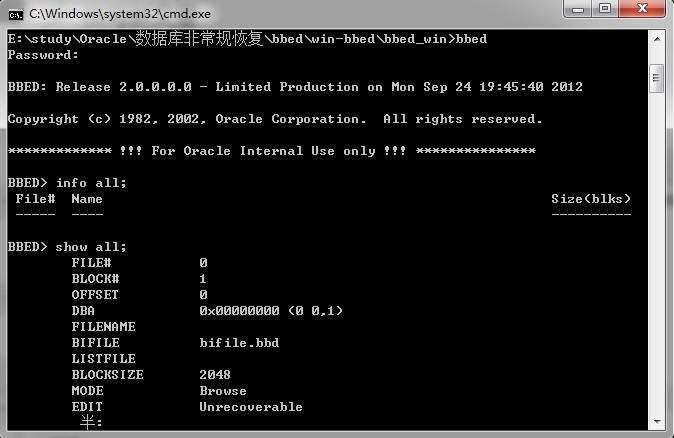
运行bbed程序

E:\study\Oracle\数据库非常规恢复\bbed\win-bbed\bbed_win>bbed
Password:

BBED: Release 2.0.0.0.0 - Limited Production on Mon Sep 24 19:45:40 2012

Copyright (c) 1982, 2002, Oracle Corporation.  All rights reserved.

************* !!! For Oracle Internal Use only !!! ***************

BBED> info all;
 File#  Name                                                        Size(blks)
 -----  ----                                                        ----------

BBED> show all;
        FILE#           0
        BLOCK#          1
        OFFSET          0
        DBA             0x00000000 (0 0,1)
        FILENAME
        BIFILE          bifile.bbd
        LISTFILE
        BLOCKSIZE       2048
        MODE            Browse
        EDIT            Unrecoverable
        IBASE           Dec
        OBASE           Dec
        WIDTH           80
        COUNT           512
        LOGFILE         log.bbd
        SPOOL           No