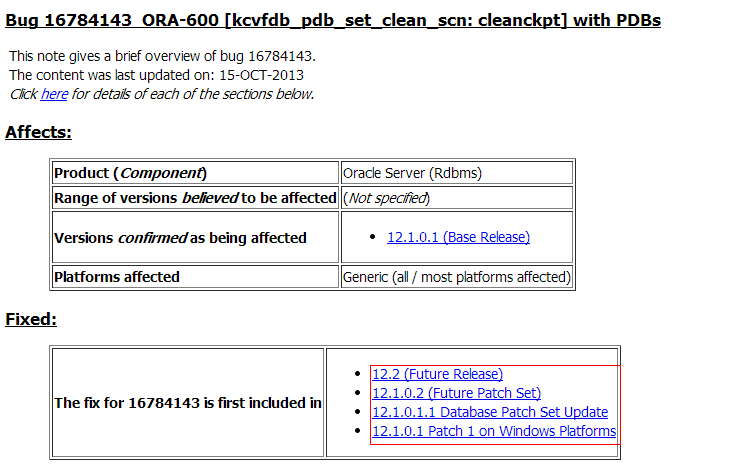
11.2.0.3 adg库因 bug 16427872 导致smon占用大量cpu

检查数据库发现客户有一套核心的ADG库smon进程负载异常,单进程一直持有cpu 100%

[oracle@q9adg01 trace]$ top -c
top - 14:00:14 up 83 days, 21:39,  4 users,  load average: 10.34, 11.55, 11.25
Tasks: 1162 total,   3 running, 1157 sleeping,   0 stopped,   2 zombie
Cpu(s):  1.7%us,  1.2%sy,  0.0%ni, 86.2%id, 10.7%wa,  0.0%hi,  0.1%si,  0.0%st
Mem:  264253752k total, 200445076k used, 63808676k free,   757684k buffers
Swap: 33554424k total,        0k used, 33554424k free,  6529220k cached

  PID USER      PR  NI  VIRT  RES  SHR S %CPU %MEM    TIME+  COMMAND        
 5707 oracle    25   0  150g  20m  16m R 99.9  0.0  14273:00 ora_smon_q9db1 
 5285 oracle    16   0 13564 1952  820 R 31.5  0.0   0:02.49 top -c         
 5713 oracle    18   0  150g  20m  17m S  5.3  0.0 410:01.33 ora_asmb_q9db1 
 5821 oracle    15   0  150g  23m  17m S  5.3  0.0   4883:29 ora_lck0_q9db1 
 7596 oracle    15   0  150g  69m  37m S  5.3  0.0   5368:28 ora_pr00_q9db1 


[oracle@q9adg02 ~]$ top -c
top - 14:00:03 up 84 days, 19:36,  3 users,  load average: 6.46, 6.96, 6.76
Tasks: 1045 total,   5 running, 1040 sleeping,   0 stopped,   0 zombie
Cpu(s):  1.8%us,  1.0%sy,  0.0%ni, 93.4%id,  3.7%wa,  0.0%hi,  0.1%si,  0.0%st
Mem:  264253752k total, 196879216k used, 67374536k free,   425320k buffers
Swap: 33554424k total,        0k used, 33554424k free,  4727836k cached

  PID USER      PR  NI  VIRT  RES  SHR S %CPU %MEM    TIME+  COMMAND        
11615 oracle    25   0  150g  16m  14m R 100.0  0.0  14272:55 ora_smon_q9db2
18173 oracle    16   0  150g  73m  37m D 18.6  0.0  24:33.91 oracleq9db2 (LOCAL=NO) 
 6561 oracle    15   0  150g  31m  25m R 12.2  0.0   0:48.50 oracleq9db2 (LOCAL=NO)  

数据库版本和patch信息

14:18:05 sys@Q9DB>select * from v$version;

BANNER
--------------------------------------------------------------------------------
Oracle Database 11g Enterprise Edition Release 11.2.0.3.0 - 64bit Production
PL/SQL Release 11.2.0.3.0 - Production
CORE    11.2.0.3.0      Production
TNS for Linux: Version 11.2.0.3.0 - Production
NLSRTL Version 11.2.0.3.0 - Production


SQL>  SELECT INST_ID,DATABASE_ROLE,OPEN_MODE FROM GV$DATABASE;

   INST_ID DATABASE_ROLE    OPEN_MODE
---------- ---------------- --------------------
         2 PHYSICAL STANDBY READ ONLY WITH APPLY
         1 PHYSICAL STANDBY READ ONLY WITH APPLY

SQL >select inst_id,STARTUP_TIME from gv$instance;

   INST_ID STARTUP_T
---------- ---------
         2 01-NOV-13
         1 01-NOV-13

[oracle@q9adg01 trace]$ /u01/app/oracle/product/11.2.0/db_1/OPatch/opatch  lspatches
16056266;Database Patch Set Update : 11.2.0.3.6 (16056266)
16315641;Grid Infrastructure Patch Set Update : 11.2.0.3.6 (16083653)

SYSAUX表空间增加数据文件

SQL> select ts# from v$tablespace where name='SYSAUX';

       TS#
----------
         2

SQL> select file#,name,creation_time from v$datafile where ts#=2;

     FILE# NAME                                               CREATION_
---------- -------------------------------------------------- ---------
         3 +DATA/q9db/datafile/sysaux.1412.818566605          12-MAR-08
       151 +DATA/q9db/datafile/sysaux.1431.818566885          26-MAR-12
       221 +DATA/q9db/datafile/sysaux.828.818547945           16-APR-12
      1744 +DATA/q9db_adg/datafile/sysaux.2050.835459505      29-DEC-13

核对数据库确实在2013年12月29日对SYSAUX表空间增加了数据文件而且未重启数据库,触发Bug 16427872 Standby SMON spins on CPU after add/drop SYSAUX datafile on primary
bug-16427872
Bug 16427872 Standby SMON spins on CPU after add/drop SYSAUX datafile on primary
在12.1.0.1中修复,在未修复前增加/删除sysaux的数据文件后,通过重启实例来解决该问题

数据库恢复检查脚本(Oracle Database Recovery Check)

Oracle Database Recovery Check 介绍
根据多年来的数据库恢复经验,提炼出来数据库恢复关键点信息收集脚本(Oracle Database Recovery Check),该脚本主要是在数据库mount状态情况下查询数据库的一些基础表信息等信息,不对数据库进行任何写操作(只做读和dump操作),不会在坏的数据库基础之上带来任何破坏,不影响任何数据库后续的恢复工作。通过该脚本收集信息能够快速定位数据库异常原因,并初步判断数据库恢复疑难程度,减少数据库异常恢复诊断时间,提供恢复效率和准确性。

Oracle Database Recovery Check下载
Oracle Database Recovery Check FOR ORACE 11G及其以前版本下载
Oracle Database Recovery Check For Linux/Uinx
Oracle Database Recovery Check For Windows
Oracle Database Recovery Check For ALL
Oracle Database Recovery Check FOR ORACE 12C下载
Oracle Database Recovery Check For Linux/Uinx
Oracle Database Recovery Check For Windows
Oracle Database Recovery Check For ALL

Oracle Database Recovery Check使用说明
1. 根据系统平台下载对应的版本,相应平台,使用unzip/winrar软件解压成sql文件
2. 上传到服务器之上(oracle用户需要有读取权限)
3. 启动数据库到mount状态
4. 在sqlplus中使用@path/check_recover_db.sql文件
5. 发送xifenfei_db_recover_YYYYMMDD.html到dba@xifenfei.com
6. 联系我:手机(17813235971)或者qq(107644445)

操作演示(所有平台,版本操作相同)
unix/liunx平台使用方法(for 12c以前版本,12c版本操作步骤完全相同)

[oracle@xifenfei ~]$ ls -l /home/oracle/check_recover_db_linux.sql 
-rw-r--r-- 1 oracle oinstall 13008 Mar 30 10:36 check_recover_db_linux.sql
[oracle@xifenfei ~]$ sqlplus / as sysdba

SQL*Plus: Release 11.2.0.4.0 Production on Sun Mar 30 10:55:58 2014

Copyright (c) 1982, 2013, Oracle.  All rights reserved.

Connected to an idle instance.

SQL> startup mount
ORACLE instance started.

Total System Global Area  418484224 bytes
Fixed Size                  1385052 bytes
Variable Size             331353508 bytes
Database Buffers           79691776 bytes
Redo Buffers                6053888 bytes
Database mounted.
SQL> @/home/oracle/check_recover_db_linux.sql 

+----------------------------------------------------------------------------+
|                   Oracle Database Recovery Check Result                    |
|----------------------------------------------------------------------------+
|  Copyright (c) 2012-2014 xifenfei. All rights reserved. (www.orasos.com) |
+----------------------------------------------------------------------------+

Please start the database to mount state.
Note: Do not modify any inspection results
Please refer to the use of the script:http://www.orasos.com/5056.html
To send xifenfei_db_recover_YYYYMMDD.html to dba@xifenfei.com or QQ(107644445)
-----Oracle Database Recovery Check STRAT-----

----Starting Collect Data Dictionary Information----

----Starting Collect PATCH Information----

----Starting Collect ALERT LOG Information----

----Starting DUMP file_hdrs Information----

----Starting DUMP controlf Information----

----Starting DUMP redohdr Information----

-----Oracle Database Recovery Check END-----
********************************************************************************
Please check and upload /home/oracle/xifenfei_db_recover_20140330.html
********************************************************************************
Disconnected from Oracle Database 11g Enterprise Edition Release 11.2.0.4.0 - 64bit Production
With the Partitioning, OLAP, Data Mining and Real Application Testing options

生成的html文件为:/home/oracle/xifenfei_db_recover_20140330.html

win平台使用方法(for 12c版本,12c以前版本操作步骤完全相同)

C:\Users\XIFENFEI>dir E:\SkyDrive\ORACLE\tools\db_recover\check_recover_db_win_12c.sql
 驱动器 E 中的卷是 本地磁盘
 卷的序列号是 000C-3B41

 E:\SkyDrive\ORACLE\tools\db_recover 的目录

2014-03-29  23:43            11,101 check_recover_db_win_12c.sql
               1 个文件         11,101 字节
               0 个目录 19,557,310,464 可用字节

C:\Users\XIFENFEI>sqlplus / as sysdba

SQL*Plus: Release 12.1.0.1.0 Production on 星期日 3月 30 11:01:37 2014

Copyright (c) 1982, 2013, Oracle.  All rights reserved.

已连接到空闲例程。

SQL> startup mount
ORACLE 例程已经启动。

Total System Global Area  400846848 bytes
Fixed Size                  2440024 bytes
Variable Size             289408168 bytes
Database Buffers          100663296 bytes
Redo Buffers                8335360 bytes

SQL> @E:\SkyDrive\ORACLE\tools\db_recover\check_recover_db_win_12c.sql

+----------------------------------------------------------------------------+
|                   Oracle Database Recovery Check Result                    |
|----------------------------------------------------------------------------+
|  Copyright (c) 2012-2014 xifenfei. All rights reserved. (www.orasos.com) |
+----------------------------------------------------------------------------+

Please start the database to mount state.
Note: Do not modify any inspection results
Please refer to the use of the script:http://www.orasos.com/5056.html
To send xifenfei_db_recover_YYYYMMDD.html to dba@xifenfei.com or QQ(107644445)
 驱动器 C 中的卷没有标签。
 卷的序列号是 D053-8FE1

 C:\Users\XIFENFEI 的目录

2014-03-30  11:02            32,796 xifenfei_db_recover_20140330.html
               1 个文件         32,796 字节
               0 个目录  8,444,190,720 可用字节
********************************************************************************
Please check and upload "xifenfei_db_recover_YYYYMMDD.html" in current directory
********************************************************************************
从 Oracle Database 12c Enterprise Edition Release 12.1.0.1.0 - 64bit Production
With the Partitioning, OLAP, Advanced Analytics and Real Application Testing options 断开

生成的html文件为C:\Users\XIFENFEI\xifenfei_db_recover_20140330.html

因asm sga_target设置不当导致11gr2 rac无法正常启动

2014年第一个故障排查和解决:同事反馈给我说solaris 11.2 两节点rac无法启动,让我帮忙看下。通过分析是因为sga_target参数设置不合理导致asm无法正常启动
GI无法正常启动

grid@zwq-rpt1:~$crsctl status resource -t
CRS-4535: Cannot communicate with Cluster Ready Services
CRS-4000: Command Status failed, or completed with errors.
grid@zwq-rpt1:~$crsctl status resource -t -init
--------------------------------------------------------------------------------
NAME           TARGET  STATE        SERVER                   STATE_DETAILS       
--------------------------------------------------------------------------------
Cluster Resources
--------------------------------------------------------------------------------
ora.asm
      1        ONLINE  OFFLINE                               Instance Shutdown   
ora.cluster_interconnect.haip
      1        ONLINE  ONLINE       zwq-rpt1                                     
ora.crf
      1        ONLINE  ONLINE       zwq-rpt1                                     
ora.crsd
      1        ONLINE  OFFLINE                                                   
ora.cssd
      1        ONLINE  ONLINE       zwq-rpt1                                     
ora.cssdmonitor
      1        ONLINE  ONLINE       zwq-rpt1                                     
ora.ctssd
      1        ONLINE  ONLINE       zwq-rpt1                 ACTIVE:0            
ora.diskmon
      1        OFFLINE OFFLINE                                                   
ora.evmd
      1        ONLINE  INTERMEDIATE zwq-rpt1                                     
ora.gipcd
      1        ONLINE  ONLINE       zwq-rpt1                                     
ora.gpnpd
      1        ONLINE  ONLINE       zwq-rpt1                                     
ora.mdnsd
      1        ONLINE  ONLINE       zwq-rpt1                                     

asm未正常启动

GI日志报错

2014-01-01 00:40:47.708
[cssd(1418)]CRS-1605:CSSD voting file is online: /dev/rdsk/emcpower0a; details in /export/home/app/grid/log/zwq-rpt1/cssd/ocssd.log.
2014-01-01 00:40:53.234
[cssd(1418)]CRS-1601:CSSD Reconfiguration complete. Active nodes are zwq-rpt1 zwq-rpt2 .
2014-01-01 00:40:56.659
[ctssd(1483)]CRS-2407:The new Cluster Time Synchronization Service reference node is host zwq-rpt2.
2014-01-01 00:40:56.661
[ctssd(1483)]CRS-2401:The Cluster Time Synchronization Service started on host zwq-rpt1.
2014-01-01 00:41:02.016
[ctssd(1483)]CRS-2408:The clock on host zwq-rpt1 has been updated by the Cluster Time Synchronization Service to be synchronous with the mean cluster time.
2014-01-01 00:43:23.874
[/export/home/app/grid/bin/oraagent.bin(1348)]CRS-5019:All OCR locations are on ASM disk groups [], and none of these disk groups are mounted. Details are at "(:CLSN00100:)" in "/export/home/app/grid/log/zwq-rpt1/agent/ohasd/oraagent_grid/oraagent_grid.log".
2014-01-01 00:45:42.837
[/export/home/app/grid/bin/oraagent.bin(1348)]CRS-5019:All OCR locations are on ASM disk groups [], and none of these disk groups are mounted. Details are at "(:CLSN00100:)" in "/export/home/app/grid/log/zwq-rpt1/agent/ohasd/oraagent_grid/oraagent_grid.log".
2014-01-01 00:48:02.087
[/export/home/app/grid/bin/oraagent.bin(1348)]CRS-5019:All OCR locations are on ASM disk groups [], and none of these disk groups are mounted. Details are at "(:CLSN00100:)" in "/export/home/app/grid/log/zwq-rpt1/agent/ohasd/oraagent_grid/oraagent_grid.log".
2014-01-01 00:48:18.836
[ohasd(1083)]CRS-2807:Resource 'ora.asm' failed to start automatically.
2014-01-01 00:48:18.837
[ohasd(1083)]CRS-2807:Resource 'ora.crsd' failed to start automatically.
2014-01-01 01:05:15.396
[/export/home/app/grid/bin/oraagent.bin(1348)]CRS-5019:All OCR locations are on ASM disk groups [CRSDG], and none of these disk groups are mounted. Details are at "(:CLSN00100:)" in "/export/home/app/grid/log/zwq-rpt1/agent/ohasd/oraagent_grid/oraagent_grid.log".
2014-01-01 01:05:45.101
[/export/home/app/grid/bin/oraagent.bin(1348)]CRS-5019:All OCR locations are on ASM disk groups [CRSDG], and none of these disk groups are mounted. Details are at "(:CLSN00100:)" in "/export/home/app/grid/log/zwq-rpt1/agent/ohasd/oraagent_grid/oraagent_grid.log".
2014-01-01 01:06:15.104
[/export/home/app/grid/bin/oraagent.bin(1348)]CRS-5019:All OCR locations are on ASM disk groups [CRSDG], and none of these disk groups are mounted. Details are at "(:CLSN00100:)" in "/export/home/app/grid/log/zwq-rpt1/agent/ohasd/oraagent_grid/oraagent_grid.log".

这里较为明显的看到,因为asm磁盘组异常导致ocr无法被访问导致crs无法正常启动

ORAAGENT日志

2014-01-01 00:43:23.870: [ora.asm][9] {0:0:2} [start] InstConnection::connectInt (2) Exception OCIException
2014-01-01 00:43:23.870: [ora.asm][9] {0:0:2} [start] InstConnection:connect:excp OCIException OCI error 604
2014-01-01 00:43:23.870: [ora.asm][9] {0:0:2} [start] DgpAgent::queryDgStatus excp ORA-00604: error occurred at recursive SQL level 1
ORA-04031: unable to allocate 32 bytes of shared memory ("shared pool","unknown object","KGLH0^34f764db","kglHeapInitialize:temp")

报了较为清晰的ORA-4031错误,检查asm日志

ASM日志报错

Wed Jan 01 00:47:33 2014
ORACLE_BASE not set in environment. It is recommended
that ORACLE_BASE be set in the environment
Reusing ORACLE_BASE from an earlier startup = /export/home/app/oracle
Wed Jan 01 00:47:39 2014
Errors in file /export/home/app/oracle/diag/asm/+asm/+ASM1/trace/+ASM1_ora_1728.trc  (incident=291447):
ORA-04031: unable to allocate 32 bytes of shared memory ("shared pool","unknown object","KGLH0^34f764db","kglHeapInitialize:temp")
Incident details in: /export/home/app/oracle/diag/asm/+asm/+ASM1/incident/incdir_291447/+ASM1_ora_1728_i291447.trc
Wed Jan 01 00:47:48 2014
Dumping diagnostic data in directory=[cdmp_20140101004748], requested by (instance=1, osid=1728), summary=[incident=291447].
Use ADRCI or Support Workbench to package the incident.
See Note 411.1 at My Oracle Support for error and packaging details.
Wed Jan 01 00:47:53 2014
Errors in file /export/home/app/oracle/diag/asm/+asm/+ASM1/trace/+ASM1_ora_1730.trc  (incident=291448):
ORA-04031: unable to allocate 32 bytes of shared memory ("shared pool","unknown object","KGLH0^34f764db","kglHeapInitialize:temp")
Incident details in: /export/home/app/oracle/diag/asm/+asm/+ASM1/incident/incdir_291448/+ASM1_ora_1730_i291448.trc
Wed Jan 01 00:48:01 2014
Dumping diagnostic data in directory=[cdmp_20140101004801], requested by (instance=1, osid=1730), summary=[incident=291448].
Use ADRCI or Support Workbench to package the incident.
See Note 411.1 at My Oracle Support for error and packaging details.
Wed Jan 01 00:48:07 2014
Errors in file /export/home/app/oracle/diag/asm/+asm/+ASM1/trace/+ASM1_ora_1732.trc  (incident=291449):
ORA-04031: unable to allocate 32 bytes of shared memory ("shared pool","unknown object","KGLH0^34f764db","kglHeapInitialize:temp")
Incident details in: /export/home/app/oracle/diag/asm/+asm/+ASM1/incident/incdir_291449/+ASM1_ora_1732_i291449.trc
Wed Jan 01 00:48:16 2014
Dumping diagnostic data in directory=[cdmp_20140101004816], requested by (instance=1, osid=1732), summary=[incident=291449].
Use ADRCI or Support Workbench to package the incident.
See Note 411.1 at My Oracle Support for error and packaging details.
Wed Jan 01 00:48:16 2014
License high water mark = 1
USER (ospid: 1736): terminating the instance
Instance terminated by USER, pid = 1736

这里可以清晰的看到,因为shared pool不足,导致asm报ora-4031错误,从而使得asm无法正常启动

分析原因

Starting up:
Oracle Database 11g Enterprise Edition Release 11.2.0.3.0 - 64bit Production
With the Real Application Clusters and Automatic Storage Management options.
ORACLE_HOME = /export/home/app/grid
System name:	SunOS
Node name:	zwq-rpt1
Release:	5.11
Version:	11.1
Machine:	sun4v
Using parameter settings in server-side spfile +CRSDG/zwq-rpt-cluster/asmparameterfile/registry.253.823992831
System parameters with non-default values:
  sga_max_size             = 2G
  large_pool_size          = 16M
  instance_type            = "asm"
  sga_target               = 0
  remote_login_passwordfile= "EXCLUSIVE"
  asm_diskstring           = "/dev/rdsk/*"
  asm_diskgroups           = "FRADG"
  asm_diskgroups           = "DATADG"
  asm_power_limit          = 1
  diagnostic_dest          = "/export/home/app/oracle"

这里可以看到sga_target被设置为了0,而shared pool又未被配置,这里因为shared pool不足从而出现了ORA-4031,从而导致crs在启动asm的过程失败,从而使得ocr不能被访问,进而使得crs不能正常启动.

处理方法
1.编辑pfile

grid@zwq-rpt1:/export/home/app/oracle/diag/asm/+asm/+ASM1/trace$vi /tmp/asm.pfile

  memory_target = 2G
  large_pool_size          = 16M
  instance_type            = "asm"
  sga_target               = 0
  remote_login_passwordfile= "EXCLUSIVE"
  asm_diskstring           = "/dev/rdsk/*"
  asm_diskgroups           = "FRADG"
  asm_diskgroups           = "DATADG"
  asm_power_limit          = 1
  diagnostic_dest          = "/export/home/app/oracle"

2.启动asm

grid@zwq-rpt1:/export/home/app/oracle/diag/asm/+asm/+ASM1/trace$sqlplus / as sysasm

SQL*Plus: Release 11.2.0.3.0 Production on Wed Jan 1 01:04:10 2014

Copyright (c) 1982, 2011, Oracle.  All rights reserved.

Connected to an idle instance.

SQL> startup pfile='/tmp/asm.pfile'
ASM instance started

Total System Global Area 2138521600 bytes
Fixed Size                  2161024 bytes
Variable Size            2102806144 bytes
ASM Cache                  33554432 bytes
ASM diskgroups mounted

3. 创建spfile

SQL> create spfile='+CRSDG' FROM PFILE='/tmp/asm.pfile';

File created.

--asm alert日志
Wed Jan 01 01:08:59 2014
NOTE: updated gpnp profile ASM SPFILE to 
NOTE: updated gpnp profile ASM diskstring: /dev/rdsk/*
NOTE: updated gpnp profile ASM SPFILE to +CRSDG/zwq-rpt-cluster/asmparameterfile/registry.253.835664939

4. 关闭asm

SQL> shutdown immediate
ORA-15097: cannot SHUTDOWN ASM instance with connected client (process 1971)
SQL> shutdown abort
ASM instance shutdown

5. 重启crs

root@zwq-rpt1:~# crsctl stop crs -f
root@zwq-rpt1:~# crsctl start crs

6. 重启其他节点crs

root@zwq-rpt2:~# crsctl stop crs -f
root@zwq-rpt2:~# crsctl start crs

7. 检查结果

root@zwq-rpt1:~# crsctl status res -t
--------------------------------------------------------------------------------
NAME           TARGET  STATE        SERVER                   STATE_DETAILS       
--------------------------------------------------------------------------------
Local Resources
--------------------------------------------------------------------------------
ora.CRSDG.dg
               ONLINE  ONLINE       zwq-rpt1                                     
               ONLINE  ONLINE       zwq-rpt2                                     
ora.DATADG.dg
               ONLINE  ONLINE       zwq-rpt1                                     
               ONLINE  ONLINE       zwq-rpt2                                     
ora.FRADG.dg
               ONLINE  ONLINE       zwq-rpt1                                     
               ONLINE  ONLINE       zwq-rpt2                                     
ora.LISTENER.lsnr
               ONLINE  ONLINE       zwq-rpt1                                     
               ONLINE  ONLINE       zwq-rpt2                                     
ora.asm
               ONLINE  ONLINE       zwq-rpt1                 Started             
               ONLINE  ONLINE       zwq-rpt2                 Started             
ora.gsd
               OFFLINE OFFLINE      zwq-rpt1                                     
               OFFLINE OFFLINE      zwq-rpt2                                     
ora.net1.network
               ONLINE  ONLINE       zwq-rpt1                                     
               ONLINE  ONLINE       zwq-rpt2                                     
ora.ons
               ONLINE  ONLINE       zwq-rpt1                                     
               ONLINE  ONLINE       zwq-rpt2                                     
--------------------------------------------------------------------------------
Cluster Resources
--------------------------------------------------------------------------------
ora.LISTENER_SCAN1.lsnr
      1        ONLINE  ONLINE       zwq-rpt1                                     
ora.cvu
      1        ONLINE  ONLINE       zwq-rpt1                                     
ora.oc4j
      1        ONLINE  ONLINE       zwq-rpt1                                     
ora.rptdb.db
      1        ONLINE  ONLINE       zwq-rpt1                 Open                
      2        ONLINE  ONLINE       zwq-rpt2                 Open                
ora.scan1.vip
      1        ONLINE  ONLINE       zwq-rpt1                                     
ora.zwq-rpt1.vip
      1        ONLINE  ONLINE       zwq-rpt1                                     
ora.zwq-rpt2.vip
      1        ONLINE  ONLINE       zwq-rpt2                  

至此恢复正常,2014年第一个故障顺利解决

ORACLE DUL汇总

oracle数据库恢复三板斧,最大限度减少因为ORACLE不能open导致的数据损失
第一板:HIDE PARAMETER AND EVENT
第二板:BBED
第三板:DUL

当我们使用第一和第二板斧头无法解决问题之时,我们就需要考虑使用ORACLE数据库恢复终极工具DUL,这里对于dul的相关测试进行总结,便于查询
dul处理分区表
dul恢复drop表测试
dul抽取异常asm文件
使用dul恢复asm中数据
dul恢复truncate表测试
dul 10支持oracle 11g r2
使用 dul 挖数据文件初试
DUL挖ORACLE 8.0数据库
dul实现对数据文件内容更新
dul 10 export_mode=true功能增强
dul实现exp dump文件转换sqlldr格式
dul支持ORACLE 12C CDB数据库恢复
dul实现expdp dump文件转换sqlldr格式
使用DUL挖数据文件恢复非数据外对象方法
为推进国内DUL的发展,欢迎在DUL使用过程中的问题探讨

ORACLE 12C RAC hub AND leaf 相互转换

感谢Lunar的指导,完成ORACLE 12C RAC hub和leaf相互转换,参考官方文档Oracle Flex Clusters部分
当前数据库状态

--集群状态
[root@rac1 ~]# crsctl status res -t
--------------------------------------------------------------------------------
Name           Target  State        Server                   State details       
--------------------------------------------------------------------------------
Local Resources
--------------------------------------------------------------------------------
ora.ASMNET1LSNR_ASM.lsnr
               ONLINE  ONLINE       rac1                     STABLE
               ONLINE  ONLINE       rac2                     STABLE
ora.DATA.dg
               ONLINE  ONLINE       rac1                     STABLE
               ONLINE  ONLINE       rac2                     STABLE
ora.LISTENER.lsnr
               ONLINE  ONLINE       rac1                     STABLE
               ONLINE  ONLINE       rac2                     STABLE
ora.SYSDB_NEW.dg
               ONLINE  ONLINE       rac1                     STABLE
               ONLINE  ONLINE       rac2                     STABLE
ora.SYSDG.dg
               ONLINE  ONLINE       rac1                     STABLE
               ONLINE  ONLINE       rac2                     STABLE
ora.net1.network
               ONLINE  ONLINE       rac1                     STABLE
               ONLINE  ONLINE       rac2                     STABLE
ora.ons
               ONLINE  ONLINE       rac1                     STABLE
               ONLINE  ONLINE       rac2                     STABLE
ora.proxy_advm
               ONLINE  ONLINE       rac1                     STABLE
               ONLINE  ONLINE       rac2                     STABLE
--------------------------------------------------------------------------------
Cluster Resources
--------------------------------------------------------------------------------
ora.LISTENER_SCAN1.lsnr
      1        ONLINE  ONLINE       rac1                     STABLE
ora.LISTENER_SCAN2.lsnr
      1        ONLINE  ONLINE       rac2                     STABLE
ora.LISTENER_SCAN3.lsnr
      1        ONLINE  ONLINE       rac2                     STABLE
ora.MGMTLSNR
      1        ONLINE  ONLINE       rac2                     169.254.177.226 10.1
                                                             .1.104,STABLE
ora.asm
      1        ONLINE  ONLINE       rac1                     STABLE
      2        ONLINE  ONLINE       rac2                     STABLE
      3        OFFLINE OFFLINE                               STABLE
ora.cvu
      1        ONLINE  ONLINE       rac2                     STABLE
ora.gns
      1        ONLINE  ONLINE       rac2                     STABLE
ora.gns.vip
      1        ONLINE  ONLINE       rac2                     STABLE
ora.mgmtdb
      1        ONLINE  ONLINE       rac2                     Open,STABLE
ora.oc4j
      1        ONLINE  ONLINE       rac2                     STABLE
ora.ora12c.db
      1        ONLINE  ONLINE       rac1                     Open,STABLE
      2        ONLINE  ONLINE       rac2                     Open,STABLE
ora.rac1.vip
      1        ONLINE  ONLINE       rac1                     STABLE
ora.rac2.vip
      1        ONLINE  ONLINE       rac2                     STABLE
ora.scan1.vip
      1        ONLINE  ONLINE       rac1                     STABLE
ora.scan2.vip
      1        ONLINE  ONLINE       rac2                     STABLE
ora.scan3.vip
      1        ONLINE  ONLINE       rac2                     STABLE
--------------------------------------------------------------------------------

--rac运行在flex模式
[root@rac1 ~]#  crsctl get cluster mode status
Cluster is running in "flex" mode

--asm运行在flex模式
[grid@rac1 ~]$ asmcmd
ASMCMD> showclustermode
ASM cluster : Flex mode enabled

--节点角色
[root@rac1 ~]# crsctl get node role config
Node 'rac1' configured role is 'hub'
[root@rac2 ~]# crsctl get node role config
Node 'rac2' configured role is 'hub'

转换hub to leaf

--转换hub为leaf
[root@rac1 ~]# crsctl set node role leaf
CRS-4408: Node 'rac1' configured role successfully changed; restart Oracle High Availability Services for new role to take effect.

--关闭集群
[root@rac1 ~]# crsctl stop crs
CRS-2791: Starting shutdown of Oracle High Availability Services-managed resources on 'rac1'
CRS-2673: Attempting to stop 'ora.crsd' on 'rac1'
CRS-2790: Starting shutdown of Cluster Ready Services-managed resources on 'rac1'
CRS-2673: Attempting to stop 'ora.LISTENER_SCAN1.lsnr' on 'rac1'
CRS-2673: Attempting to stop 'ora.LISTENER.lsnr' on 'rac1'
CRS-2673: Attempting to stop 'ora.SYSDB_NEW.dg' on 'rac1'
CRS-2673: Attempting to stop 'ora.DATA.dg' on 'rac1'
CRS-2673: Attempting to stop 'ora.SYSDG.dg' on 'rac1'
CRS-2673: Attempting to stop 'ora.ora12c.db' on 'rac1'
CRS-2673: Attempting to stop 'ora.proxy_advm' on 'rac1'
CRS-2677: Stop of 'ora.LISTENER.lsnr' on 'rac1' succeeded
CRS-2673: Attempting to stop 'ora.rac1.vip' on 'rac1'
CRS-2677: Stop of 'ora.LISTENER_SCAN1.lsnr' on 'rac1' succeeded
CRS-2673: Attempting to stop 'ora.scan1.vip' on 'rac1'
CRS-2677: Stop of 'ora.rac1.vip' on 'rac1' succeeded
CRS-2672: Attempting to start 'ora.rac1.vip' on 'rac2'
CRS-2677: Stop of 'ora.ora12c.db' on 'rac1' succeeded
CRS-2677: Stop of 'ora.scan1.vip' on 'rac1' succeeded
CRS-2672: Attempting to start 'ora.scan1.vip' on 'rac2'
CRS-2676: Start of 'ora.rac1.vip' on 'rac2' succeeded
CRS-2677: Stop of 'ora.SYSDB_NEW.dg' on 'rac1' succeeded
CRS-2676: Start of 'ora.scan1.vip' on 'rac2' succeeded
CRS-2672: Attempting to start 'ora.LISTENER_SCAN1.lsnr' on 'rac2'
CRS-2677: Stop of 'ora.DATA.dg' on 'rac1' succeeded
CRS-2677: Stop of 'ora.SYSDG.dg' on 'rac1' succeeded
CRS-2673: Attempting to stop 'ora.asm' on 'rac1'
CRS-2677: Stop of 'ora.asm' on 'rac1' succeeded
CRS-2673: Attempting to stop 'ora.ASMNET1LSNR_ASM.lsnr' on 'rac1'
CRS-2676: Start of 'ora.LISTENER_SCAN1.lsnr' on 'rac2' succeeded
CRS-2677: Stop of 'ora.proxy_advm' on 'rac1' succeeded
CRS-2677: Stop of 'ora.ASMNET1LSNR_ASM.lsnr' on 'rac1' succeeded
CRS-2673: Attempting to stop 'ora.ons' on 'rac1'
CRS-2677: Stop of 'ora.ons' on 'rac1' succeeded
CRS-2673: Attempting to stop 'ora.net1.network' on 'rac1'
CRS-2677: Stop of 'ora.net1.network' on 'rac1' succeeded
CRS-2792: Shutdown of Cluster Ready Services-managed resources on 'rac1' has completed
CRS-2677: Stop of 'ora.crsd' on 'rac1' succeeded
CRS-2673: Attempting to stop 'ora.storage' on 'rac1'
CRS-2673: Attempting to stop 'ora.crf' on 'rac1'
CRS-2673: Attempting to stop 'ora.mdnsd' on 'rac1'
CRS-2673: Attempting to stop 'ora.gpnpd' on 'rac1'
CRS-2673: Attempting to stop 'ora.drivers.acfs' on 'rac1'
CRS-2677: Stop of 'ora.storage' on 'rac1' succeeded
CRS-2673: Attempting to stop 'ora.asm' on 'rac1'
CRS-2677: Stop of 'ora.drivers.acfs' on 'rac1' succeeded
CRS-2677: Stop of 'ora.crf' on 'rac1' succeeded
CRS-2677: Stop of 'ora.mdnsd' on 'rac1' succeeded
CRS-2677: Stop of 'ora.gpnpd' on 'rac1' succeeded
CRS-2677: Stop of 'ora.asm' on 'rac1' succeeded
CRS-2673: Attempting to stop 'ora.cluster_interconnect.haip' on 'rac1'
CRS-2677: Stop of 'ora.cluster_interconnect.haip' on 'rac1' succeeded
CRS-2673: Attempting to stop 'ora.ctssd' on 'rac1'
CRS-2673: Attempting to stop 'ora.evmd' on 'rac1'
CRS-2677: Stop of 'ora.evmd' on 'rac1' succeeded
CRS-2677: Stop of 'ora.ctssd' on 'rac1' succeeded
CRS-2673: Attempting to stop 'ora.cssd' on 'rac1'
CRS-2677: Stop of 'ora.cssd' on 'rac1' succeeded
CRS-2673: Attempting to stop 'ora.gipcd' on 'rac1'
CRS-2677: Stop of 'ora.gipcd' on 'rac1' succeeded
CRS-2793: Shutdown of Oracle High Availability Services-managed resources on 'rac1' has completed
CRS-4133: Oracle High Availability Services has been stopped.

--启动集群
[root@rac1 ~]# crsctl start crs -wait
CRS-4123: Starting Oracle High Availability Services-managed resources
CRS-2672: Attempting to start 'ora.mdnsd' on 'rac1'
CRS-2672: Attempting to start 'ora.evmd' on 'rac1'
CRS-2676: Start of 'ora.evmd' on 'rac1' succeeded
CRS-2676: Start of 'ora.mdnsd' on 'rac1' succeeded
CRS-2672: Attempting to start 'ora.gpnpd' on 'rac1'
CRS-2676: Start of 'ora.gpnpd' on 'rac1' succeeded
CRS-2672: Attempting to start 'ora.gipcd' on 'rac1'
CRS-2676: Start of 'ora.gipcd' on 'rac1' succeeded
CRS-2672: Attempting to start 'ora.cssdmonitor' on 'rac1'
CRS-2676: Start of 'ora.cssdmonitor' on 'rac1' succeeded
CRS-2672: Attempting to start 'ora.cssd' on 'rac1'
CRS-2672: Attempting to start 'ora.diskmon' on 'rac1'
CRS-2676: Start of 'ora.diskmon' on 'rac1' succeeded
CRS-2789: Cannot stop resource 'ora.diskmon' as it is not running on server 'rac1'
CRS-2676: Start of 'ora.cssd' on 'rac1' succeeded
CRS-2672: Attempting to start 'ora.cluster_interconnect.haip' on 'rac1'
CRS-2672: Attempting to start 'ora.ctssd' on 'rac1'
CRS-2676: Start of 'ora.cluster_interconnect.haip' on 'rac1' succeeded
CRS-2676: Start of 'ora.ctssd' on 'rac1' succeeded
CRS-2672: Attempting to start 'ora.storage' on 'rac1'
CRS-2676: Start of 'ora.storage' on 'rac1' succeeded
CRS-2672: Attempting to start 'ora.crf' on 'rac1'
CRS-2676: Start of 'ora.crf' on 'rac1' succeeded
CRS-2672: Attempting to start 'ora.crsd' on 'rac1'
CRS-2676: Start of 'ora.crsd' on 'rac1' succeeded
CRS-6017: Processing resource auto-start for servers: rac1
CRS-6016: Resource auto-start has completed for server rac1
CRS-6024: Completed start of Oracle Cluster Ready Services-managed resources
CRS-4123: Oracle High Availability Services has been started.

--hub转换为leaf后状态
[root@rac1 ~]# crsctl stat res -t
--------------------------------------------------------------------------------
Name           Target  State        Server                   State details       
--------------------------------------------------------------------------------
Local Resources
--------------------------------------------------------------------------------
ora.ASMNET1LSNR_ASM.lsnr
               ONLINE  ONLINE       rac2                     STABLE
ora.DATA.dg
               ONLINE  ONLINE       rac2                     STABLE
ora.LISTENER.lsnr
               ONLINE  ONLINE       rac2                     STABLE
ora.SYSDB_NEW.dg
               ONLINE  ONLINE       rac2                     STABLE
ora.SYSDG.dg
               ONLINE  ONLINE       rac2                     STABLE
ora.net1.network
               ONLINE  ONLINE       rac2                     STABLE
ora.ons
               ONLINE  ONLINE       rac2                     STABLE
ora.proxy_advm
               ONLINE  ONLINE       rac2                     STABLE
--------------------------------------------------------------------------------
Cluster Resources
--------------------------------------------------------------------------------
ora.LISTENER_SCAN1.lsnr
      1        ONLINE  ONLINE       rac2                     STABLE
ora.LISTENER_SCAN2.lsnr
      1        ONLINE  ONLINE       rac2                     STABLE
ora.LISTENER_SCAN3.lsnr
      1        ONLINE  ONLINE       rac2                     STABLE
ora.MGMTLSNR
      1        ONLINE  ONLINE       rac2                     169.254.177.226 10.1
                                                             .1.104,STABLE
ora.asm
      1        ONLINE  OFFLINE                               STABLE
      2        ONLINE  ONLINE       rac2                     STABLE
      3        OFFLINE OFFLINE                               STABLE
ora.cvu
      1        ONLINE  ONLINE       rac2                     STABLE
ora.gns
      1        ONLINE  ONLINE       rac2                     STABLE
ora.gns.vip
      1        ONLINE  ONLINE       rac2                     STABLE
ora.mgmtdb
      1        ONLINE  ONLINE       rac2                     Open,STABLE
ora.oc4j
      1        ONLINE  ONLINE       rac2                     STABLE
ora.ora12c.db
      1        ONLINE  OFFLINE                               Instance Shutdown,ST
                                                             ABLE
      2        ONLINE  ONLINE       rac2                     Open,STABLE
ora.rac1.vip
      1        ONLINE  INTERMEDIATE rac2                     FAILED OVER,STABLE
ora.rac2.vip
      1        ONLINE  ONLINE       rac2                     STABLE
ora.scan1.vip
      1        ONLINE  ONLINE       rac2                     STABLE
ora.scan2.vip
      1        ONLINE  ONLINE       rac2                     STABLE
ora.scan3.vip
      1        ONLINE  ONLINE       rac2                     STABLE
--------------------------------------------------------------------------------

--集群角色
[root@rac1 ~]# crsctl get node role config
Node 'rac1' configured role is 'leaf'
[root@rac2 ~]# crsctl get node role config
Node 'rac2' configured role is 'hub'

leaf转换为hub

--leaf转换为hub
[root@rac1 ~]# crsctl set node role hub
CRS-4408: Node 'rac1' configured role successfully changed; restart Oracle High Availability Services for new role to take effect.

--关闭集群
[root@rac1 ~]# crsctl stop crs
CRS-2791: Starting shutdown of Oracle High Availability Services-managed resources on 'rac1'
CRS-2673: Attempting to stop 'ora.crsd' on 'rac1'
CRS-2677: Stop of 'ora.crsd' on 'rac1' succeeded
CRS-2673: Attempting to stop 'ora.storage' on 'rac1'
CRS-2673: Attempting to stop 'ora.mdnsd' on 'rac1'
CRS-2673: Attempting to stop 'ora.gpnpd' on 'rac1'
CRS-2673: Attempting to stop 'ora.drivers.acfs' on 'rac1'
CRS-2677: Stop of 'ora.storage' on 'rac1' succeeded
CRS-2677: Stop of 'ora.drivers.acfs' on 'rac1' succeeded
CRS-2673: Attempting to stop 'ora.crf' on 'rac1'
CRS-2673: Attempting to stop 'ora.ctssd' on 'rac1'
CRS-2673: Attempting to stop 'ora.evmd' on 'rac1'
CRS-2673: Attempting to stop 'ora.cluster_interconnect.haip' on 'rac1'
CRS-2677: Stop of 'ora.cluster_interconnect.haip' on 'rac1' succeeded
CRS-2677: Stop of 'ora.gpnpd' on 'rac1' succeeded
CRS-2677: Stop of 'ora.crf' on 'rac1' succeeded
CRS-2677: Stop of 'ora.evmd' on 'rac1' succeeded
CRS-2677: Stop of 'ora.mdnsd' on 'rac1' succeeded
CRS-2677: Stop of 'ora.ctssd' on 'rac1' succeeded
CRS-2673: Attempting to stop 'ora.cssd' on 'rac1'
CRS-2677: Stop of 'ora.cssd' on 'rac1' succeeded
CRS-2673: Attempting to stop 'ora.gipcd' on 'rac1'
CRS-2677: Stop of 'ora.gipcd' on 'rac1' succeeded
CRS-2793: Shutdown of Oracle High Availability Services-managed resources on 'rac1' has completed
CRS-4133: Oracle High Availability Services has been stopped.

--启动集群
[root@rac1 ~]# crsctl start crs -wait
CRS-4123: Starting Oracle High Availability Services-managed resources
CRS-2672: Attempting to start 'ora.mdnsd' on 'rac1'
CRS-2672: Attempting to start 'ora.evmd' on 'rac1'
CRS-2676: Start of 'ora.evmd' on 'rac1' succeeded
CRS-2676: Start of 'ora.mdnsd' on 'rac1' succeeded
CRS-2672: Attempting to start 'ora.gpnpd' on 'rac1'
CRS-2676: Start of 'ora.gpnpd' on 'rac1' succeeded
CRS-2672: Attempting to start 'ora.gipcd' on 'rac1'
CRS-2676: Start of 'ora.gipcd' on 'rac1' succeeded
CRS-2672: Attempting to start 'ora.cssdmonitor' on 'rac1'
CRS-2676: Start of 'ora.cssdmonitor' on 'rac1' succeeded
CRS-2672: Attempting to start 'ora.cssd' on 'rac1'
CRS-2672: Attempting to start 'ora.diskmon' on 'rac1'
CRS-2676: Start of 'ora.diskmon' on 'rac1' succeeded
CRS-2789: Cannot stop resource 'ora.diskmon' as it is not running on server 'rac1'
CRS-2676: Start of 'ora.cssd' on 'rac1' succeeded
CRS-2672: Attempting to start 'ora.cluster_interconnect.haip' on 'rac1'
CRS-2672: Attempting to start 'ora.ctssd' on 'rac1'
CRS-2676: Start of 'ora.ctssd' on 'rac1' succeeded
CRS-2676: Start of 'ora.cluster_interconnect.haip' on 'rac1' succeeded
CRS-2672: Attempting to start 'ora.asm' on 'rac1'
CRS-2676: Start of 'ora.asm' on 'rac1' succeeded
CRS-2672: Attempting to start 'ora.storage' on 'rac1'
CRS-2676: Start of 'ora.storage' on 'rac1' succeeded
CRS-2672: Attempting to start 'ora.crf' on 'rac1'
CRS-2676: Start of 'ora.crf' on 'rac1' succeeded
CRS-2672: Attempting to start 'ora.crsd' on 'rac1'
CRS-2676: Start of 'ora.crsd' on 'rac1' succeeded
CRS-6017: Processing resource auto-start for servers: rac1
CRS-2672: Attempting to start 'ora.ons' on 'rac1'
CRS-2673: Attempting to stop 'ora.rac1.vip' on 'rac2'
CRS-2672: Attempting to start 'ora.ASMNET1LSNR_ASM.lsnr' on 'rac1'
CRS-2673: Attempting to stop 'ora.LISTENER_SCAN1.lsnr' on 'rac2'
CRS-2677: Stop of 'ora.LISTENER_SCAN1.lsnr' on 'rac2' succeeded
CRS-2673: Attempting to stop 'ora.scan1.vip' on 'rac2'
CRS-2677: Stop of 'ora.rac1.vip' on 'rac2' succeeded
CRS-2672: Attempting to start 'ora.rac1.vip' on 'rac1'
CRS-2677: Stop of 'ora.scan1.vip' on 'rac2' succeeded
CRS-2672: Attempting to start 'ora.scan1.vip' on 'rac1'
CRS-2676: Start of 'ora.rac1.vip' on 'rac1' succeeded
CRS-2672: Attempting to start 'ora.LISTENER.lsnr' on 'rac1'
CRS-2676: Start of 'ora.scan1.vip' on 'rac1' succeeded
CRS-2672: Attempting to start 'ora.LISTENER_SCAN1.lsnr' on 'rac1'
CRS-2676: Start of 'ora.ASMNET1LSNR_ASM.lsnr' on 'rac1' succeeded
CRS-2676: Start of 'ora.ons' on 'rac1' succeeded
CRS-2676: Start of 'ora.LISTENER.lsnr' on 'rac1' succeeded
CRS-2672: Attempting to start 'ora.asm' on 'rac1'
CRS-2676: Start of 'ora.LISTENER_SCAN1.lsnr' on 'rac1' succeeded
CRS-2676: Start of 'ora.asm' on 'rac1' succeeded
CRS-2672: Attempting to start 'ora.proxy_advm' on 'rac1'
CRS-2676: Start of 'ora.proxy_advm' on 'rac1' succeeded
CRS-2672: Attempting to start 'ora.ora12c.db' on 'rac1'
CRS-2676: Start of 'ora.ora12c.db' on 'rac1' succeeded
CRS-6016: Resource auto-start has completed for server rac1
CRS-6024: Completed start of Oracle Cluster Ready Services-managed resources
CRS-4123: Oracle High Availability Services has been started.

--集群状态
[root@rac1 ~]# crsctl stat res -t
--------------------------------------------------------------------------------
Name           Target  State        Server                   State details       
--------------------------------------------------------------------------------
Local Resources
--------------------------------------------------------------------------------
ora.ASMNET1LSNR_ASM.lsnr
               ONLINE  ONLINE       rac1                     STABLE
               ONLINE  ONLINE       rac2                     STABLE
ora.DATA.dg
               ONLINE  ONLINE       rac1                     STABLE
               ONLINE  ONLINE       rac2                     STABLE
ora.LISTENER.lsnr
               ONLINE  ONLINE       rac1                     STABLE
               ONLINE  ONLINE       rac2                     STABLE
ora.SYSDB_NEW.dg
               ONLINE  ONLINE       rac1                     STABLE
               ONLINE  ONLINE       rac2                     STABLE
ora.SYSDG.dg
               ONLINE  ONLINE       rac1                     STABLE
               ONLINE  ONLINE       rac2                     STABLE
ora.net1.network
               ONLINE  ONLINE       rac1                     STABLE
               ONLINE  ONLINE       rac2                     STABLE
ora.ons
               ONLINE  ONLINE       rac1                     STABLE
               ONLINE  ONLINE       rac2                     STABLE
ora.proxy_advm
               ONLINE  ONLINE       rac1                     STABLE
               ONLINE  ONLINE       rac2                     STABLE
--------------------------------------------------------------------------------
Cluster Resources
--------------------------------------------------------------------------------
ora.LISTENER_SCAN1.lsnr
      1        ONLINE  ONLINE       rac1                     STABLE
ora.LISTENER_SCAN2.lsnr
      1        ONLINE  ONLINE       rac2                     STABLE
ora.LISTENER_SCAN3.lsnr
      1        ONLINE  ONLINE       rac2                     STABLE
ora.MGMTLSNR
      1        ONLINE  ONLINE       rac2                     169.254.177.226 10.1
                                                             .1.104,STABLE
ora.asm
      1        ONLINE  ONLINE       rac1                     STABLE
      2        ONLINE  ONLINE       rac2                     STABLE
      3        OFFLINE OFFLINE                               STABLE
ora.cvu
      1        ONLINE  ONLINE       rac2                     STABLE
ora.gns
      1        ONLINE  ONLINE       rac2                     STABLE
ora.gns.vip
      1        ONLINE  ONLINE       rac2                     STABLE
ora.mgmtdb
      1        ONLINE  ONLINE       rac2                     Open,STABLE
ora.oc4j
      1        ONLINE  ONLINE       rac2                     STABLE
ora.ora12c.db
      1        ONLINE  ONLINE       rac1                     Open,STABLE
      2        ONLINE  ONLINE       rac2                     Open,STABLE
ora.rac1.vip
      1        ONLINE  ONLINE       rac1                     STABLE
ora.rac2.vip
      1        ONLINE  ONLINE       rac2                     STABLE
ora.scan1.vip
      1        ONLINE  ONLINE       rac1                     STABLE
ora.scan2.vip
      1        ONLINE  ONLINE       rac2                     STABLE
ora.scan3.vip
      1        ONLINE  ONLINE       rac2                     STABLE
--------------------------------------------------------------------------------

--集群角色
[root@rac1 ~]# crsctl get node role config
Node 'rac1' configured role is 'hub'
[root@rac2 ~]# crsctl get node role config
Node 'rac2' configured role is 'hub'

这里实现了ORACLE 12C RAC的leaf和hub 角色相互转换,在转换的过程中需要转移确认集群和ASM均为flex mode,如果参考相关文档完成转换