ORA-600[2037]与ORA-07445[kcbs_dump_adv_state]错误

一台win oracle 数据库,重启后发现数据库无法访问,检查发现是Bug 4899479,但是oracle未提供完整的解决方法,这里根据自己对于数据库启动过程的理解,通过屏蔽前滚和回滚,拉起来数据库
数据库版本平台信息

ORACLE:11.1.0.7
OS:WIN 2008 R2 X64

数据库启动报错

Tue Apr 16 12:36:31 2013
alter database open
Beginning crash recovery of 1 threads
 parallel recovery started with 7 processes
Started redo scan
Completed redo scan
 28878 redo blocks read, 7353 data blocks need recovery
Started redo application at
 Thread 1: logseq 7960, block 14132
Recovery of Online Redo Log: Thread 1 Group 1 Seq 7960 Reading mem 0
  Mem# 0: D:\APP\SDWLJG-DB101\ORADATA\WLJG\REDO01.LOG
Tue Apr 16 12:36:32 2013
RECOVERY OF THREAD 1 STUCK AT BLOCK 915068 OF FILE 9
Hex dump of (file 9, block 1698691) in trace file c:\app\sdwljg-db101\diag\rdbms\wljg\wljg\trace\wljg_p001_1500.trc
Corrupt block relative dba: 0x0259eb83 (file 9, block 1698691)
Bad header found during crash/instance recovery
Data in bad block:
 type: 0 format: 0 rdba: 0x0000a206
 last change scn: 0x2359.0259eb83 seq: 0xf7 flg: 0x0b
 spare1: 0x0 spare2: 0x0 spare3: 0x601
 consistency value in tail: 0x02c10243
 check value in block header: 0x0
 block checksum disabled
Reread of rdba: 0x0259eb83 (file 9, block 1698691) found valid data
Slave exiting with ORA-1172 exception
Errors in file c:\app\sdwljg-db101\diag\rdbms\wljg\wljg\trace\wljg_p001_1500.trc:
ORA-01172: recovery of thread 1 stuck at block 915068 of file 9
ORA-01151: use media recovery to recover block, restore backup if needed
Tue Apr 16 12:36:32 2013
Errors in file c:\app\sdwljg-db101\diag\rdbms\wljg\wljg\trace\wljg_p003_4088.trc  (incident=187558):
ORA-00600: internal error code, arguments: [2037], [12619645], [41474], [6], [1], [247], [12619645], [0], [], [], [], []
Incident details in: c:\app\sdwljg-db101\diag\rdbms\wljg\wljg\incident\incdir_187558\wljg_p003_4088_i187558.trc
ORA-07445: exception encountered: core dump [kcbs_dump_adv_state()+1352] [ACCESS_VIOLATION]
 [ADDR:0xFFFFFFFFFFFFFFFF] [PC:0x16BFD20] [UNABLE_TO_READ] []
ORA-00600: internal error code, arguments: [2037], [12619645], [41474], [6], [1], [247], [12619645], [0], [], [], [], []
Incident details in: c:\app\sdwljg-db101\diag\rdbms\wljg\wljg\incident\incdir_187559\wljg_p003_4088_i187559.trc
Errors in file c:\app\sdwljg-db101\diag\rdbms\wljg\wljg\trace\wljg_p006_1216.trc  (incident=187567):

这里提示file 9 block 915068异常,但是通过dbv检查发现file 9无任何坏块.

trace文件内容

Dump continued from file: c:\app\sdwljg-db101\diag\rdbms\wljg\wljg\trace\wljg_p003_4088.trc
ORA-00600: internal error code, arguments: [2037], [12620930], [41474], [2], [1], [247], [12619645], [0], [], [], [], []

** DBGRL Error: ARB Alert Log
** DBGRL Error: <msg time='2013-04-16T11:05:58.522+08:00' org_id='oracle' comp_id='rdbms'
 msg_id='dbgexProcessError:1097:3370026720' type='TRACE' level='16'
 host_id='SDWLSCJG-DB' host_addr='172.18.1.15'>
 <txt>Incident details in: c:\app\sdwljg-db101\diag\rdbms\wljg\wlj
========= Dump for incident 129879 (ORA 600 [2037]) ========

*** 2013-04-16 11:05:58.522
----- SQL Statement (None) -----
Current SQL information unavailable - no cursor.

----- Call Stack Trace -----
calling              call     entry                argument values in hex      
location             type     point                (? means dubious value)     
-------------------- -------- -------------------- ----------------------------
ksedst1()+111        CALL???  skdstdst()+0         000000000 000000000 01CFC9B80
                                                   000000200
ksedst()+63          CALL???  ksedst1()+0          000000005 021B00600 005D30C80
                                                   000002004
dbkedDefDump()+1012  CALL???  ksedst()+0           000000000 000000000 000000000
                                                   000000000
ksedmp()+51          CALL???  dbkedDefDump()+0     000000003 000000002 021AF92C0
                                                   000405038
__PGOSF184_ksfdmp()  CALL???  ksedmp()+0           000000000 000000000 000000000
+27                                                27F00000000
dbgexPhaseII()+266   CALL???  __PGOSF184_ksfdmp()  00000000D 0082FAE50 000000000
                              +0                   000000004
dbgexProcessError()  CALL???  dbgexPhaseII()+0     021B00600 021AFCA50 000000201
+1313                                              000000000
dbgeExecuteForError  CALL???  dbgexProcessError()  021B00600 021B07590 000000001
()+55                         +0                   000000000
dbgePostErrorKGE()+  CALL???  dbgeExecuteForError  021AFCA30 021AFCA80 00000002E
1608                          ()+0                 000000005
dbkePostKGE_kgsf()+  CALL???  dbgePostErrorKGE()+  01CFC99D0 021B0E080 000000258
65                            0                    021B0E080
kgeade()+556         CALL???  dbkePostKGE_kgsf()+  000002000 000000000 000000009
                              0                    000000004
kgeriv_int()+105     CALL???  kgeade()+0           3A4F00000003 000C09482
                                                   0FFFFFFFF 000000000
kgeriv()+27          CALL???  kgeriv_int()+0       3A9A024E0 000000000 01CFC9410
                                                   000000000
kgesiv()+102         CALL???  kgeriv()+0           0000008D5 0000008C3 021AFD9A0
                                                   000AFDC73
ksesic7()+125        CALL???  kgesiv()+0           006371F20 000000007 27F912000
                                                   200000004
kcoexam()+248        CALL???  ksesic7()+0          2000007F5 000000000 000C09482
                                                   000000000
kcbtema()+2154       CALL???  kcoexam()+0          27FFC22C8 39E113470 3A940BBB8
                                                   000000000
kcrpap()+355         CALL???  kcbtema()+0          27FFC22C8 28BFC2628 000000000
                                                   021B10200
kcrpdv()+1655        CALL???  kcrpap()+0           021B101A0 000000002 000000004
                                                   000000512
kxfprdp()+1384       CALL???  kcrpdv()+0           3A7AD3098 000000000 00000000C
                                                   00757CF00
opirip()+1396        CALL???  kxfprdp()+0          00000001E 005CDB518 021AFF9E0
                                                   000000000
opidrv()+855         CALL???  opirip()+0           000000032 000000004 021AFFD30
                                                   000000000
sou2o()+52           CALL???  opidrv()+213         000000032 000000004 021AFFD30
                                                   021AFFDB0
opimai_real()+295    CALL???  sou2o()+0            000000000 7FEFD9819B5
                                                   000000000 000000000
opimai()+96          CALL???  opimai_real()+0      000000000 000000000 000000000
                                                   000000000
BackgroundThreadSta  CALL???  opimai()+0           021AFFE98 000000001 000000000
rt()+695                                           000000000
00000000775AF56D     CALL???  BackgroundThreadSta  00A26B7A0 000000000 000000000
                              rt()+0               000000000
0000000077923281     CALL???  00000000775AF560     000000000 000000000 000000000
                                                   000000000
 
--------------------- Binary Stack Dump ---------------------

查询mos发现During Startup (Open Database) Alert Log Shows ORA-600[2037] and ORA-7445[kcbs_dump_adv_state] [ID 551993.1]和我们这里展示的错误相符,引起该问题的原因主要是因为:The database may crash and fail to open due to undo/redo corruption if you are using distributed transactions.因为使用分布式事务的时候,数据库crash导致undo/redo corruption,从而使得数据库无法正常启动.

故障处理思路
因为通过数据库alert日志可以知道,数据库是在做前滚的时候并发进程失败,设置fast_start_parallel_rollback=false,禁止数据库实例恢复并发,可以恢复依然失败.因为前滚过不去,那就通过设置隐含参数禁止数据库前滚,在open数据库的过程中发现ora-600[2662]错误,推进scn,继续open数据库发现ora-600[4194],通过设置undo管理模式,屏蔽事务,屏蔽回滚段等方法,终于重新open库并重建undo,然后重建库算是完成恢复任务
ORACLE 12C TOP N SQL实现分页功能

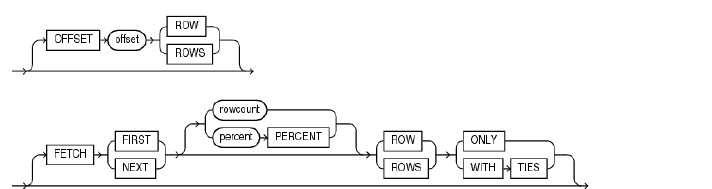
从oracle 12c开始,oracle 也提供了类似sql server的top,mysql的limit分页功能,在本文中分别通过TOP N和传统方法来实现分页,sql实现效果是(按照id 倒序排列,取第六条到底十条)
TOP N写法

SQL> select * from v$version;

BANNER                                                                               CON_ID
-------------------------------------------------------------------------------- ----------
Oracle Database 12c Enterprise Edition Release 12.1.0.0.2 - 64bit                         0
PL/SQL Release 12.1.0.0.2                                                                 0
CORE    12.1.0.0.2                                                                        0
TNS for Linux: Version 12.1.0.0.2                                                         0
NLSRTL Version 12.1.0.0.2                                                                 0

SQL> set autot on exp stat
SQL> SELECT id
  2  FROM t_xifenfei
  3  ORDER BY id  desc offset 5 rows FETCH next 5 ROWS ONLY;

        ID
----------
       188
       187
       186
       185
       184


Execution Plan
----------------------------------------------------------
Plan hash value: 755690401

---------------------------------------------------------------------------------------
| Id  | Operation                | Name       | Rows  | Bytes | Cost (%CPU)| Time     |
---------------------------------------------------------------------------------------
|   0 | SELECT STATEMENT         |            |   192 |  7488 |     3   (0)| 00:00:01 |
|*  1 |  VIEW                    |            |   192 |  7488 |     3   (0)| 00:00:01 |
|*  2 |   WINDOW SORT PUSHED RANK|            |   192 |   768 |     3   (0)| 00:00:01 |
|   3 |    TABLE ACCESS FULL     | T_XIFENFEI |   192 |   768 |     3   (0)| 00:00:01 |
---------------------------------------------------------------------------------------

Predicate Information (identified by operation id):
---------------------------------------------------

   1 - filter("from$_subquery$_003"."rowlimit_$$_rownumber"<=CASE  WHEN (5>=0)
              THEN 5 ELSE 0 END +5 AND "from$_subquery$_003"."rowlimit_$$_rownumber">5)
   2 - filter(ROW_NUMBER() OVER ( ORDER BY INTERNAL_FUNCTION("ID") DESC
              )<=CASE  WHEN (5>=0) THEN 5 ELSE 0 END +5)


Statistics
----------------------------------------------------------
          0  recursive calls
          0  db block gets
          7  consistent gets
          0  physical reads
          0  redo size
        619  bytes sent via SQL*Net to client
        544  bytes received via SQL*Net from client
          2  SQL*Net roundtrips to/from client
          1  sorts (memory)
          0  sorts (disk)
          5  rows processed

传统分页写法

SQL> select id from (select id,rownum rn from (
  2  select id  from t_xifenfei order by id desc
  3  )) where rn<11 and rn>=6;

        ID
----------
       188
       187
       186
       185
       184


Execution Plan
----------------------------------------------------------
Plan hash value: 327151993

------------------------------------------------------------------------------------
| Id  | Operation             | Name       | Rows  | Bytes | Cost (%CPU)| Time     |
------------------------------------------------------------------------------------
|   0 | SELECT STATEMENT      |            |   192 |  4992 |     3   (0)| 00:00:01 |
|*  1 |  VIEW                 |            |   192 |  4992 |     3   (0)| 00:00:01 |
|   2 |   COUNT               |            |       |       |            |          |
|   3 |    VIEW               |            |   192 |  2496 |     3   (0)| 00:00:01 |
|   4 |     SORT ORDER BY     |            |   192 |   768 |     3   (0)| 00:00:01 |
|   5 |      TABLE ACCESS FULL| T_XIFENFEI |   192 |   768 |     3   (0)| 00:00:01 |
------------------------------------------------------------------------------------

Predicate Information (identified by operation id):
---------------------------------------------------

   1 - filter("RN">=6 AND "RN"<11)


Statistics
----------------------------------------------------------
          0  recursive calls
          0  db block gets
          7  consistent gets
          0  physical reads
          0  redo size
        619  bytes sent via SQL*Net to client
        544  bytes received via SQL*Net from client
          2  SQL*Net roundtrips to/from client
          1  sorts (memory)
          0  sorts (disk)
          5  rows processed

从这里可以看出来两种sql分页写法,在小数据量上效率都差不多,但是明显TOP N的写法更加简单,更加灵活.如果数据量大可能还是需要自己写分页SQL。TOP N是通过ROW_NUMBER() OVER INTERNAL_FUNCTION(“ID”)和CASE WHEN内部转换实现分页功能.

12c 使用sequence作为列默认值

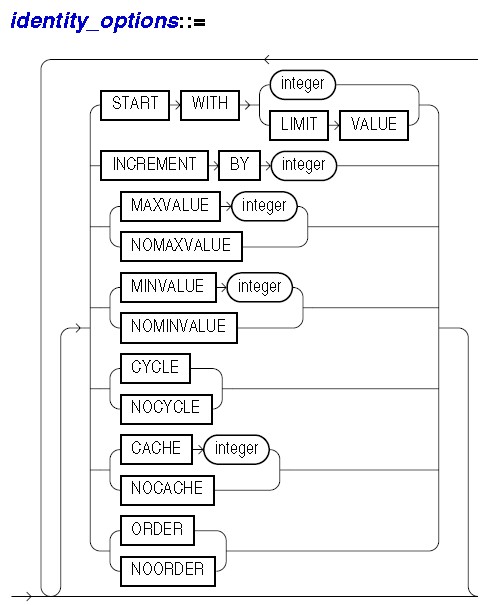
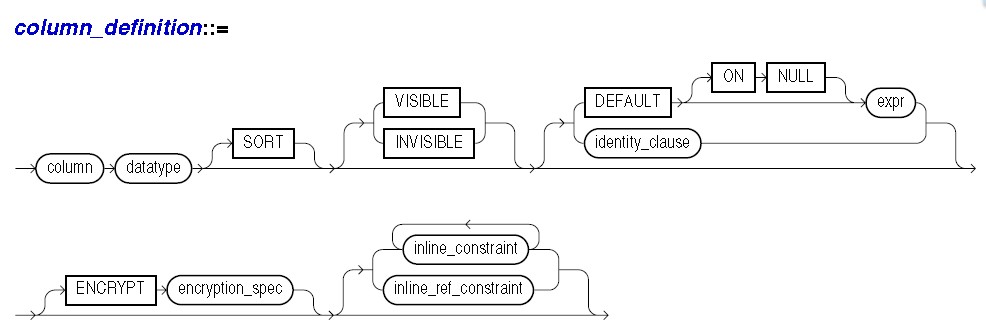
官方文档创建表语句部分说明
在12c中,表支持默认列为sequence值,而且不用使用传统的触发器来实现该功能.


12c创建表使用默认sequence测试过程

SQL> select * from v$version;

BANNER                                                                               CON_ID
-------------------------------------------------------------------------------- ----------
Oracle Database 12c Enterprise Edition Release 12.1.0.0.2 - 64bit                         0
PL/SQL Release 12.1.0.0.2                                                                 0
CORE    12.1.0.0.2                                                                        0
TNS for Linux: Version 12.1.0.0.2                                                         0
NLSRTL Version 12.1.0.0.2                                                                 0

SQL> create table t_xifenfei
  2  (
  3  id number GENERATED ALWAYS as identity (
  4  start with 1
  5  increment by 1
  6  ), 
  7  name varchar2(200)
  8  );

Table created.

SQL> insert into t_xifenfei(name) values('www.orasos.com');

1 row created.

SQL> commit;

Commit complete.

SQL> col name for a30
SQL> select * from t_xifenfei;

        ID NAME
---------- ------------------------------
         1 www.orasos.com

SQL> insert into t_xifenfei(name) values('www.orasos.com');

1 row created.

SQL> commit;

Commit complete.

SQL> select * from t_xifenfei;

        ID NAME
---------- ------------------------------
         1 www.orasos.com
         2 www.orasos.com

SQL> insert into t_xifenfei values(5,'www.orasos.com');
insert into t_xifenfei values(5,'www.orasos.com')
            *
ERROR at line 1:
ORA-32795: cannot insert into a generated always identity column


SQL> insert into t_xifenfei(name) values('www.orasos.com');

1 row created.

SQL> commit;

Commit complete.

SQL> select * from t_xifenfei;

        ID NAME
---------- ------------------------------
         1 www.orasos.com
         2 www.orasos.com
         3 www.orasos.com

补充说明
1.如果设置了列默认值为seq,则不能手工插入一个该列值否则报ORA-32795
2.通过10046跟踪该insert语句未发现trigger对应sql语句操作,比传统自己编写触发器效率原则上更加高

模拟enq: TX – allocate ITL entry等待

今天在分析一份awr中发现了较为明显的enq: TX – allocate ITL entry等待,这里通过试验详细重现了enq: TX – allocate ITL entry等待
创建测试对象

SQL> create table t_xifenfei (name char(2000)) pctfree 0 initrans 1;

Table created.

SQL> insert into t_xifenfei select object_name from all_objects    where rownum < 5;

4 rows created.

SQL> commit;

Commit complete.

SQL> alter system flush buffer_cache;

System altered.

SQL>  select distinct dbms_rowid.rowid_relative_fno(rowid) file#,
  2  dbms_rowid.rowid_block_number(rowid) block# from t_xifenfei;

     FILE#     BLOCK#
---------- ----------
         4         32

bbed查看block

BBED> set block 32
        BLOCK#          32

BBED> map
 File: /u01/oracle/oradata/XFF/users01.dbf (0)
 Block: 32                                    Dba:0x00000000
------------------------------------------------------------
 KTB Data Block (Table/Cluster)

 struct kcbh, 20 bytes                      @0       

 struct ktbbh, 72 bytes                     @20      

 struct kdbh, 14 bytes                      @100     

 struct kdbt[1], 4 bytes                    @114     

 sb2 kdbr[4]                                @118     

 ub1 freespace[38]                          @126    --该block空闲空间为38byte 

 ub1 rowdata[8024]                          @164     

 ub4 tailchk                                @8188    


BBED> p ktbbh
struct ktbbh, 72 bytes                      @20      
   ub1 ktbbhtyp                             @20       0x01 (KDDBTDATA)
   union ktbbhsid, 4 bytes                  @24      
      ub4 ktbbhsg1                          @24       0x0000d318
      ub4 ktbbhod1                          @24       0x0000d318
   struct ktbbhcsc, 8 bytes                 @28      
      ub4 kscnbas                           @28       0xc0320e3b
      ub2 kscnwrp                           @32       0x0b2c
   b2 ktbbhict                              @36       2
   ub1 ktbbhflg                             @38       0x32 (NONE)
   ub1 ktbbhfsl                             @39       0x00
   ub4 ktbbhfnx                             @40       0x01000019
   struct ktbbhitl[0], 24 bytes             @44       --1个itl slot为24byte
      struct ktbitxid, 8 bytes              @44      
         ub2 kxidusn                        @44       0x0015
         ub2 kxidslt                        @46       0x0019
         ub4 kxidsqn                        @48       0x00000005
      struct ktbituba, 8 bytes              @52      
         ub4 kubadba                        @52       0x0080009d
         ub2 kubaseq                        @56       0x0002
         ub1 kubarec                        @58       0x28
      ub2 ktbitflg                          @60       0x2004 (KTBFUPB)
      union _ktbitun, 2 bytes               @62      
         b2 _ktbitfsc                       @62       0
         ub2 _ktbitwrp                      @62       0x0000
      ub4 ktbitbas                          @64       0xc0320e4e
   struct ktbbhitl[1], 24 bytes             @68       --有两个itl slot
      struct ktbitxid, 8 bytes              @68      
         ub2 kxidusn                        @68       0x0000
         ub2 kxidslt                        @70       0x0000
         ub4 kxidsqn                        @72       0x00000000
      struct ktbituba, 8 bytes              @76      
         ub4 kubadba                        @76       0x00000000
         ub2 kubaseq                        @80       0x0000
         ub1 kubarec                        @82       0x00
      ub2 ktbitflg                          @84       0x0000 (NONE)
      union _ktbitun, 2 bytes               @86      
         b2 _ktbitfsc                       @86       0
         ub2 _ktbitwrp                      @86       0x0000
      ub4 ktbitbas                          @88       0x00000000

通过bbed我们可以得出如下结论:
1.该block剩余38 byte 空闲空间可以用来存放数据
2.该block 初始化 itl 为2(和我们设置的1不相符)
3.一个itl slot为24byte

更新表记录

--session 1
SQL> select trim(name) from t_xifenfei;

TRIM(NAME)
--------------------------------------------------------------------------------
ICOL$
I_USER1
CON$
UNDO$

SQL> update t_xifenfei set name='WWW.XIFENFEI.COM' WHERE name='ICOL$';

1 row updated.

--session 2
SQL> update t_xifenfei set name='www.orasos.com' where name='UNDO$';

1 row updated.

--session 3
SQL> update t_xifenfei set name='www.orasos.com' where name='CON$';

1 row updated.

--session 4
SQL> update t_xifenfei set name='www.orasos.com' where name='I_USER1';
--hang住

--session 5
SQL> select event from v$session where  event like 'enq%';

EVENT
----------------------------------------------------------------
enq: TX - allocate ITL entry

通过这里可以看到我们模拟了4个update 该block操作(均未提交),前面三个可以正常的update操作,第四个出现了enq: TX – allocate ITL entry等待,根据我们知识分析(未提交事务的itl不能覆盖,一个dml操作需要一个itl),这里使用了3个itl slot,而我们已经知道一个itl 需要24byte,该block初始化有2个itl,现在这里有3个dml操作成功,即占用了3个itl,所以该block的剩余空间只有38-24=14 byte<24byte,因此无法分配第四个itl slot从而出现了enq: TX - allocate ITL entry等待
bbed验证上述分析

BBED> map
 File: /u01/oracle/oradata/XFF/users01.dbf (0)
 Block: 32                                    Dba:0x00000000
------------------------------------------------------------
 KTB Data Block (Table/Cluster)

 struct kcbh, 20 bytes                      @0       

 struct ktbbh, 96 bytes                     @20      

 struct kdbh, 14 bytes                      @124     

 struct kdbt[1], 4 bytes                    @138     

 sb2 kdbr[4]                                @142     

 ub1 freespace[14]                          @150     

 ub1 rowdata[8024]                          @164     

 ub4 tailchk                                @8188    


BBED> p ktbbh
struct ktbbh, 96 bytes                      @20      
   ub1 ktbbhtyp                             @20       0x01 (KDDBTDATA)
   union ktbbhsid, 4 bytes                  @24      
      ub4 ktbbhsg1                          @24       0x0000d318
      ub4 ktbbhod1                          @24       0x0000d318
   struct ktbbhcsc, 8 bytes                 @28      
      ub4 kscnbas                           @28       0xc0320eb0
      ub2 kscnwrp                           @32       0x0b2c
   b2 ktbbhict                              @36       3
   ub1 ktbbhflg                             @38       0x32 (NONE)
   ub1 ktbbhfsl                             @39       0x00
   ub4 ktbbhfnx                             @40       0x01000019
   struct ktbbhitl[0], 24 bytes             @44      
      struct ktbitxid, 8 bytes              @44      
         ub2 kxidusn                        @44       0x0003
         ub2 kxidslt                        @46       0x001f
         ub4 kxidsqn                        @48       0x00000208
      struct ktbituba, 8 bytes              @52      
         ub4 kubadba                        @52       0x00800027
         ub2 kubaseq                        @56       0x0414
         ub1 kubarec                        @58       0x01
      ub2 ktbitflg                          @60       0x0001 (NONE)
      union _ktbitun, 2 bytes               @62      
         b2 _ktbitfsc                       @62       0
         ub2 _ktbitwrp                      @62       0x0000
      ub4 ktbitbas                          @64       0x00000000
   struct ktbbhitl[1], 24 bytes             @68      
      struct ktbitxid, 8 bytes              @68      
         ub2 kxidusn                        @68       0x000a
         ub2 kxidslt                        @70       0x000f
         ub4 kxidsqn                        @72       0x00000185
      struct ktbituba, 8 bytes              @76      
         ub4 kubadba                        @76       0x0080008a
         ub2 kubaseq                        @80       0x01a6
         ub1 kubarec                        @82       0x0c
      ub2 ktbitflg                          @84       0x0001 (NONE)
      union _ktbitun, 2 bytes               @86      
         b2 _ktbitfsc                       @86       0
         ub2 _ktbitwrp                      @86       0x0000
      ub4 ktbitbas                          @88       0x00000000
   struct ktbbhitl[2], 24 bytes             @92      
      struct ktbitxid, 8 bytes              @92      
         ub2 kxidusn                        @92       0x0008
         ub2 kxidslt                        @94       0x002a
         ub4 kxidsqn                        @96       0x00000217
      struct ktbituba, 8 bytes              @100     
         ub4 kubadba                        @100      0x008000cc
         ub2 kubaseq                        @104      0x0291
         ub1 kubarec                        @106      0x12
      ub2 ktbitflg                          @108      0x0001 (NONE)
      union _ktbitun, 2 bytes               @110     
         b2 _ktbitfsc                       @110      0
         ub2 _ktbitwrp                      @110      0x0000
      ub4 ktbitbas                          @112      0x00000000

可以看到剩余空间为14byte,事务槽为3个,因此上述分析为正确。

提交会话测试

--session 1
SQL> commit;

Commit complete.

--session 4
SQL> update t_xifenfei set name='www.orasos.com' where name='I_USER1';


1 row updated.

证明commit掉事务后,itl slot可以重利用

总结说明
enq: TX – allocate ITL entry为分配ITL条目的等待,因为PCTFREE不足,BLOCK中没有足够空间分配ITL,ORACLE只能重用ITL,但是这个时候由于没有COMMIT,无法重用ITL,所以会出现allocate ITL等待事件。要解决此类问题,我们可以考虑增加PCTFREE和initrans大小,需要注意该修改只能对于新block生效,已经存放数据的block不会发生改变.另外可以考虑修改业务逻辑,减少频繁访问

使用PXE刷XD

需要安装服务

bind
dhcp
system-config-netboot
tftp-server

dhcp配置

[root@xifenfei ~]# more /etc/redhat-release 
Red Hat Enterprise Linux AS release 4 (Nahant Update 8)

[root@xifenfei ~]# more /etc/dhcpd.conf
subnet 192.168.30.0 netmask 255.255.255.0 {
  range dynamic-bootp 192.168.30.101 192.168.30.126;
  option broadcast-address 192.168.30.255;
  option routers 192.168.30.1;
  next-server 192.168.30.90;
  filename = "pxelinux.0";
}
--以下直接复制无需修改
ddns-update-style none;
subnet 10.182.77.0 netmask 255.255.255.0 {}
subnet 10.182.45.0 netmask 255.255.255.0 {
  range dynamic-bootp 10.182.45.92 10.182.45.100;
  option broadcast-address 10.182.45.255;
  option routers 10.182.45.1;
  next-server 10.182.77.133;
  filename = "pxelinux.0";
}

tftp配置

[root@xifenfei ~]# more /etc/xinetd.d/tftp
service tftp
{
        socket_type             = dgram
        protocol                = udp
        wait                    = yes
        user                    = root
        server                  = /usr/sbin/in.tftpd
        server_args             = -v -s /xd
        disable                 = no
        per_source              = 11
        cps                     = 100 2
        flags                   = IPv4
}

nfs配置

[root@xifenfei ~]# more /etc/exports
/xd *(no_root_squash,no_subtree_check,insecure)

pxe配置

[root@xifenfei ~]# cp /usr/share/syslinux/pxelinux.0 /xd

[root@xifenfei pxelinux.cfg]# more /xd/pxelinux.cfg/default 
default linux
timeout 70

label cell
prompt 1
display boot.msg
  kernel dl180/vmlinux-11.2.3.2.1-dl180-DL180
  append initrd=dl180/initrd-11.2.3.2.1-dl180-DL180.img pxe stit updfrm dhcp sk=192.168.30.90:/xd/dl180 preconf=192.168.30.90:/xd/prec
onf.csv

label db
prompt 1
display boot.msg
  kernel dl360/vmlinux-11.2.3.2.1-dl360-DL360
  append initrd=dl360/initrd-11.2.3.2.1-dl360-DL360.img pxe stit updfrm dhcp sk=192.168.30.90:/xd/dl360 preconf=192.168.30.90:/xd/prec
onf.csv
tar -pxvf the ImageMaker.tar
cd /xd/dl180
[root@xifenfei dl180]# ./makeImageMedia.sh -pxe -pxeout dl180
Please wait. Calculating md5 checksums for cellbits ...
Calculating md5 checksum for exaos.tbz ...
Calculating md5 checksum for cellboot.tbz ...
Calculating md5 checksum for cellfw.tbz ...
Calculating md5 checksum for kernel.tbz ...
Calculating md5 checksum for ofed.tbz ...
Calculating md5 checksum for sunutils.tbz ...
Calculating md5 checksum for hputils.tbz ...
Calculating md5 checksum for c7rpms.tbz ...
Calculating md5 checksum for commonos.tbz ...
Calculating md5 checksum for debugos.tbz ...
Calculating md5 checksum for cellrpms.tbz ...
Calculating md5 checksum for doclib.zip ...
Calculating md5 checksum for cell.bin ...
Store filename of nfsimg tarball nfsimg-11.2.3.2.1-dl180-DL180.tar inside initrd
Please wait. Making initrd ...
214836 blocks
Please wait. Calculating md5 checksums for boot ...
PXE NFS image:   /xd/dl180/./PXE/nfsimg-11.2.3.2.1-dl180-DL180.tar
PXE NFS md5 sum: /xd/dl180/./PXE/nfsimg-11.2.3.2.1-dl180-DL180.tar.md5
PXE initrd:      /xd/dl180/./PXE/initrd-11.2.3.2.1-dl180-DL180.img
PXE kernel:      /xd/dl180/./PXE/vmlinux-11.2.3.2.1-dl180-DL180

[root@xifenfei dl180]# mv /xd/dl180/./PXE/nfsimg-11.2.3.2.1-dl180-DL180.tar /xd/dl180/
[root@xifenfei dl180]# mv /xd/dl180/./PXE/nfsimg-11.2.3.2.1-dl180-DL180.tar.md5 /xd/dl180/
[root@xifenfei dl180]# mv /xd/dl180/./PXE/initrd-11.2.3.2.1-dl180-DL180.img /xd/dl180/
[root@xifenfei dl180]# mv /xd/dl180/./PXE/vmlinux-11.2.3.2.1-dl180-DL180 /xd/dl180/

[root@xifenfei dl180]# ll
total 1531612
drwxr-xr-x   3 root root       4096 Mar 26 23:41 boot
drwxrwxr-x   2 root root       4096 Jan  9 22:34 doc
drwxr-xr-x   2 root root       4096 Jan  9 22:33 grub
drwxr-xr-x  17 root root       4096 Mar 26 23:41 initrd
-rw-r--r--   1 root root   38839215 Mar 26 23:41 initrd-11.2.3.2.1-dl180-DL180.img
-rwxrwxr-x   1 root root      27485 Jan  9 22:34 makeImageMedia.sh
-rw-r--r--   1 root root 1524193280 Mar 26 23:40 nfsimg-11.2.3.2.1-dl180-DL180.tar
-rw-r--r--   1 root root         68 Mar 26 23:41 nfsimg-11.2.3.2.1-dl180-DL180.tar.md5
drwxrwxr-x   3 root root       4096 Jan  9 22:34 patches
drwxr-xr-x   2 root root       4096 Mar 26 23:48 PXE
-r-xr-xr-x   1 root root      39041 Mar 31  2011 README_FOR_FACTORY.txt
-r-xr-xr-x   1 root root    3688864 Mar 26 23:41 vmlinux-11.2.3.2.1-dl180-DL180

上传preconf.csv到/xd目录

[root@xifenfei xd]# ll preconf.csv 
-rw-r--r--  1 root root 2133 Mar 14 18:14 preconf.csv

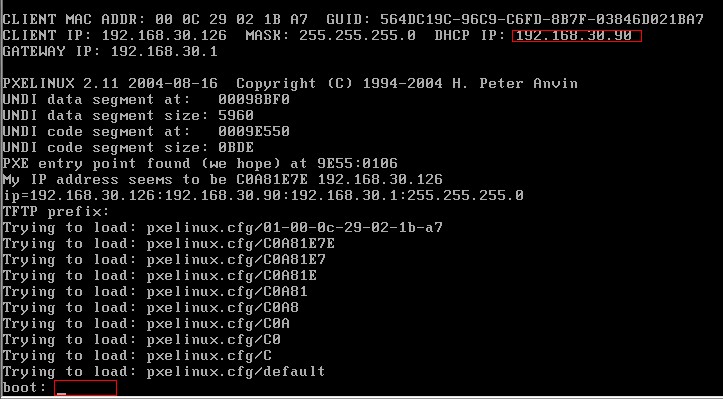
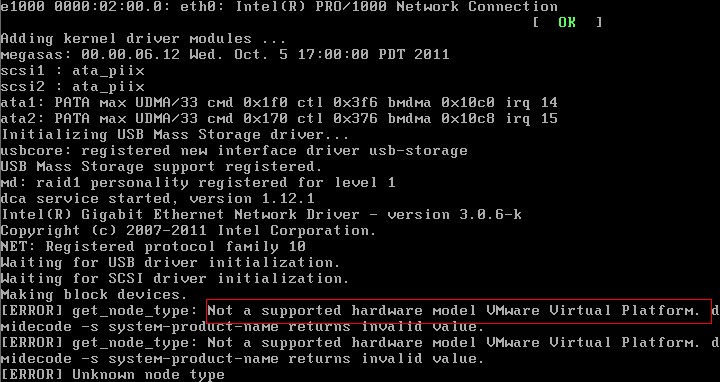
然后重启dhcp,xinetd,nfs服务,重启需要恢复的xd的db and cell节点,验证结果如下