ASM中磁盘组权限设置

aix平台11gr2单库使用使用grid和oracle用户分别部署gi和db,在添加磁盘的时候,使用设置磁盘所属用户和组为grid与oinstall,设置权限为755.添加磁盘成功后,数据库直接crash.
asm添加磁盘操作

SQL>  alter diskgroup DATA add disk '/dev/rhdisk15' 
NOTE: Assigning number (2,7) to disk (/dev/rhdisk15)
NOTE: requesting all-instance membership refresh for group=2
NOTE: initializing header on grp 2 disk DATA_0007
NOTE: requesting all-instance disk validation for group=2
Wed Apr 03 22:09:03 2013
NOTE: skipping rediscovery for group 2/0xa026f7ec (DATA) on local instance.
NOTE: requesting all-instance disk validation for group=2
NOTE: skipping rediscovery for group 2/0xa026f7ec (DATA) on local instance.
NOTE: initiating PST update: grp = 2
Wed Apr 03 22:09:03 2013
GMON updating group 2 at 21 for pid 17, osid 22610284
NOTE: PST update grp = 2 completed successfully 
NOTE: membership refresh pending for group 2/0xa026f7ec (DATA)
GMON querying group 2 at 22 for pid 13, osid 20643916
NOTE: cache opening disk 7 of grp 2: DWDATAGRP_0007 path:/dev/rhdisk15
GMON querying group 2 at 23 for pid 13, osid 20643916
SUCCESS: refreshed membership for 2/0xa026f7ec (DATA)
NOTE: starting rebalance of group 2/0xa026f7ec (DATA) at power 1
SUCCESS:  alter diskgroup DATA add disk '/dev/rhdisk15'
Starting background process ARB0
Wed Apr 03 22:09:07 2013
ARB0 started with pid=22, OS id=14155890 
NOTE: assigning ARB0 to group 2/0xa026f7ec (DATA) with 1 parallel I/O
NOTE: Attempting voting file refresh on diskgroup DATA
Wed Apr 03 22:09:19 2013
SQL>  alter diskgroup DATA add disk '/dev/rhdisk11' 
Wed Apr 03 22:09:20 2013
NOTE: stopping process ARB0
NOTE: rebalance interrupted for group 2/0xa026f7ec (DATA)
NOTE: Assigning number (2,8) to disk (/dev/rhdisk11)
NOTE: requesting all-instance membership refresh for group=2
NOTE: initializing header on grp 2 disk DATA_0008
NOTE: requesting all-instance disk validation for group=2
NOTE: skipping rediscovery for group 2/0xa026f7ec (DATA) on local instance.
NOTE: requesting all-instance disk validation for group=2
NOTE: skipping rediscovery for group 2/0xa026f7ec (DATA) on local instance.
NOTE: initiating PST update: grp = 2
Wed Apr 03 22:09:23 2013
GMON updating group 2 at 24 for pid 17, osid 22610284
NOTE: PST update grp = 2 completed successfully 
NOTE: membership refresh pending for group 2/0xa026f7ec (DATA)
GMON querying group 2 at 25 for pid 13, osid 20643916
NOTE: cache opening disk 8 of grp 2: DATA_0008 path:/dev/rhdisk11
GMON querying group 2 at 26 for pid 13, osid 20643916
SUCCESS: refreshed membership for 2/0xa026f7ec (DATA)
NOTE: starting rebalance of group 2/0xa026f7ec (DATA) at power 1
SUCCESS:  alter diskgroup DATA add disk '/dev/rhdisk11'
Starting background process ARB0
Wed Apr 03 22:09:26 2013
ARB0 started with pid=22, OS id=22872116 
NOTE: assigning ARB0 to group 2/0xa026f7ec (DATA) with 1 parallel I/O
NOTE: Attempting voting file refresh on diskgroup DATA
Wed Apr 03 22:14:41 2013
NOTE: ASM client xifenfei:xifenfei disconnected unexpectedly.
NOTE: check client alert log.
NOTE: Trace records dumped in trace file /u01/diag/asm/+asm/+ASM/trace/+ASM_ora_15073468.trc
Wed Apr 03 22:16:53 2013
NOTE: client xifenfei:xifenfei registered, osid 20709378, mbr 0x0
Wed Apr 03 22:20:33 2013
NOTE: client xifenfei:xifenfei deregistered

这里可看到增加磁盘操作正常并且开始做rebalance,但是也看到关于client xifenfei异常断开连接(本质就是数据库crash)

crash时的alert日志

Wed Apr 03 22:00:00 2013
Setting Resource Manager plan SCHEDULER[0x318B]:DEFAULT_MAINTENANCE_PLAN via scheduler window
Setting Resource Manager plan DEFAULT_MAINTENANCE_PLAN via parameter
Wed Apr 03 22:00:00 2013
Starting background process VKRM
Wed Apr 03 22:00:00 2013
VKRM started with pid=31, OS id=22413426 
Wed Apr 03 22:09:06 2013
ORA-15025: could not open disk "/dev/rhdisk15"
ORA-27041: unable to open file
IBM AIX RISC System/6000 Error: 13: Permission denied
Additional information: 11
Wed Apr 03 22:09:06 2013
SUCCESS: disk DATA_0007 (7.2092304189) added to diskgroup DATA
Wed Apr 03 22:09:26 2013
ORA-15025: could not open disk "/dev/rhdisk15"
ORA-27041: unable to open file
IBM AIX RISC System/6000 Error: 13: Permission denied
Additional information: 11
Wed Apr 03 22:09:26 2013
SUCCESS: disk DATA_0008 (8.2092304190) added to diskgroup DATA
Wed Apr 03 22:14:40 2013
Errors in file /oracle/diag/rdbms/xifenfei/xifenfei/trace/xifenfei_dbw0_17367438.trc:
ORA-15080: synchronous I/O operation to a disk failed
WARNING: failed to write mirror side 1 of virtual extent 1 logical extent 0 of file 261 in 
group 2 on disk 7 allocation unit 464 
KCF: read, write or open error, block=0x6a online=1
        file=1 '+DATA/xifenfei/datafile/system.261.788373447'
        error=15081 txt: ''
Errors in file /oracle/diag/rdbms/xifenfei/xifenfei/trace/xifenfei_dbw0_17367438.trc:
ORA-63999: data file suffered media failure
ORA-01114: IO error writing block to file 1 (block # 106)
ORA-01110: data file 1: '+DATA/xifenfei/datafile/system.261.788373447'
ORA-15081: failed to submit an I/O operation to a disk
DBW0 (ospid: 17367438): terminating the instance due to error 63999

这里可以看到数据库异常crash是因为/dev/rhdisk15没有权限去操作该文件,导致dbw0进程异常,从而出现该数据库crash

尝试重启数据库(asm重启正常)

SQL> startup
ORACLE instance started.

Total System Global Area 1.2827E+10 bytes
Fixed Size                  2233480 bytes
Variable Size            1711278968 bytes
Database Buffers         1.1073E+10 bytes
Redo Buffers               40894464 bytes
Database mounted.
ORA-01113: file 1 needs media recovery
ORA-01110: data file 1: '+DATA/xifenfei/datafile/system.261.788373447'

这里提示file 1需要恢复,查看alert日志,出现以下错误

Completed: ALTER DATABASE   MOUNT
Wed Apr 03 22:17:02 2013
ALTER DATABASE OPEN
Errors in file /oracle/diag/rdbms/xifenfei/xifenfei/trace/xifenfei_ora_11534798.trc:
ORA-27041: unable to open file
IBM AIX RISC System/6000 Error: 13: Permission denied
Additional information: 3
Additional information: 4
Additional information: 4194306
WARNING: Write Failed. group:2 disk:8 AU:462 offset:16384 size:16384
Errors in file /oracle/diag/rdbms/xifenfei/xifenfei/trace/xifenfei_ora_11534798.trc:
ORA-15080: synchronous I/O operation to a disk failed
WARNING: failed to write mirror side 1 of virtual extent 0 logical extent 0 of file 261 in 
group 2 on disk 8 allocation unit 462 
Errors in file /oracle/diag/rdbms/xifenfei/xifenfei/trace/xifenfei_ora_11534798.trc:
ORA-27041: unable to open file
IBM AIX RISC System/6000 Error: 13: Permission denied
Additional information: 3
Additional information: 4
Additional information: 4194306
WARNING: Write Failed. group:2 disk:8 AU:690 offset:16384 size:16384
Errors in file /oracle/diag/rdbms/xifenfei/xifenfei/trace/xifenfei_ora_11534798.trc:
ORA-27041: unable to open file
IBM AIX RISC System/6000 Error: 13: Permission denied
Additional information: 3
Additional information: 4
Additional information: 4194306
WARNING: Write Failed. group:2 disk:8 AU:918 offset:16384 size:16384
Errors in file /oracle/diag/rdbms/xifenfei/xifenfei/trace/xifenfei_ora_11534798.trc:
ORA-15080: synchronous I/O operation to a disk failed
WARNING: failed to write mirror side 1 of virtual extent 0 logical extent 0 of file 263 in 
group 2 on disk 8 allocation unit 918 
Errors in file /oracle/diag/rdbms/xifenfei/xifenfei/trace/xifenfei_ora_11534798.trc:
ORA-15080: synchronous I/O operation to a disk failed
WARNING: failed to write mirror side 1 of virtual extent 0 logical extent 0 of file 262 in 
group 2 on disk 8 allocation unit 690 
Errors in file /oracle/diag/rdbms/xifenfei/xifenfei/trace/xifenfei_ora_11534798.trc:
ORA-01110: data file 3: '+DATA/xifenfei/datafile/undotbs1.263.788373475'
ORA-01114: IO error writing block to file 3 (block # 1)
ORA-15081: failed to submit an I/O operation to a disk
Errors in file /oracle/diag/rdbms/xifenfei/xifenfei/trace/xifenfei_ora_11534798.trc:
ORA-01110: data file 2: '+DATA/xifenfei/datafile/sysaux.262.788373463'
ORA-01114: IO error writing block to file 2 (block # 1)
ORA-15081: failed to submit an I/O operation to a disk

recover database 操作

SQL> recover database;
ORA-00283: recovery session canceled due to errors
ORA-01201: file 1 header failed to write correctly
Wed Apr 03 22:18:49 2013
ALTER DATABASE RECOVER  database  
Media Recovery Start
 started logmerger process
Wed Apr 03 22:18:50 2013
Errors in file /oracle/diag/rdbms/xifenfei/xifenfei/trace/xifenfei_pr00_12714126.trc:
ORA-27041: unable to open file
IBM AIX RISC System/6000 Error: 13: Permission denied
Additional information: 3
Additional information: 4
Additional information: 4194306
WARNING: Write Failed. group:2 disk:8 AU:462 offset:16384 size:16384
Errors in file /oracle/diag/rdbms/xifenfei/xifenfei/trace/xifenfei_pr00_12714126.trc:
ORA-27041: unable to open file
IBM AIX RISC System/6000 Error: 13: Permission denied
Additional information: 3
Additional information: 4
Additional information: 4194306

依然是这里的提示依然是因为磁盘无读写权限从而出现数据库无法写数据文件问题,修改刚刚加入的磁盘文件权限问为660(4读2写1执行),表明与oinstall相同组的oracle用户对该磁盘也有读写权限.
这个事故是一个很简单,而且随着11g中asm使用grid和oracle用户的客户越来越多,相关的事故也越来越多,因为大多数使用人习惯直接给某个文件授权为755,而在这样的grid和oracle分开安装的系统中,将出现增加磁盘后,数据库crash,而且不能起来(因为oracle用户对磁盘只有读权限,无写权限),一种比较好的规范:在11gr2的asm系统中(grid和oracle用户),建议设置磁盘为grid.oinstall,权限设置为660
制作U盘刷EXADATA

在XD需要刷机(方言重装操作系统),现在比较常见的是一种是使用PXE来刷机,另外一张是使用U盘制作启动盘来刷机.PXE配置起来比较麻烦,这里展示制作U盘刷机的过程.db节点和cell节点的制作方法基本相同,这里以cell节点的U盘制作为例说明制作过程
1. 前提条件
1) Linux 64位机器(最好直接在db和cell节点的机器上直接处理
2) U盘大小最少4G
3) 上传preconf.csv配置文件(使用java配置)

2. 下载image文件
通过888828.1文档找到image的名称,然后在edelivery中下载

3. 查看U盘盘符

[root@xifenfei tmp]# fdisk -l

Disk /dev/sda: 32.2 GB, 32212254720 bytes
255 heads, 63 sectors/track, 3916 cylinders
Units = cylinders of 16065 * 512 = 8225280 bytes

   Device Boot      Start         End      Blocks   Id  System
/dev/sda1   *           1        3655    29358756   83  Linux
/dev/sda2            3656        3916     2096482+  82  Linux swap / Solaris

Disk /dev/sdb: 4048 MB, 4048551936 bytes
128 heads, 9 sectors/track, 6864 cylinders
Units = cylinders of 1152 * 512 = 589824 bytes

   Device Boot      Start         End      Blocks   Id  System
/dev/sdb1   *           8        6864     3949096    b  W95 FAT32

4. 上传压缩文件到服务器,并解压

unzip V36290-01.zip
tar xvf cellImageMaker_11.2.3.2.1_LINUX.X64_130109-1.x86_64.tar 

5. dl180内容

[root@xifenfei tmp]# cd dl180/
[root@xifenfei dl180]# ll
total 92
drwxr-xr-x  3 root root  4096 Jan  9 22:33 boot
drwxrwxr-x  2 root root  4096 Jan  9 22:34 doc
drwxr-xr-x  2 root root  4096 Jan  9 22:33 grub
drwxr-xr-x 17 root root  4096 Jan  9 22:33 initrd
-rwxrwxr-x  1 root root 27485 Jan  9 22:34 makeImageMedia.sh
drwxrwxr-x  3 root root  4096 Jan  9 22:34 patches
-r-xr-xr-x  1 root root 39041 Mar 31  2011 README_FOR_FACTORY.txt
drwxrwxr-x  4 root root  4096 Jan  9 22:34 tmp

6. 制作U盘启动

--执行makeImageMedia.sh命令
[root@xifenfei dl180]# ./makeImageMedia.sh -preconf  /tmp/preconf.csv 
Done. Pre config verification OK
Please wait. Calculating md5 checksums for cellbits ...
Calculating md5 checksum for exaos.tbz ...
Calculating md5 checksum for cellboot.tbz ...
Calculating md5 checksum for cellfw.tbz ...
Calculating md5 checksum for kernel.tbz ...
Calculating md5 checksum for ofed.tbz ...
Calculating md5 checksum for sunutils.tbz ...
Calculating md5 checksum for hputils.tbz ...
Calculating md5 checksum for c7rpms.tbz ...
Calculating md5 checksum for commonos.tbz ...
Calculating md5 checksum for debugos.tbz ...
Calculating md5 checksum for cellrpms.tbz ...
Calculating md5 checksum for doclib.zip ...
Calculating md5 checksum for cell.bin ...
Please wait. Making initrd ...
214842 blocks
Please wait. Calculating md5 checksums for boot ...

Choose listed USB devices to set up the Oracle CELL installer

sdb   Approximate capacity 3953 MB 
--指定U盘盘符
Enter the comma separated (no spaces) list of devices or word 'ALL' for to select all: sdb <--注意
sdb will be used as the Oracle CELL installer

All data on sdb will be erased. Proceed [y/n]? y <--注意

The number of cylinders for this disk is set to 6864.
There is nothing wrong with that, but this is larger than 1024,
and could in certain setups cause problems with:
1) software that runs at boot time (e.g., old versions of LILO)
2) booting and partitioning software from other OSs
   (e.g., DOS FDISK, OS/2 FDISK)

Command (m for help): Building a new DOS disklabel. Changes will remain in memory only,
until you decide to write them. After that, of course, the previous
content won't be recoverable.


The number of cylinders for this disk is set to 6864.
There is nothing wrong with that, but this is larger than 1024,
and could in certain setups cause problems with:
1) software that runs at boot time (e.g., old versions of LILO)
2) booting and partitioning software from other OSs
   (e.g., DOS FDISK, OS/2 FDISK)
Warning: invalid flag 0x0000 of partition table 4 will be corrected by w(rite)

Command (m for help): Command action
   e   extended
   p   primary partition (1-4)
Partition number (1-4): First cylinder (1-6864, default 1): Last cylinder or +size or +sizeM or +sizeK (1-6864, default 6864): 
Command (m for help): The partition table has been altered!

Calling ioctl() to re-read partition table.
Syncing disks.
umount2: Invalid argument
umount: /dev/sdb1: not mounted
mke2fs 1.39 (29-May-2006)
Filesystem label=
OS type: Linux
Block size=4096 (log=2)
Fragment size=4096 (log=2)
495008 inodes, 988270 blocks
49413 blocks (5.00%) reserved for the super user
First data block=0
Maximum filesystem blocks=1015021568
31 block groups
32768 blocks per group, 32768 fragments per group
15968 inodes per group
Superblock backups stored on blocks: 
        32768, 98304, 163840, 229376, 294912, 819200, 884736

Writing inode tables: done                            
Creating journal (16384 blocks): done
Writing superblocks and filesystem accounting information: done

This filesystem will be automatically checked every 33 mounts or
180 days, whichever comes first.  Use tune2fs -c or -i to override.
Copying files... will take several minutes


    GNU GRUB  version 0.97  (640K lower / 3072K upper memory)

 [ Minimal BASH-like line editing is supported.  For the first word, TAB
   lists possible command completions.  Anywhere else TAB lists the possible
   completions of a device/filename.]
grub> root (hd0,0)
 Filesystem type is ext2fs, partition type 0x83
grub> setup (hd0)
 Checking if "/boot/grub/stage1" exists... no
 Checking if "/grub/stage1" exists... yes
 Checking if "/grub/stage2" exists... yes
 Checking if "/grub/e2fs_stage1_5" exists... yes
 Running "embed /grub/e2fs_stage1_5 (hd0)"... failed (this is not fatal)
 Running "embed /grub/e2fs_stage1_5 (hd0,0)"... failed (this is not fatal)
 Running "install /grub/stage1 (hd0) /grub/stage2 p /grub/grub.conf "... succeeded
Done.
grub> Done creation of installation USB for DL180

现在已经制作完成,重启系统进入bios选择U盘启动,就可以对XD的cell节点进行刷机

ORACLE 12C RMAN recover table

12c的rman有了很大的增强,其中一个亮点就是可以进行table 级别的恢复,本试验测试了rman基于时间点恢复一个被删除表的操作过程
数据库版本

SQL> select * from v$version; 

BANNER                                                                               CON_ID
-------------------------------------------------------------------------------- ----------
Oracle Database 12c Enterprise Edition Release 12.1.0.0.2 - 64bit                         0
PL/SQL Release 12.1.0.0.2                                                                 0
CORE    12.1.0.0.2                                                                        0
TNS for Linux: Version 12.1.0.0.2                                                         0
NLSRTL Version 12.1.0.0.2                                                                 0

创建表并插入数据

SQL> select to_char(sysdate,'yyyy-mm-dd hh24:mi:ss') from dual;

TO_CHAR(SYSDATE,'YY
-------------------
2013-01-17 18:37:07

SQL> create table t_xifenfei(id number,insert_time date);

Table created.

SQL> insert into t_xifenfei values(1,sysdate);

1 row created.

SQL> commit;
Commit complete.

SQL> archive log list;
Database log mode              Archive Mode
Automatic archival             Enabled
Archive destination            USE_DB_RECOVERY_FILE_DEST
Oldest online log sequence     53
Next log sequence to archive   55
Current log sequence           55

SQL> select to_char(sysdate,'yyyy-mm-dd hh24:mi:ss') from dual;

TO_CHAR(SYSDATE,'YY
-------------------
2013-01-17 18:37:55

备份数据库

RMAN> backup  as compressed backupset database  format '/tmp/xifenfei_db_%U';

Starting backup at 17-JAN-13
using target database control file instead of recovery catalog
allocated channel: ORA_DISK_1
channel ORA_DISK_1: SID=30 device type=DISK
channel ORA_DISK_1: starting compressed full datafile backup set
channel ORA_DISK_1: specifying datafile(s) in backup set
input datafile file number=00001 name=/u01/app/oracle/oradata/xifenfei/system01.dbf
input datafile file number=00002 name=/u01/app/oracle/oradata/xifenfei/sysaux01.dbf
input datafile file number=00003 name=/u01/app/oracle/oradata/xifenfei/undotbs01.dbf
input datafile file number=00005 name=/u01/app/oracle/oradata/xifenfei/xifenfei01.dbf
input datafile file number=00004 name=/u01/app/oracle/oradata/xifenfei/users01.dbf
channel ORA_DISK_1: starting piece 1 at 17-JAN-13
channel ORA_DISK_1: finished piece 1 at 17-JAN-13
piece handle=/tmp/xifenfei_db_07nvln1g_1_1 tag=TAG20130117T183839 comment=NONE
channel ORA_DISK_1: backup set complete, elapsed time: 00:01:15
channel ORA_DISK_1: starting compressed full datafile backup set
channel ORA_DISK_1: specifying datafile(s) in backup set
including current control file in backup set
including current SPFILE in backup set
channel ORA_DISK_1: starting piece 1 at 17-JAN-13
channel ORA_DISK_1: finished piece 1 at 17-JAN-13
piece handle=/tmp/xifenfei_db_08nvln3r_1_1 tag=TAG20130117T183839 comment=NONE
channel ORA_DISK_1: backup set complete, elapsed time: 00:00:03
Finished backup at 17-JAN-13

插入数据继续测试

SQL> insert into t_xifenfei values(2,sysdate);

1 row created.

SQL> commit;

Commit complete.

SQL> alter system switch logfile;

System altered.

SQL> alter system switch logfile;

System altered.

SQL> insert into t_xifenfei values(3,sysdate);

1 row created.

SQL> insert into t_xifenfei values(4,sysdate);

1 row created.

SQL> commit;

Commit complete.

SQL> archive log list;
Database log mode              Archive Mode
Automatic archival             Enabled
Archive destination            USE_DB_RECOVERY_FILE_DEST
Oldest online log sequence     55
Next log sequence to archive   57
Current log sequence           57

SQL> select to_char(sysdate,'yyyy-mm-dd hh24:mi:ss') from dual;

TO_CHAR(SYSDATE,'YY
-------------------
2013-01-17 18:41:17

SQL> select id,to_char(insert_time,'yyyy-mm-dd hh24:mi:ss') from t_xifenfei;

        ID TO_CHAR(INSERT_TIME
---------- -------------------
         1 2013-01-17 18:37:22
         2 2013-01-17 18:40:37
         3 2013-01-17 18:40:58
         4 2013-01-17 18:40:59

删除测试表

SQL> drop table t_xifenfei purge;

Table dropped.

SQL> select to_char(sysdate,'yyyy-mm-dd hh24:mi:ss') from dual;

TO_CHAR(SYSDATE,'YY
-------------------
2013-01-17 18:41:36

rman recover table

[oracle@Lunar tmp]$ rman target sys/xifenfei log=/tmp/recover_table.log
RMAN> RECOVER TABLE XFF."T_XIFENFEI" 
until time  "to_date('2013-01-17 18:41:17','yyyy-mm-dd hh24:mi:ss')"
AUXILIARY DESTINATION '/tmp/recovertable'
REMAP TABLE 'XFF'.'T_XIFENFEI':'T_XIFENFEI_NEW';
--recover table XFF.T_XIFENFEI data impdp into XFF.T_XIFENFEI_NEW

验证数据库

SQL> select id,to_char(insert_time,'yyyy-mm-dd hh24:mi:ss') from t_xifenfei_new;

        ID TO_CHAR(INSERT_TIME
---------- -------------------
         1 2013-01-17 18:37:22
         2 2013-01-17 18:40:37
         3 2013-01-17 18:40:58
         4 2013-01-17 18:40:59

补充说明
1.rman recover table 必须使用sys用户登录,而不能使用/,因为12c默认有backup用户
2.rman recover table 需要还原system,undo,sysaux表空间,需要还原表所在表空间,和expdp导出文件空间,所以需要额外空间较大
3.整体恢复过程是:还原system,undo,sysaux表空间,然后read only数据库,然后重启数据库还原表所在表空间,然后expdp导出表,根据需要决定是否导入表到数据库
4.完整的rman recover table执行过程脚本recover_table

Swingbench简单使用

Swingbench是一款很不错的oracle压力测试工具,使用比较简单,而且很效果比较明显,可以满足在一些简单的测试案例中的需求,这里大概的写了主要的Swingbench测试过程中的一些注意事项
1.相关网站
Swingbench
2.上传服务器并解压

--整体目录
[oracle@localhost swingbench]$ ll
total 484
drwxr-xr-x. 3 oracle dba   4096 Mar 26 15:54 bin
drwxr-xr-x. 2 oracle dba   4096 Mar 26 15:48 configs
drwxr-xr-x. 2 oracle dba   4096 Jun 11  2010 launcher
drwxr-xr-x. 3 oracle dba   4096 Dec  9  2011 lib
drwxr-xr-x. 2 oracle dba   4096 Mar  3  2010 log
-rwx------. 1 oracle dba   1768 Feb 15  2011 README.txt
drwxr-xr-x. 3 oracle dba   4096 Dec  9  2011 source
drwxr-xr-x. 2 oracle dba   4096 Mar 26 15:38 sql
-rw-r--r--. 1 oracle dba    848 Mar 26 11:02 swingbench.env
-rw-r--r--. 1 oracle dba 454110 Feb 15  2011 swingbenchFAQ.pdf
drwx------. 3 oracle dba   4096 Dec  8  2011 winbin

--动态库
[oracle@localhost lib]$ ll
total 14896
-rw-r--r--. 1 oracle dba   999966 Dec  9  2011 ant.jar
drwxr-xr-x. 2 oracle dba     4096 Dec  9  2011 launcher
-rw-r--r--. 1 oracle dba  2152849 Dec  9  2011 ojdbc6.jar
-rw-r--r--. 1 oracle dba    70569 Dec  9  2011 ons.jar
-rw-r--r--. 1 oracle dba    20349 Dec  9  2011 simplefan.jar
-rw-r--r--. 1 oracle dba 11512178 Dec  9  2011 swingbench.jar
-rw-r--r--. 1 oracle dba   479413 Dec  9  2011 ucp.jar

--相关执行文件和初始化*.xml文件等
[oracle@localhost bin]$ ll
total 192
-rwxr-xr-x. 1 oracle dba    106 Nov 17  2010 bmcompare
-rwx------. 1 oracle dba   4456 Apr 19  2010 ccconfig.xml
-rwxr-xr-x. 1 oracle dba    120 Nov 17  2010 ccwizard
-rwx------. 1 oracle dba   4086 Jul 27  2010 ccwizard.xml
-rwxr-xr-x. 1 oracle dba    106 Nov 17  2010 charbench
-rwxr-xr-x. 1 oracle dba    118 Nov 17  2010 clusteroverview
-rw-r--r--. 1 oracle dba   1740 Jul 27  2010 clusteroverview.xml
-rwxr-xr-x. 1 oracle dba    110 Nov 17  2010 coordinator
drwxr-xr-x. 2 oracle dba   4096 Dec  8  2011 data
-rw-r--r--. 1 oracle dba 113698 Nov  2  2011 debug.log
-rwxr-xr-x. 1 oracle dba    106 Nov 17  2010 minibench
-rwxr-xr-x. 1 oracle dba    120 Nov 17  2010 oewizard
-rwx------. 1 oracle dba   3279 Jul 27  2010 oewizard.xml
-rw-r--r--. 1 oracle dba   2790 Feb 15  2011 results.xml
-rwxr-xr-x. 1 oracle dba    128 Nov 17  2010 shwizard
-rwx------. 1 oracle dba   2499 Aug 28  2010 shwizard.xml
-rwxr-xr-x. 1 oracle dba    108 Nov 17  2010 swingbench
-rwx------. 1 oracle dba   5766 Mar 26 15:29 swingconfig.xml
-rw-r--r--. 1 oracle dba    241 Mar 26 11:56 wizardlog.xml

--执行相关*.xml配置文件
[oracle@localhost configs]$ ll
total 36
-rwx------. 1 oracle dba 4714 Mar 27 10:02 ccconfig.xml
-rwx------. 1 oracle dba 3950 Nov  8  2011 oeconfig.xml
-rwx------. 1 oracle dba 3774 Nov  8  2011 shconfig.xml
-rwx------. 1 oracle dba 5009 Mar 27 10:15 soeconfig.xml
-rwx------. 1 oracle dba 3198 Nov  8  2011 spconfig.xml
-rwx------. 1 oracle dba 3074 Mar 23  2010 stresstest.xml

3.编辑环境变量

--自己编辑生成,然后使用.执行
vi swingbench.env
#!/bin/bash
--note:官方要求java 1.6,oracle 11g自带1.5可以执行
export JAVAHOME=/data/oracle/product/11.2.0/dbhome_1/jdk
export SWINGHOME=/swingbench 
export ORACLE_HOME=/data/oracle/product/11.2.0/dbhome_1
export LD_LIBRARY_PATH=${LD_LIBRARY_PATH}:$ORACLE_HOME/lib:$SWINGHOME/lib
export CLASSPATH=$JAVAHOME/lib/rt.jar:$JAVAHOME/lib/tools.jar:${SWINGHOME}/lib/swingbench.jar
export CLASSPATH=$CALSSPATH:${SWINGHOME}/lib/ojdbc6.jar:${SWINGHOME}/lib/ant.jar:ucp.jar
export CLASSPATH=$CLASSPATH:$ORACLE_HOME/jdbc/lib/ojdbc14.jar:$ORACLE_HOME/opmn/lib/ons.jar
export CLASSPATH=$CLASSPATH:$ORACLE_HOME/jdbc/lib/ojdbc5.jar

4.初始化数据

--初始化sh数据
[oracle@localhost bin]$ ll sh*
-rwxr-xr-x. 1 oracle dba  128 Nov 17  2010 shwizard
-rwx------. 1 oracle dba 2499 Aug 28  2010 shwizard.xml

--初始化soe数据
[oracle@localhost bin]$ ll oe*
-rwxr-xr-x. 1 oracle dba  120 Nov 17  2010 oewizard
-rwx------. 1 oracle dba 3279 Jul 27  2010 oewizard.xml

--初始化cc数据
[oracle@localhost bin]$ ll ccwizard*
-rwxr-xr-x. 1 oracle dba  120 Nov 17  2010 ccwizard
-rwx------. 1 oracle dba 4086 Jul 27  2010 ccwizard.xml

5.执行压力测试

--执行sh
[oracle@localhost bin]$ ./swingbench -c /swingbench/configs/shconfig.xml

--执行soe
[oracle@localhost bin]$ ./swingbench -c /swingbench/configs/soeconfig.xml

--执行cc
[oracle@localhost bin]$ ./swingbench -c /swingbench/configs/ccconfig.xml

6.测试结果
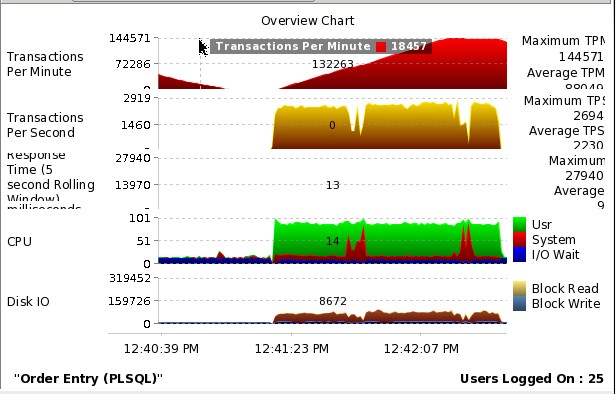
为了能够收集系统的io和cpu,需要登录系统(configuration–>connect pooling–>distributed controls)

非归档异常数据库rman备份

最近在数据库恢复中遇到一个案例:xx单位1.5T oracle 10.2.0.4(redhat 4.5),因为异常关闭操作系统,导致数据库不能启动,需要帮忙恢复。该数据库为非归档模式,使用裸设备,一个裸设备文件大小(35G),数据库文件大小4-30G都有,现在客户要求我们不能对现有环境进行任何操作,需要克隆一份数据库出来,然后在克隆的库上进行数据库恢复操作.数据库环境的克隆最好的方法就是使用rman来完成,但是该数据库为非归档模式,无法直接使用rman进行备份操作.最后采取dd的方式处理(需要注意dd文件大小为block_size*(v$datafile.blocks+1)+v$datafile.offset).因为不能使用rman的一条命令处理,心里一直不舒服,在家里实验,终于还是确定可以通过重建控制文件的方法来欺骗rman是归档模式,来实现rman完成类似工作.
数据库非非归档模式

SQL> select * from v$version;

BANNER
--------------------------------------------------------------------------------
Oracle Database 11g Enterprise Edition Release 11.2.0.3.0 - Production
PL/SQL Release 11.2.0.3.0 - Production
CORE    11.2.0.3.0      Production
TNS for Linux: Version 11.2.0.3.0 - Production
NLSRTL Version 11.2.0.3.0 - Production

SQL> archive log list;
Database log mode              No Archive Mode
Automatic archival             Disabled
Archive destination            /u01/oracle/oradata/ora11g/archivelog
Oldest online log sequence     7
Current log sequence           9

非归档模式尝试rman 备份

RMAN> backup database format '/u01/oracle/oradata/orall1g_%U';

Starting backup at 22-JAN-13
using target database control file instead of recovery catalog
allocated channel: ORA_DISK_1
channel ORA_DISK_1: SID=10 device type=DISK
channel ORA_DISK_1: starting full datafile backup set
channel ORA_DISK_1: specifying datafile(s) in backup set
RMAN-03009: failure of backup command on ORA_DISK_1 channel at 01/22/2013 16:10:49
ORA-19602: cannot backup or copy active file in NOARCHIVELOG mode
continuing other job steps, job failed will not be re-run
channel ORA_DISK_1: starting full datafile backup set
channel ORA_DISK_1: specifying datafile(s) in backup set
including current control file in backup set
including current SPFILE in backup set
channel ORA_DISK_1: starting piece 1 at 22-JAN-13
channel ORA_DISK_1: finished piece 1 at 22-JAN-13
piece handle=/u01/oracle/oradata/orall1g_13o02k8a_1_1 tag=TAG20130122T161048 comment=NONE
channel ORA_DISK_1: backup set complete, elapsed time: 00:00:03
RMAN-00571: ===========================================================
RMAN-00569: =============== ERROR MESSAGE STACK FOLLOWS ===============
RMAN-00571: ===========================================================

rman的backup or copy命令不能在非归档模式下执行

尝试修改数据库为归档模式

SQL> alter database archivelog;
alter database archivelog
*
ERROR at line 1:
ORA-00265: instance recovery required, cannot set ARCHIVELOG mode

数据库非正常关闭,不能修改归档模式

重建控制文件

SQL> alter database backup controlfile to trace as '/tmp/ctl';

Database altered.

SQL> shutdown immediate
ORA-01109: database not open


Database dismounted.
ORACLE instance shut down.

--备份当前控制文件(保留控制文件现场)

SQL> STARTUP NOMOUNT
ORACLE instance started.

Total System Global Area  313860096 bytes
Fixed Size                  1344652 bytes
Variable Size             285215604 bytes
Database Buffers           20971520 bytes
Redo Buffers                6328320 bytes
SQL> CREATE CONTROLFILE REUSE DATABASE "ORA11G" NORESETLOGS  ARCHIVELOG
  2      MAXLOGFILES 16
  3      MAXLOGMEMBERS 3
  4      MAXDATAFILES 100
  5      MAXINSTANCES 8
  6      MAXLOGHISTORY 292
  7  LOGFILE
  8    GROUP 1 '/u01/oracle/oradata/ora11g/redo01.log'  SIZE 50M BLOCKSIZE 512,
  9    GROUP 2 '/u01/oracle/oradata/ora11g/redo02.log'  SIZE 50M BLOCKSIZE 512,
 10    GROUP 3 '/u01/oracle/oradata/ora11g/redo03.log'  SIZE 50M BLOCKSIZE 512
 11  DATAFILE
 12    '/u01/oracle/oradata/ora11g/system01.dbf',
 13    '/u01/oracle/oradata/ora11g/sysaux01.dbf',
 14    '/u01/oracle/oradata/ora11g/users01.dbf',
 15    '/u01/oracle/oradata/ora11g/dbfs01.dbf',
 16    '/u01/oracle/oradata/ora11g/tts_xifenfei02.dbf',
 17    '/u01/oracle/oradata/ora11g/tts_xifenfei01.dbf',
 18    '/u01/oracle/oradata/ora11g/system02.dbf',
 19    '/u01/oracle/oradata/ora11g/czum01.dbf',
 20    '/u01/oracle/oradata/ora11g/undotbs02.dbf'
 21  CHARACTER SET ZHS16GBK
 22  ;

Control file created.

数据库已经变为归档模式

SQL> archive log list;
Database log mode              Archive Mode
Automatic archival             Disabled
Archive destination            /u01/oracle/oradata/ora11g/archivelog
Oldest online log sequence     7
Next log sequence to archive   7
Current log sequence           9

归档模式尝试rman备份

RMAN> backup datafile 1 format '/u01/oracle/oradata/system01_%U';

Starting backup at 22-JAN-13
using channel ORA_DISK_1
channel ORA_DISK_1: starting full datafile backup set
channel ORA_DISK_1: specifying datafile(s) in backup set
input datafile file number=00001 name=/u01/oracle/oradata/ora11g/system01.dbf
channel ORA_DISK_1: starting piece 1 at 22-JAN-13
channel ORA_DISK_1: finished piece 1 at 22-JAN-13
piece handle=/u01/oracle/oradata/system01_02o02kl7_1_1 tag=TAG20130122T161742 comment=NONE
channel ORA_DISK_1: backup set complete, elapsed time: 00:01:15
Finished backup at 22-JAN-13

RMAN-06497: WARNING: control file is not current, control file AUTOBACKUP skipped

因为现在的控制文件是新创建的,不能算是数据库的当前控制文件,所以未被rman自动备份(很好理解,重建控制文件后,我们做恢复都要使用using backup controlfile命令)

总结说明
1.数据库为非归档模式,不能使用rman的backup和copy命令来备份
2.因为数据库为非正常关闭不能直接修改为归档模式
3.通过重建控制文件修改数据库(注意备份)为归档模式实现rman正常备份
4.当rman备份好之后,使用原先控制文件替换现在控制文件