今天接到朋友的电话说他们装ORACLE 11G R1 RAC的时候遇到ORA-12801/ORA-15243错误,请求我帮忙解决
具体情况
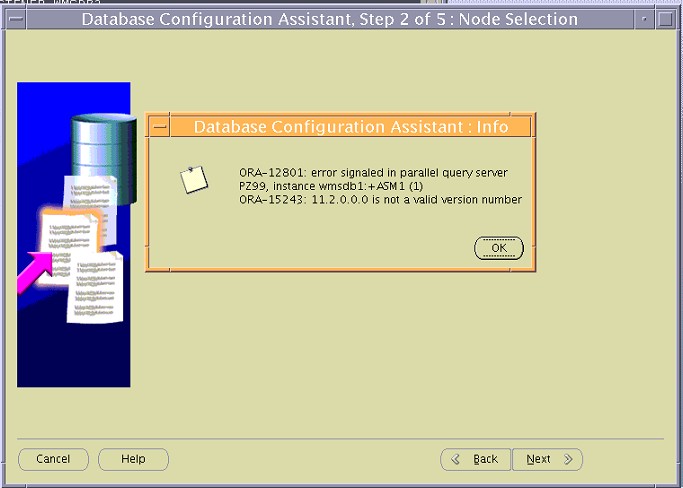
AIX系统以前装过11G R2 RAC,现因为项目要求11G R1,已经重装了系统,然后安装R1,在安装到DBCA配置ASM的时候,出现ORA-12801/ORA-15243错误
ORA-12801: error signaled in parallel query server PZ99, instance wmsdb1:+ASM1(1)
ORA-15243: 11.2.0.0.0 is not a valid version number
通过SQLPLUS登录ASM1实例查询发现该有一个ORADATA磁盘组,包含了一个/dev/rhdisk1.通过询问,得出结论是这个磁盘组以前是安装R2的时候作为存储OCR和VOTINGDISK使用,重装系统的时候未对该磁盘进行处理.
处理思路[想办法清除磁盘中asm信息]
1.尝试通过sqlplus 删除该磁盘组,报该磁盘组处于dismount状态
2.尝试mount该磁盘组,提示版本无效(ORA-15243)[当前的asm程序是11.1而磁盘组信息是11.2 程序当然不一致了]
3.直接使用dd清理该asm disk header信息(dd if=/dev/zero of=/dev/rhdisk1 bs=4096 count=1)
4.重新运行dbca一切工作正常
MOS中相关文章[1460997.1]只适合linux asmlib情况
Applies to:
Oracle Server - Enterprise Edition - Version 11.1.0.7 and later
Information in this document applies to any platform.

Symptoms
On : 11.1.0.7 version, STORAGE

When attempting to create database or query gv$asm_diskgroup,
the following error occurs.

ERROR
-----------------------
ORA-12801: error signaled in parallel query server PZ99, instance dchilcmsdb2.hq.navteq.com:+ASM2 (2)
ORA-15243: 11.2.0.0.0 is not a valid version number


STEPS
-----------------------
The issue can be reproduced at will with the following steps:
1. Previously had 11GR2 installed and configured. Removed this installation then installed
   11.1.0.7  and created diskgroups using some of the same disks previously used.
2. Attempt to create database and receive the errors. Drop the newly
   created diskgroups and query the view still get same errors.


BUSINESS IMPACT
-----------------------
The issue has the following business impact:
Due to this issue, users cannot create new database.

Changes
 Removed 11.2.0.1 installation and installed 11.1.0.7 software without cleaning up all of
 the diskgroup information from previous installation.

Cause
All the current information shows that we are using correct binaries and
that the diskgroups that are being used have correct comparability settings.
HTML shows that the disks for the old diskgroup are still being discovered.
This in conjunction with the text of the error as follows shows that
we are picking up 11.2.0.0.0 as version from somewhere.
ORA-15243: 11.2.0.0.0 is not a valid version number

Problem was caused by the disks that had been used for the
OCR/Voting disk diskgroup in 11GR2 installation still being present and accessible.


Solution
As the root user execute /etc/init.d/oracleasm/deletedisk command against all the disks
that were previously used for the OCR/Voting disk diskgroup then try the operation again.