
启动数据库报错
SQL> startup
ORACLE instance started.

Total System Global Area  167772160 bytes
Fixed Size                  1260720 bytes
Variable Size             150995792 bytes
Database Buffers            8388608 bytes
Redo Buffers                7127040 bytes
Database mounted.
ORA-01092: ORACLE instance terminated. Disconnection forced

alert.log导错
Wed Aug 10 12:31:11 2011
Errors in file /u01/admin/xienfei/udump/xff_ora_8568.trc:
ORA-00600: internal error code, arguments: [ktbdchk1: bad dscn], [], [], [], [], [], [], []

xff_ora_8568.trc内容
[ktbdchk] -- readers_dsz -- bad dscn
scn: 0x0000.b1e60c00scn: 0x0000.0011fca1
*** 2011-08-10 12:31:11.998
ksedmp: internal or fatal error
ORA-00600: internal error code, arguments: [ktbdchk1: bad dscn], [], [], [], [], [], [], []
Current SQL statement for this session:
select ctime, mtime, stime from obj$ where obj# = :1
根据上面错误判断,错误的scn为b1e60c00,不是整个数据文件的scn错误
而应该是一个对象的scn错误,所以继续在xff_ora_8568.trc文件中查找b1e60c00
找到结果如下:
Block header dump:  0x0040007a
 Object id on Block? Y
 seg/obj: 0x12  csc: 0x00.b1e60c00  itc: 1  flg: -  typ: 1 - DATA
     fsl: 0  fnx: 0x0 ver: 0x01

 Itl           Xid                  Uba         Flag  Lck        Scn/Fsc
0x01   0x0008.02a.000001d9  0x00802341.01bb.04  ----    1  fsc 0x0000.0011ae7c

data_block_dump,data header at 0x20fd6044
===============
tsiz: 0x1fb8
hsiz: 0xea
pbl: 0x20fd6044
bdba: 0x0040007a
     76543210
flag=--------
ntab=1
nrow=108
frre=-1
fsbo=0xea
fseo=0x453
avsp=0x369
tosp=0x369
0xe:pti[0]      nrow=108        offs=0

根据这个提示,发现dba为:0040007a的对象异常,查找对应的file_id,block
SQL> SELECT DBMS_UTILITY.data_block_address_file (TO_NUMBER ('40007a', 'XXXXXXXX')) file_id,
  2          DBMS_UTILITY.data_block_address_block (TO_NUMBER ('40007a', 'XXXXXXXX')) block_id
  3    FROM DUAL;

   FILE_ID   BLOCK_ID
---------- ----------
         1        122

使用bbed查看file=1,block=122的scn情况
BBED> p ktbbh
struct ktbbh, 48 bytes                      @20
   ub1 ktbbhtyp                             @20       0x01 (KDDBTDATA)
   union ktbbhsid, 4 bytes                  @24
      ub4 ktbbhsg1                          @24       0x00000012
      ub4 ktbbhod1                          @24       0x00000012
   struct ktbbhcsc, 8 bytes                 @28
      ub4 kscnbas                           @28       0xb1e60c00
      ub2 kscnwrp                           @32       0x0000
   b2 ktbbhict                              @36       1
   ub1 ktbbhflg                             @38       0x02 (NONE)
   ub1 ktbbhfsl                             @39       0x00
   ub4 ktbbhfnx                             @40       0x00000000
   struct ktbbhitl[0], 24 bytes             @44
      struct ktbitxid, 8 bytes              @44
         ub2 kxidusn                        @44       0x0008
         ub2 kxidslt                        @46       0x002a
         ub4 kxidsqn                        @48       0x000001d9
      struct ktbituba, 8 bytes              @52
         ub4 kubadba                        @52       0x00802341
         ub2 kubaseq                        @56       0x01bb
         ub1 kubarec                        @58       0x04
      ub2 ktbitflg                          @60       0x0001 (NONE)
      union _ktbitun, 2 bytes               @62
         b2 _ktbitfsc                       @62       0
         ub2 _ktbitwrp                      @62       0x0000
      ub4 ktbitbas                          @64       0x0011ae7c

果然发现scn为0xb1e60c00,现在把其修改为:0x00124ac6(注意规则,一般linux下都是倒序)
BBED> set offset 28
        OFFSET          28

BBED> m /x c64a1200
BBED-00209: invalid number (c64a1200)
小技巧,一次性修改报错,尝试一次修改一点

BBED> m /x c64a
 File: /u01/oradata/xienfei/system01.dbf (0)
 Block: 122              Offsets:   28 to   43           Dba:0x00000000
------------------------------------------------------------------------
 c64ae6b1 00000000 01000200 00000000

 <32 bytes per line>

BBED> set offset +2
        OFFSET          30

BBED> m /x 1200
 File: /u01/oradata/xienfei/system01.dbf (0)
 Block: 122              Offsets:   30 to   45           Dba:0x00000000
------------------------------------------------------------------------
 12000000 00000100 02000000 00000800

 <32 bytes per line>

BBED> set offset -2
        OFFSET          28

BBED> dump
 File: /u01/oradata/xienfei/system01.dbf (0)
 Block: 122              Offsets:   28 to   43           Dba:0x00000000
------------------------------------------------------------------------
 c64a1200 00000000 01000200 00000000

 <32 bytes per line>

BBED> sum apply
Check value for File 0, Block 122:
current = 0x3a4e, required = 0x3a4e

SQL> startup
ORACLE instance started.

Total System Global Area  167772160 bytes
Fixed Size                  1260720 bytes
Variable Size             150995792 bytes
Database Buffers            8388608 bytes
Redo Buffers                7127040 bytes
Database mounted.
Database opened.
Category Archives: Oracle备份恢复
rman 实现在线传输表空间(>=10g)
rman操作
RMAN> transport tablespace O_ORACLE
2> tablespace destination ‘F:\rmanbackup\td’
3> auxiliary destination ‘F:\rmanbackup\ad’;
RMAN-05026: 警告: 假定以下表空间集适用于指定的时间点
表空间列表要求具有 UNDO 段
表空间 SYSTEM
表空间 UNDOTBS1
使用 SID=’enEv’ 创建自动实例
供自动实例使用的初始化参数:
db_name=XFF
db_unique_name=enEv_tspitr_XFF
compatible=11.2.0.0.0
db_block_size=8192
db_files=200
sga_target=280M
processes=50
db_create_file_dest=F:\rmanbackup\ad
log_archive_dest_1=’location=F:\rmanbackup\ad’
#No auxiliary parameter file used
启动自动实例 XFF
Oracle 实例已启动
系统全局区域总计 292933632 字节
Fixed Size 1374164 字节
Variable Size 100665388 字节
Database Buffers 184549376 字节
Redo Buffers 6344704 字节
自动实例已创建
对恢复集表空间运行 TRANSPORT_SET_CHECK
TRANSPORT_SET_CHECK 已成功完成
内存脚本的内容:
{
# set requested point in time
set until scn 10903430793309;
# restore the controlfile
restore clone controlfile;
# mount the controlfile
sql clone ‘alter database mount clone database’;
# archive current online log
sql ‘alter system archive log current’;
}
正在执行内存脚本
正在执行命令: SET until clause
启动 restore 于 12-9月 -11
分配的通道: ORA_AUX_DISK_1
通道 ORA_AUX_DISK_1: SID=59 设备类型=DISK
通道 ORA_AUX_DISK_1: 正在开始还原数据文件备份集
通道 ORA_AUX_DISK_1: 正在还原控制文件
通道 ORA_AUX_DISK_1: 正在读取备份片段 F:\RMANBACKUP\9_12_0HMMD2S8_1_1
通道 ORA_AUX_DISK_1: 段句柄 = F:\RMANBACKUP\9_12_0HMMD2S8_1_1 标记 = TAG20110912
T215425
通道 ORA_AUX_DISK_1: 已还原备份片段 1
通道 ORA_AUX_DISK_1: 还原完成, 用时: 00:00:01
输出文件名=F:\RMANBACKUP\AD\XFF\CONTROLFILE\O1_MF_76W4C7XM_.CTL
完成 restore 于 12-9月 -11
sql 语句: alter database mount clone database
sql 语句: alter system archive log current
内存脚本的内容:
{
# set requested point in time
set until scn 10903430793309;
# set destinations for recovery set and auxiliary set datafiles
set newname for clone datafile 1 to new;
set newname for clone datafile 3 to new;
set newname for clone datafile 2 to new;
set newname for clone tempfile 1 to new;
set newname for datafile 6 to
“F:\rmanbackup\td\O_ORACLE.DBF”;
# switch all tempfiles
switch clone tempfile all;
# restore the tablespaces in the recovery set and the auxiliary set
restore clone datafile 1, 3, 2, 6;
switch clone datafile all;
}
正在执行内存脚本
正在执行命令: SET until clause
正在执行命令: SET NEWNAME
正在执行命令: SET NEWNAME
正在执行命令: SET NEWNAME
正在执行命令: SET NEWNAME
正在执行命令: SET NEWNAME
临时文件 1 在控制文件中已重命名为 F:\RMANBACKUP\AD\XFF\DATAFILE\O1_MF_TEMP_%U_.T
MP
启动 restore 于 12-9月 -11
使用通道 ORA_AUX_DISK_1
通道 ORA_AUX_DISK_1: 正在开始还原数据文件备份集
通道 ORA_AUX_DISK_1: 正在指定从备份集还原的数据文件
通道 ORA_AUX_DISK_1: 将数据文件 00001 还原到 F:\RMANBACKUP\AD\XFF\DATAFILE\O1_MF
_SYSTEM_%U_.DBF
通道 ORA_AUX_DISK_1: 将数据文件 00003 还原到 F:\RMANBACKUP\AD\XFF\DATAFILE\O1_MF
_UNDOTBS1_%U_.DBF
通道 ORA_AUX_DISK_1: 将数据文件 00002 还原到 F:\RMANBACKUP\AD\XFF\DATAFILE\O1_MF
_SYSAUX_%U_.DBF
通道 ORA_AUX_DISK_1: 将数据文件 00006 还原到 F:\rmanbackup\td\O_ORACLE.DBF
通道 ORA_AUX_DISK_1: 正在读取备份片段 F:\RMANBACKUP\9_12_0GMMD2KI_1_1
通道 ORA_AUX_DISK_1: 段句柄 = F:\RMANBACKUP\9_12_0GMMD2KI_1_1 标记 = TAG20110912
T215425
通道 ORA_AUX_DISK_1: 已还原备份片段 1
通道 ORA_AUX_DISK_1: 还原完成, 用时: 00:03:55
完成 restore 于 12-9月 -11
数据文件 1 已转换成数据文件副本
输入数据文件副本 RECID=19 STAMP=761695711 文件名=F:\RMANBACKUP\AD\XFF\DATAFILE\O
1_MF_SYSTEM_76W4CMJO_.DBF
数据文件 3 已转换成数据文件副本
输入数据文件副本 RECID=20 STAMP=761695711 文件名=F:\RMANBACKUP\AD\XFF\DATAFILE\O
1_MF_UNDOTBS1_76W4CSVY_.DBF
数据文件 2 已转换成数据文件副本
输入数据文件副本 RECID=21 STAMP=761695711 文件名=F:\RMANBACKUP\AD\XFF\DATAFILE\O
1_MF_SYSAUX_76W4CMM9_.DBF
数据文件 6 已转换成数据文件副本
输入数据文件副本 RECID=22 STAMP=761695711 文件名=F:\RMANBACKUP\TD\O_ORACLE.DBF
内存脚本的内容:
{
# set requested point in time
set until scn 10903430793309;
# online the datafiles restored or switched
sql clone “alter database datafile 1 online”;
sql clone “alter database datafile 3 online”;
sql clone “alter database datafile 2 online”;
sql clone “alter database datafile 6 online”;
# recover and open resetlogs
recover clone database tablespace “O_ORACLE”, “SYSTEM”, “UNDOTBS1”, “SYSAUX” de
lete archivelog;
alter clone database open resetlogs;
}
正在执行内存脚本
正在执行命令: SET until clause
sql 语句: alter database datafile 1 online
sql 语句: alter database datafile 3 online
sql 语句: alter database datafile 2 online
sql 语句: alter database datafile 6 online
启动 recover 于 12-9月 -11
使用通道 ORA_AUX_DISK_1
正在开始介质的恢复
线程 1 序列 177 的归档日志已作为文件 E:\ORACLE\ARCHIVELOG\ARC0000000177_07534894
09.0001 存在于磁盘上
线程 1 序列 178 的归档日志已作为文件 E:\ORACLE\ARCHIVELOG\ARC0000000178_07534894
09.0001 存在于磁盘上
归档日志文件名=E:\ORACLE\ARCHIVELOG\ARC0000000177_0753489409.0001 线程=1 序列=17
7
归档日志文件名=E:\ORACLE\ARCHIVELOG\ARC0000000178_0753489409.0001 线程=1 序列=17
8
介质恢复完成, 用时: 00:00:16
完成 recover 于 12-9月 -11
数据库已打开
内存脚本的内容:
{
# make read only the tablespace that will be exported
sql clone ‘alter tablespace O_ORACLE read only’;
# create directory for datapump export
sql clone “create or replace directory STREAMS_DIROBJ_DPDIR as ”
F:\rmanbackup\td””;
}
正在执行内存脚本
sql 语句: alter tablespace O_ORACLE read only
sql 语句: create or replace directory STREAMS_DIROBJ_DPDIR as ”F:\rmanbackup\td
”
正在执行元数据导出…
EXPDP> 启动 “SYS”.”TSPITR_EXP_enEv”:
EXPDP> 处理对象类型 TRANSPORTABLE_EXPORT/PLUGTS_BLK
EXPDP> 处理对象类型 TRANSPORTABLE_EXPORT/TABLE
EXPDP> 处理对象类型 TRANSPORTABLE_EXPORT/INDEX
EXPDP> 处理对象类型 TRANSPORTABLE_EXPORT/CONSTRAINT/CONSTRAINT
EXPDP> 处理对象类型 TRANSPORTABLE_EXPORT/INDEX_STATISTICS
EXPDP> 处理对象类型 TRANSPORTABLE_EXPORT/COMMENT
EXPDP> 处理对象类型 TRANSPORTABLE_EXPORT/TRIGGER
EXPDP> 处理对象类型 TRANSPORTABLE_EXPORT/TABLE_STATISTICS
EXPDP> 处理对象类型 TRANSPORTABLE_EXPORT/POST_INSTANCE/PLUGTS_BLK
EXPDP> 已成功加载/卸载了主表 “SYS”.”TSPITR_EXP_enEv”
EXPDP> **********************************************************************
********
EXPDP> SYS.TSPITR_EXP_enEv 的转储文件集为:
EXPDP> F:\RMANBACKUP\TD\DMPFILE.DMP
EXPDP> **********************************************************************
********
EXPDP> 可传输表空间 O_ORACLE 所需的数据文件:
EXPDP> F:\RMANBACKUP\TD\O_ORACLE.DBF
EXPDP> 作业 “SYS”.”TSPITR_EXP_enEv” 已于 22:12:39 成功完成
导出完毕
/*
The following command may be used to import the tablespaces.
Substitute values for
impdp
es= F:\rmanbackup\td\O_ORACLE.DBF
*/
————————————————————–
— Start of sample PL/SQL script for importing the tablespaces
————————————————————–
— creating directory objects
CREATE DIRECTORY STREAMS$DIROBJ$1 AS ‘F:\rmanbackup\td\’;
CREATE DIRECTORY STREAMS$DIROBJ$DPDIR AS ‘F:\rmanbackup\td’;
/* PL/SQL Script to import the exported tablespaces */
DECLARE
— the datafiles
tbs_files dbms_streams_tablespace_adm.file_set;
cvt_files dbms_streams_tablespace_adm.file_set;
— the dumpfile to import
dump_file dbms_streams_tablespace_adm.file;
dp_job_name VARCHAR2(30) := NULL;
— names of tablespaces that were imported
ts_names dbms_streams_tablespace_adm.tablespace_set;
BEGIN
— dump file name and location
dump_file.file_name := ‘dmpfile.dmp’;
dump_file.directory_object := ‘STREAMS$DIROBJ$DPDIR’;
— forming list of datafiles for import
tbs_files( 1).file_name := ‘O_ORACLE.DBF’;
tbs_files( 1).directory_object := ‘STREAMS$DIROBJ$1’;
— import tablespaces
dbms_streams_tablespace_adm.attach_tablespaces(
datapump_job_name => dp_job_name,
dump_file => dump_file,
tablespace_files => tbs_files,
converted_files => cvt_files,
tablespace_names => ts_names);
— output names of imported tablespaces
IF ts_names IS NOT NULL AND ts_names.first IS NOT NULL THEN
FOR i IN ts_names.first .. ts_names.last LOOP
dbms_output.put_line(‘imported tablespace ‘|| ts_names(i));
END LOOP;
END IF;
END;
/
— dropping directory objects
DROP DIRECTORY STREAMS$DIROBJ$1;
DROP DIRECTORY STREAMS$DIROBJ$DPDIR;
————————————————————–
— End of sample PL/SQL script
————————————————————–
删除自动实例
关闭自动实例
数据库已关闭
数据库已卸装
Oracle 实例已关闭
自动实例已删除
已删除辅助实例文件 F:\RMANBACKUP\AD\XFF\DATAFILE\O1_MF_TEMP_76W4N51K_.TMP
已删除辅助实例文件 F:\RMANBACKUP\AD\XFF\ONLINELOG\O1_MF_3_76W4MVQS_.LOG
已删除辅助实例文件 F:\RMANBACKUP\AD\XFF\ONLINELOG\O1_MF_2_76W4MV1H_.LOG
已删除辅助实例文件 F:\RMANBACKUP\AD\XFF\ONLINELOG\O1_MF_1_76W4MT2Q_.LOG
已删除辅助实例文件 F:\RMANBACKUP\AD\XFF\DATAFILE\O1_MF_SYSAUX_76W4CMM9_.DBF
已删除辅助实例文件 F:\RMANBACKUP\AD\XFF\DATAFILE\O1_MF_UNDOTBS1_76W4CSVY_.DBF
已删除辅助实例文件 F:\RMANBACKUP\AD\XFF\DATAFILE\O1_MF_SYSTEM_76W4CMJO_.DBF
已删除辅助实例文件 F:\RMANBACKUP\AD\XFF\CONTROLFILE\O1_MF_76W4C7XM_.CTL
最终生成需要处理的文件与处理
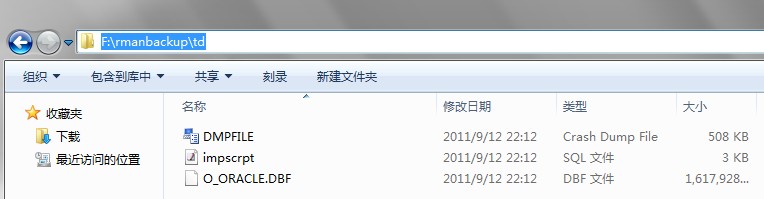
复制上面文件到目标端适当位置,然后可以修改并执行sql文件实现表传输表空间,或者使用impdp只是实现
相关说明
1、在使用rman之前,需要检查平台支持情况,如果不支持,需要先转换,然后使用catalog start with处理(10g),如果9i其他变通办法
2、在rman处理传输表空间的过程中,可以指定scn或者时间,既不完成恢复
UNTIL SCN 11379;或者UNTIL TIME ‘SYSDATE-1’;
3、rman的备份不能是resetlogs 打开数据库之前的
4、主要是利用10g的辅助实例自动实现处理,如果是9i,需要人工建立辅助实例
Oracle 传输表空间
0、检查平台信息
所有tts支持平台
SELECT * FROM V$TRANSPORTABLE_PLATFORM;
当前系统平台情况
SELECT d.PLATFORM_NAME, ENDIAN_FORMAT
FROM V$TRANSPORTABLE_PLATFORM tp, V$DATABASE d
WHERE tp.PLATFORM_NAME = d.PLATFORM_NAME;
一、源端操作
检查是否符合TTS要求
SQL> EXECUTE DBMS_TTS.TRANSPORT_SET_CHECK(‘ODU’, TRUE);
PL/SQL procedure successfully completed.
SQL> SELECT * FROM TRANSPORT_SET_VIOLATIONS;
no rows selected
SQL> SELECT COUNT(*) FROM DBA_TABLES WHERE TABLESPACE_NAME=’ODU’;
COUNT(*)
———-
59
SQL> SELECT file_name from dba_data_files where tablespace_name=’ODU’;
FILE_NAME
————————————————–
/opt/oracle/oradata/chf/odu01.dbf
/opt/oracle/oradata/chf/odu02.dbf
需要传输表空间至于readonly模式
SQL> ALTER TABLESPACE ODU READ ONLY;
Tablespace altered.
导出表空间元数据
[oracle@node1 ~]$ exp userid=\’/ as sysdba\’ tablespaces=ODU file=/tmp/ODU.dmp transport_tablespace=y
Export: Release 10.2.0.4.0 – Production on Sun Sep 11 10:01:52 2011
Copyright (c) 1982, 2007, Oracle. All rights reserved.
Connected to: Oracle Database 10g Enterprise Edition Release 10.2.0.4.0 – 64bit Production
With the Partitioning, OLAP, Data Mining and Real Application Testing options
Export done in ZHS16GBK character set and AL16UTF16 NCHAR character set
Note: table data (rows) will not be exported
About to export transportable tablespace metadata…
For tablespace ODU …
. exporting cluster definitions
. exporting table definitions
. . exporting table T_ODU_03
. . exporting table T_ODU_01
. . exporting table T_ODU
. . exporting table DB
. . exporting table NODE
. . exporting table CONF
. . exporting table DBINC
. . exporting table CKP
. . exporting table TS
. . exporting table TSATT
. . exporting table DF
. . exporting table DFATT
. . exporting table TF
. . exporting table TFATT
. . exporting table OFFR
. . exporting table RR
. . exporting table RT
. . exporting table ORL
. . exporting table RLH
. . exporting table AL
. . exporting table BS
. . exporting table BP
. . exporting table BCF
. . exporting table CCF
. . exporting table XCF
. . exporting table BSF
. . exporting table BDF
. . exporting table CDF
. . exporting table XDF
. . exporting table BRL
. . exporting table BCB
. . exporting table CCB
. . exporting table SCR
. . exporting table SCRL
. . exporting table CONFIG
. . exporting table XAL
. . exporting table RSR
. . exporting table FB
. . exporting table GRSP
. . exporting table ROUT
. . exporting table RCVER
. . exporting table F_DROP
. . exporting table T_QUERY
. . exporting table T_UNDO
. . exporting table A
. . exporting table T1
. . exporting table T2_1
. . exporting table T2
. . exporting table T_MV
. . exporting table TAB2
. . exporting table MLOG$_T_MV
. . exporting table T_N
. . exporting table T_M
. . exporting table MLOG$_T_N
. . exporting table T_1
. . exporting table T_2
. . exporting table T_3
. . exporting table T_4
. . exporting table T_5
. exporting referential integrity constraints
. exporting triggers
. end transportable tablespace metadata export
Export terminated successfully without warnings.
SQL> alter tablespace odu read write;
Tablespace altered.
传输到目标段
[oracle@node1 ~]$ scp /opt/oracle/oradata/chf/odu0* 192.168.11.12:/opt/oracle/oradata/test
The authenticity of host ‘192.168.11.12 (192.168.11.12)’ can’t be established.
RSA key fingerprint is db:3c:b4:34:7f:d7:e4:97:ab:b6:8b:b0:ab:22:43:35.
Are you sure you want to continue connecting (yes/no)? yes
Warning: Permanently added ‘192.168.11.12’ (RSA) to the list of known hosts.
oracle@192.168.11.12’s password:
odu01.dbf 100% 100MB 3.3MB/s 00:30
odu02.dbf 100% 11GB 2.8MB/s 1:05:00
[oracle@node1 ~]$ scp /tmp/ODU.dmp 192.168.11.12:/tmp
oracle@192.168.11.12’s password:
Permission denied, please try again.
oracle@192.168.11.12’s password:
ODU.dmp 100% 456KB 456.0KB/s 00:00
二、目标端操作
导入元数据库
[oracle@ECP-UC-DB1 ~]$ imp userid=\’/ as sysdba\’ tablespaces=ODU file=/tmp/ODU.dmp transport_tablespace=y datafiles=/opt/oracle/oradata/test/odu01.dbf, /opt/oracle/oradata/test/odu02.dbf fromuser=chf touser=chf
Import: Release 10.2.0.4.0 – Production on Sun Sep 11 11:13:25 2011
Copyright (c) 1982, 2007, Oracle. All rights reserved.
Connected to: Oracle Database 10g Enterprise Edition Release 10.2.0.4.0 – 64bit Production
With the Partitioning, OLAP, Data Mining and Real Application Testing options
Export file created by EXPORT:V10.02.01 via conventional path
About to import transportable tablespace(s) metadata…
import done in ZHS16GBK character set and AL16UTF16 NCHAR character set
. importing CHF’s objects into CHF
. . importing table “T_ODU_03”
. . importing table “T_ODU_01”
. . importing table “T_ODU”
. . importing table “DB”
. . importing table “NODE”
. . importing table “CONF”
. . importing table “DBINC”
. . importing table “CKP”
. . importing table “TS”
. . importing table “TSATT”
. . importing table “DF”
. . importing table “DFATT”
. . importing table “TF”
. . importing table “TFATT”
. . importing table “OFFR”
. . importing table “RR”
. . importing table “RT”
. . importing table “ORL”
. . importing table “RLH”
. . importing table “AL”
. . importing table “BS”
. . importing table “BP”
. . importing table “BCF”
. . importing table “CCF”
. . importing table “XCF”
. . importing table “BSF”
. . importing table “BDF”
. . importing table “CDF”
. . importing table “XDF”
. . importing table “BRL”
. . importing table “BCB”
. . importing table “CCB”
. . importing table “SCR”
. . importing table “SCRL”
. . importing table “CONFIG”
. . importing table “XAL”
. . importing table “RSR”
. . importing table “FB”
. . importing table “GRSP”
. . importing table “ROUT”
. . importing table “RCVER”
. . importing table “F_DROP”
. . importing table “T_QUERY”
. . importing table “T_UNDO”
. . importing table “A”
. . importing table “T1”
. . importing table “T2_1”
. . importing table “T2”
. . importing table “T_MV”
. . importing table “TAB2”
. . importing table “MLOG$_T_MV”
. . importing table “T_N”
. . importing table “T_M”
. . importing table “MLOG$_T_N”
. . importing table “T_1”
. . importing table “T_2”
. . importing table “T_3”
. . importing table “T_4”
. . importing table “T_5”
About to enable constraints…
Import terminated successfully without warnings.
SQL> select tablespace_name ,status from dba_tablespaces;
TABLESPACE_NAME STATUS
—————————— ———
SYSTEM ONLINE
UNDOTBS1 ONLINE
SYSAUX ONLINE
TEMP ONLINE
USERS ONLINE
XFF ONLINE
ODU READ ONLY
7 rows selected.
修改为readwrite模式(根据需求)
SQL> alter tablespace odu read write;
Tablespace altered.
SQL> SELECT COUNT(*) FROM DBA_TABLES WHERE TABLESPACE_NAME=’ODU’;
COUNT(*)
———-
59
三、相关说明
1、如果平台字节顺序不同,需要使用rman convert转换
2、导出导入元数据可以使用data pump实现
3、检查视图、触发器、包、过程、函数等对象,如果没有需要使用exp/imp row=n导入或者人工建立
bbed 修改datafile header
SQL> startup
ORACLE instance started.

Total System Global Area  236000356 bytes
Fixed Size                   451684 bytes
Variable Size             201326592 bytes
Database Buffers           33554432 bytes
Redo Buffers                 667648 bytes
Database mounted.
ORA-01113: file 2 needs media recovery
ORA-01110: data file 2: '/opt/oracle/oradata/xifenfei/xff01.dbf'
提示数据文件2需要恢复,首选是recover datafile 2;,如果失败,可以考虑bbed修改scn的办法

SQL> select file#,to_char(checkpoint_change#,'999999999999') from v$datafile;

     FILE# TO_CHAR(CHECK
---------- -------------
         1  107374278108
         2  107374278108
         3  107374278108
         4  107374278108
         5  107374278108
         6  107374278108
         7  107374278108
         8  107374278108
         9  107374278108
        10  107374278108
        11  107374278108

11 rows selected.

SQL> select file#,online_status,to_char(change#,'999999999999') from v$recover_file;

     FILE# ONLINE_ TO_CHAR(CHANG
---------- ------- -------------
         2 ONLINE   107374277136

[oracle@localhost tmp]$ bbed parfile=/tmp/parfile.cnf
Password:

BBED: Release 2.0.0.0.0 - Limited Production on Mon Aug 22 06:05:34 2011

Copyright (c) 1982, 2002, Oracle Corporation.  All rights reserved.

************* !!! For Oracle Internal Use only !!! ***************

BBED> info
 File#  Name                                                        Size(blks)
 -----  ----                                                        ----------
     1  /opt/oracle/oradata/xifenfei/system01.dbf                         1280
     2  /opt/oracle/oradata/xifenfei/xff01.dbf                            1280

BBED> set dba 1,1
        DBA             0x00400001 (4194305 1,1)

BBED> p kcvfhckp
struct kcvfhckp, 36 bytes                   @140
   struct kcvcpscn, 8 bytes                 @140
*    ub4 kscnbas                           @140      0x000175dc
      ub2 kscnwrp                           @144      0x0019
* ub4 kcvcptim                             @148      0x2d49fbbb
   ub2 kcvcpthr                             @152      0x0001
   union u, 12 bytes                        @156
      struct kcvcprba, 12 bytes             @156
         ub4 kcrbaseq                       @156      0x00000005
         ub4 kcrbabno                       @160      0x00008e05
         ub2 kcrbabof                       @164      0x0010
      struct kcvcptr, 12 bytes              @156
         struct kcrtrscn, 8 bytes           @156
            ub4 kscnbas                     @156      0x00000005
            ub2 kscnwrp                     @160      0x8e05
         ub4 kcrtrtim                       @164      0x09110010
   ub1 kcvcpetb[0]                          @168      0x02
   ub1 kcvcpetb[1]                          @169      0x00
   ub1 kcvcpetb[2]                          @170      0x00
   ub1 kcvcpetb[3]                          @171      0x00
   ub1 kcvcpetb[4]                          @172      0x00
   ub1 kcvcpetb[5]                          @173      0x00
   ub1 kcvcpetb[6]                          @174      0x00
   ub1 kcvcpetb[7]                          @175      0x00

BBED> p kcvfhcpc
*ub4 kcvfhcpc                                @176      0x0000007a

BBED> p kcvfhccc
*ub4 kcvfhccc                                @184      0x00000079
星号表示使用bbed修改datafile header scn需要考虑的地方

SQL> select to_char(to_number('19000175dc','xxxxxxxxxxxx'),'999999999999') from dual;

TO_CHAR(TO_NU
-------------
 107374278108
证实system01.dbf的scn为107374278108和v$datafile查询到的一致

BBED> set dba 2,1
        DBA             0x00800001 (8388609 2,1)

BBED> p kcvfhckp
struct kcvfhckp, 36 bytes                   @140
   struct kcvcpscn, 8 bytes                 @140
      ub4 kscnbas                           @140      0x00017210
      ub2 kscnwrp                           @144      0x0019
   ub4 kcvcptim                             @148      0x2d49fa27
   ub2 kcvcpthr                             @152      0x0001
   union u, 12 bytes                        @156
      struct kcvcprba, 12 bytes             @156
         ub4 kcrbaseq                       @156      0x00000005
         ub4 kcrbabno                       @160      0x00006f18
         ub2 kcrbabof                       @164      0x0010
      struct kcvcptr, 12 bytes              @156
         struct kcrtrscn, 8 bytes           @156
            ub4 kscnbas                     @156      0x00000005
            ub2 kscnwrp                     @160      0x6f18
         ub4 kcrtrtim                       @164      0x09110010
   ub1 kcvcpetb[0]                          @168      0x02
   ub1 kcvcpetb[1]                          @169      0x00
   ub1 kcvcpetb[2]                          @170      0x00
   ub1 kcvcpetb[3]                          @171      0x00
   ub1 kcvcpetb[4]                          @172      0x00
   ub1 kcvcpetb[5]                          @173      0x00
   ub1 kcvcpetb[6]                          @174      0x00
   ub1 kcvcpetb[7]                          @175      0x00

BBED> p kcvfhcpc
ub4 kcvfhcpc                                @176      0x00000034

BBED> p kcvfhccc
ub4 kcvfhccc                                @184      0x00000033


SQL> select to_char(to_number('1900017210','xxxxxxxxxxxx'),'999999999999') from dual;

TO_CHAR(TO_NU
-------------
 107374277136
和v$recover_file视图中查询出来一致

BBED> set dba 2,1 offset 140
        DBA             0x00800001 (8388609 2,1)
        OFFSET          140

BBED> show
        FILE#           2
        BLOCK#          1
        OFFSET          140
        DBA             0x00800001 (8388609 2,1)
        FILENAME        /opt/oracle/oradata/xifenfei/xff01.dbf
        BIFILE          bifile.bbd
        LISTFILE        /tmp/list
        BLOCKSIZE       8192
        MODE            Edit
        EDIT            Unrecoverable
        IBASE           Dec
        OBASE           Dec
        WIDTH           80
        COUNT           32
        LOGFILE         log.bbd
        SPOOL           No

BBED> m /x dc750100
 File: /opt/oracle/oradata/xifenfei/xff01.dbf (2)
 Block: 1                Offsets:  140 to  171           Dba:0x00800001
------------------------------------------------------------------------
 dc750100 19000000 27fa492d 01000000 05000000 186f0000 10001109 02000000

 <32 bytes per line>

BBED> m /x bbfb492d offset 158
 File: /opt/oracle/oradata/xifenfei/xff01.dbf (2)
 Block: 1                Offsets:  158 to  189           Dba:0x00800001
------------------------------------------------------------------------
 bbfb492d 00001000 11090200 00000000 00003400 00004cc0 492d3300 00000000

 <32 bytes per line>

BBED> m /x 7a000000 offset 176
 File: /opt/oracle/oradata/xifenfei/xff01.dbf (2)
 Block: 1                Offsets:  176 to  207           Dba:0x00800001
------------------------------------------------------------------------
 7a000000 4cc0492d 33000000 00000000 00000000 00000000 00000000 00000000

 <32 bytes per line>

BBED> m /x 79000000 offset 184
 File: /opt/oracle/oradata/xifenfei/xff01.dbf (2)
 Block: 1                Offsets:  184 to  215           Dba:0x00800001
------------------------------------------------------------------------
 79000000 00000000 00000000 00000000 00000000 00000000 00000000 00000000

 <32 bytes per line>
注意:p打印出来的值和m修改的值可能不是完全一致(和cpu的计算类型有关,常用的intel cpu中是倒序存储),可以选择先dump正确的相关值,然后m修改
如:p打印出来的值为:80084d1f时,m修改时要为: 1f4d0880

BBED> sum apply dba 2,1
Check value for File 2, Block 1:
current = 0x7ece, required = 0x7ece


SQL> shutdown immediate
ORA-01109: database not open

Database dismounted.
ORACLE instance shut down.
SQL> startup
ORACLE instance started.

Total System Global Area  236000356 bytes
Fixed Size                   451684 bytes
Variable Size             201326592 bytes
Database Buffers           33554432 bytes
Redo Buffers                 667648 bytes
Database mounted.
ORA-01122: database file 2 failed verification check
ORA-01110: data file 2: '/opt/oracle/oradata/xifenfei/xff01.dbf'
ORA-01207: file is more recent than controlfile - old controlfile
提示控制文件太老,需要重建控制文件

SQL> shutdown abort
ORACLE instance shut down.
SQL> STARTUP NOMOUNT
CREATE CONTROLFILE REUSE DATABASE "XIFENFEI" NORESETLOGS  ARCHIVELOG
    MAXLOGFILES 50
    MAXLOGMEMBERS 5
    MAXDATAFILES 100
    MAXINSTANCES 1
    MAXLOGHISTORY 226
LOGFILE
  GROUP 1 '/opt/oracle/oradata/xifenfei/redo01.log'  SIZE 100M,
  GROUP 2 '/opt/oracle/oradata/xifenfei/redo02.log'  SIZE 100M,
  GROUP 3 '/opt/oracle/oradata/xifenfei/redo03.log'  SIZE 100M
DATAFILE
  '/opt/oracle/oradata/xifenfei/system01.dbf',
  '/opt/oracle/oradata/xifenfei/xff01.dbf',
  '/opt/oracle/oradata/xifenfei/cwmlite01.dbf',
  '/opt/oracle/oradata/xifenfei/drsys01.dbf',
  '/opt/oracle/oradata/xifenfei/example01.dbf',
  '/opt/oracle/oradata/xifenfei/indx01.dbf',
  '/opt/oracle/oradata/xifenfei/odm01.dbf',
  '/opt/oracle/oradata/xifenfei/tools01.dbf',
  '/opt/oracle/oradata/xifenfei/users01.dbf',
  '/opt/oracle/oradata/xifenfei/xdb01.dbf',
  '/opt/oracle/oradata/xifenfei/UNDOTBS01.dbf'
CHARACTER SET ZHS16GBK
;
ORACLE instance started.

Total System Global Area  236000356 bytes
Fixed Size                   451684 bytes
Variable Size             201326592 bytes
Database Buffers           33554432 bytes
Redo Buffers                 667648 bytes
SQL>   2    3    4    5    6    7    8    9   10   11   12   13   14   15   16   17   18   19   20
Control file created.

SQL> alter database open;

Database altered.

SQL> ALTER TABLESPACE TEMP ADD TEMPFILE '/opt/oracle/oradata/xifenfei/temp01.dbf'
  2       SIZE 32505856  REUSE AUTOEXTEND ON NEXT 655360  MAXSIZE 32767M;
重建控制文件后,需要添加临时文件
补充说明:
1、datafile 的file header 存储在第一个block里
2、Oracle considers four attributes of this data structure when determining if a datafile is sync with the other data files of the database:(不同oracle版本offset可能不同)
(1)kscnbas (at offset 140) – SCN of last change to the datafile.
(2)kcvcptim (at offset 148) -Time of the last change to the datafile.
(3)kcvfhcpc (at offset 176) – Checkpoint count.
(4)kcvfhccc (at offset 184) – Unknown, but is always 1 less than thecheckpoint point count.
Oracle有4个属性来判断datafile 是否和其他的datafile 一致,如果都一致,可以正常操作,如果不一致,那么会报ORA-01113错误
通过bbed查看数据块结构
BBED> map /v
 File: /opt/oracle/oradata/xifenfei/xff01.dbf (2)
 Block: 530                                   Dba:0x00800212
------------------------------------------------------------
 KTB Data Block (Table/Cluster)

 struct kcbh, 20 bytes                      @0
    ub1 type_kcbh                           @0
    ub1 frmt_kcbh                           @1
    ub1 spare1_kcbh                         @2
    ub1 spare2_kcbh                         @3
    ub4 rdba_kcbh                           @4
    ub4 bas_kcbh                            @8
    ub2 wrp_kcbh                            @12
    ub1 seq_kcbh                            @14
    ub1 flg_kcbh                            @15
    ub2 chkval_kcbh                         @16
    ub2 spare3_kcbh                         @18

 struct ktbbh, 72 bytes                     @20
    ub1 ktbbhtyp                            @20
    union ktbbhsid, 4 bytes                 @24
    struct ktbbhcsc, 8 bytes                @28
    b2 ktbbhict                             @36
    ub1 ktbbhflg                            @38
    ub1 ktbbhfsl                            @39
    ub4 ktbbhfnx                            @40
    struct ktbbhitl[2], 48 bytes            @44

 struct kdbh, 14 bytes                      @92
    ub1 kdbhflag                            @92
    b1 kdbhntab                             @93
    b2 kdbhnrow                             @94
    sb2 kdbhfrre                            @96
    sb2 kdbhfsbo                            @98
    sb2 kdbhfseo                            @100
    b2 kdbhavsp                             @102
    b2 kdbhtosp                             @104

 struct kdbt[1], 4 bytes                    @106
    b2 kdbtoffs                             @106
    b2 kdbtnrow                             @108

 sb2 kdbr[101]                              @110

 ub1 freespace[4270]                        @312

 ub1 rowdata[3606]                          @4582

 ub4 tailchk                                @8188


BBED>


////////////////////////////////////////////////////////////////////////////////////////
//////////// Block Header Structure,  20 bytes//////////////////////////////////////////
BBED> p kcbh
struct kcbh, 20 bytes                       @0
    ub1 type_kcbh                           @0    -- Block Type
                                                  -- 01 - Undo segment header
                                                  -- 02 - Undo data block
                                                  -- 03 - Save undo header
                                                  -- 04 - Save undo data block
                                                  -- 05 - Data segment header
                                                  -- 06 - Trans data, KTB managed data block(with ITL)
                                                  -- 07 - Temp table data block (no ITL)
                                                  -- 08 - Sort key
                                                  -- 09 - Sort Run
                                                  -- 10 - Segment free list block
                                                  -- 11 - Data file header
    ub1 frmt_kcbh                           @1    -- Block Format 1=Oracle7, 2=Oracle8+
    ub1 spare1_kcbh                         @2    -- Not used, filler field
    ub1 spare2_kcbh                         @3    -- Not used, filler field
    ub4 rdba_kcbh                           @4    -- RDBA (4 bytes) - Relative Data Block Address
    ub4 bas_kcbh                            @8    -- SCN Base (4 bytes)
    ub2 wrp_kcbh                            @12   -- SCN Wrap (2 bytes)
    ub1 seq_kcbh                            @14   -- Sequence Number, incremented for every change made to the block at the same SCN
    ub1 flg_kcbh                            @15   -- Flag:
                                                  -- 0x01 New Block
                                                  -- 0x02 Delayed Logging Chang advanced SCN/seq
                                                  -- 0x04 Check value saved - block XOR's to Zero
                                                  -- 0x08 Temporary block
    ub2 chkval_kcbh                         @16   -- Optional block checksum (if DB_BLOCK_CHECKSUM=TRUE)
    ub2 spare3_kcbh                         @18   -- Not used, filler field

 /////////////////////////////////////////////////////////////////////////////////////////
/////////Transaction Fixed Header Structure, 72 Bytes////////////////////////////////////
BBED> p ktbbh
 struct ktbbh, 72 bytes                     @20
    ub1 ktbbhtyp                            @20     -- Block type (1=DATA, 2=INDEX)
    union ktbbhsid, 4 bytes                 @24     -- Segment/Object ID
    struct ktbbhcsc, 8 bytes                @28     -- SCN at last block cleanout
    b2 ktbbhict                             @36     -- Number of ITL slots
    ub1 ktbbhflg                            @38     -- 0=on the freelist
    ub1 ktbbhfsl                            @39     -- ITL TX freelist slot
    ub4 ktbbhfnx                            @40     -- DBA of next block on the freelist
    struct ktbbhitl[2], 48 bytes            @44     -- ITL list index, each ITL takes up 24 bytes

//////////////////////////////////////////////////////////////////////////////////////////
///////////////Data Header Structure, 14 bytes////////////////////////////////////////////
BBED> p kdbh
 struct kdbh, 14 bytes                      @100
    ub1 kdbhflag                            @100    -- N=pctfree hit(clusters)
                                                    -- F=do not put on freelist
                                                    -- K=flushable cluster keys
    b1 kdbhntab                             @101    -- Number of tables (>1 in clusters)
    b2 kdbhnrow                             @102    -- Number of rows (2 bytes)
    sb2 kdbhfrre                            @104    -- First free row entry index; -1=you have to add one
    sb2 kdbhfsbo                            @106    -- Freespace begin offset
    sb2 kdbhfseo                            @108    -- Freespace end offset
    b2 kdbhavsp                             @110    -- Available space in the block
    b2 kdbhtosp                             @112    -- Total available space when all TXs commit

////////////////////////////////////////////////////////////////////////////////////////
/////////////////////Table Directory Entry Structure, 4 bytes///////////////////////////
BBED> p kdbt
 struct kdbt[1], 4 bytes                    @114
    b2 kdbtoffs                             @114
    b2 kdbtnrow                             @116

////////////////////////////////////////////////////////////////////////////////////////
////////////////// Row Directory ///////////////////////////////////////////////////////
BBED> p kdbr[100]
 sb2 kdbr[100]                                @310


////////////////////////////////////////////////////////////////////////////////////////
///////////////// Free Space ///////////////////////////////////////////////////////////
BBED> p freespace[4269]
 ub1 freespace[4269]                        @4581

///////////////////////////////////////////////////////////////////////////////////////
/////////////////////Row Data//////////////////////////////////////////////////////////
BBED> p rowdata[3605]
ub1 rowdata[3605]                           @8187     0x00

//////////////////////////////////////////////////////////////////////////////////////
/////////////////////Block Tail Check, 4 bytes////////////////////////////////////////
BBED> p tailchk
ub4 tailchk                                 @8188     0x24500601
说明事宜:
1、tailchk=Lower order two bytes of SCN Base(bas_kcbh) + Block Type(type_kcbh) + SCN Seq(seq_kcbh)
2、块的scn为:scn=wrp_kcbh+bas_kcbh
求scn语句:select to_char(to_number(‘scn’,’xxxxxxxxxx’),’999999999999′) from dual;
3、dba求文件号,块号为:
set serveroutput on
declare
   p_dba   VARCHAR2 (255) :='0x00800212';
   l_str   VARCHAR2 (255) DEFAULT NULL;
BEGIN
    l_str :=
         'datafile# is:'
      || DBMS_UTILITY.data_block_address_file (TO_NUMBER (LTRIM (p_dba, '0x'),'xxxxxxxx'))
      || chr(10)||'datablock is:'
      || DBMS_UTILITY.data_block_address_block (TO_NUMBER (LTRIM (p_dba, '0x'),'xxxxxxxx'));
   dbms_output.put_line(l_str);
END;
